
This short step by step guide show you how to tip on Twitter with Reddcoin

STEP 1)
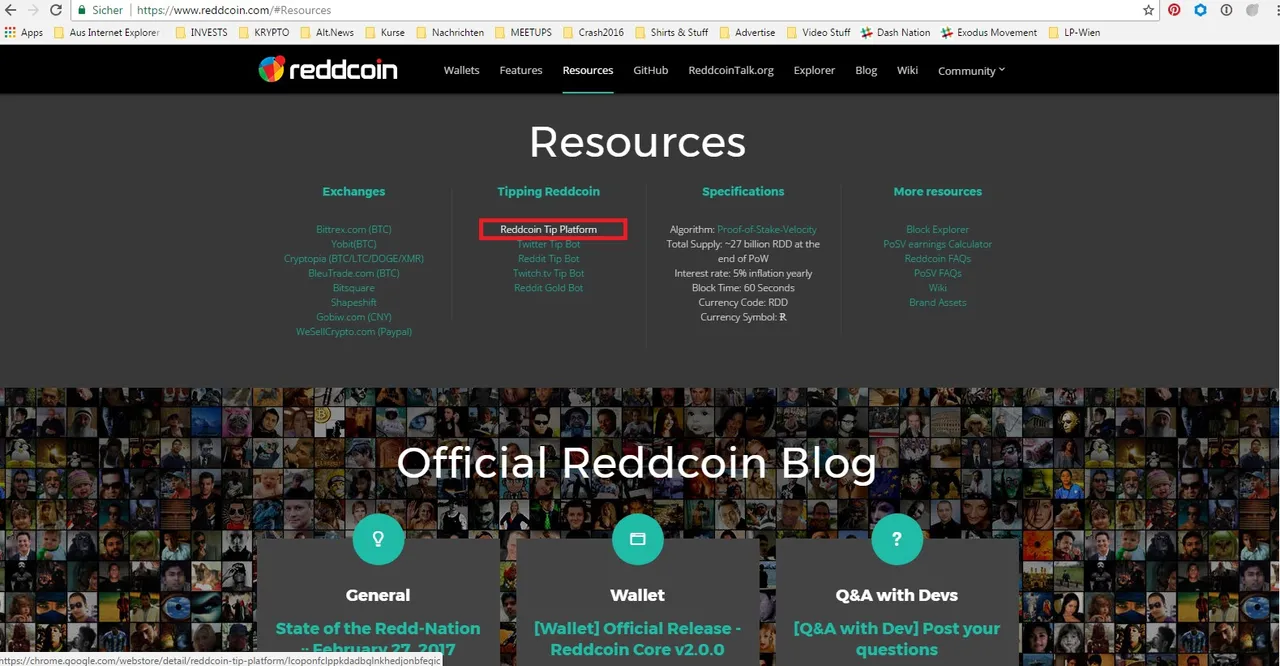
Go to https://www.reddcoin.com/
Scroll down to Resources and click on "Reddcoin Tip Platform"
STEP 2)

Add this Extension to your chrome browser (i think on firefox its also running)
STEP 3)

Find & Follow 
and click the button for private message
STEP 4)

Write
+register
then
+info
Now you see your reddcoin deposit adress
You can send some reddcoins to your adress (I recommend plus 1 RDD for fees)
After 6 confirmations you can write again +info to see your loaded balance
STEP 5)

Go to Start Page of Twitter
Type in a twitter users name like @TomEliasYPR and click on the blue Tip button
STEP 6)

Select the Amount you want to tip (you should have it in your balance already)
STEP 7)

Click on Tweet
(The Browser Extension wrote the full command for you - it also works when you do it on your own)
Have Fun :-)
HOW TO WITHDRAW:
STEP 1)

If you got a Tip you will get a Notification
STEP 2)

Write
+info
to see your balance
+withdraw [YOUR RDD ADRESS] (Amount) RDD
Example:
+withdraw RautvCN179HQ81ExxmzNVxSiC28J4gYwaX 500 RDD
Hope you try it out and tip me some RDD :-)
Followers, Upvoters and Comments are very welcome.
Best wishes
Tom Elias