

Para nadie es un secreto (para los que vivimos en Cuba) que a veces la conexión suele ser desesperante. Cuanto de nosotros a puesto "Modo Avión" repetidas veces en busca de estabilizar la conexión a internet. A menos que sea Manu Photos que por razones que desconozco, especula por Twitter (ahora X).
Captura Tweet de ManuPhotos
Bueno hoy les traigo una opción que uso desde hace algún tiempo es bastante estable en temas de conexión y además tiene el plus de que nos da seguridad. Hoy les hablaré sobre ShadowsSocks y sus usos.
¿Qué es Shadowsocks?
Shadowsocks es un proyecto de código abierto que usa el SOCKS5 como intermediario para saltarse diferentes obstáculos (por así decirlo) en internet, cosa que viene como anillo al dedo cuando eres cubano. Este protocolo no es para nada nuevo se creo que China por el 2012 (Que casualidad!). Al final el programador que lanzó dicho proyecto tuvo que abandonarlo en 2015 por tema judiciales y por presiones de la policía de su país. Pero por suerte para todos, numerosos programadores le siguen dando soporte a dicho proyecto.
¿Que hace Shadowsocks?
Shadowsocks a diferencia de los VPNs, no redirige tu trafico a través de un servidor. Los datos que envia Shadowsocks aparecen en "blanco" y no están cifrados todo esto para que puedas navegar sin restricciones en HTTPS. Este protocolo manda tu trafico por diferentes conexiones TCP y por esto se optimiza más tu conexión y puede navegar con más velocidad que muchos VPNs, incluso de pago. Esto último basado en mi experiencia.
Como usar Shadowsocks
Para usarlo hay varias vías, te mostraré la que uso yo (esto no quiere decir que sea la mejor, ni se asomo). Bueno, lo primero es descargar Shadowsocks desde aquí e instalarla.

Screenshot Shadowsock Playstore
Nada del otro mundo, pero con esto no es suficiente. Luego accedes a Shadowmere (me parece que unos de los principales programadores detrás de este proyecto es cubano) y ahi puedes escoger varias locaciones para conectarte.

ScreenShot Shadowmere
Luego que escoges por el país que te quieras conectar debes importar la configuración a la aplicación. El la siguiente imagen se puede ver señalado en rojo las tres opciones para importar dicha configuración.

ScreenShot Shadowmere
Las tres opciones serían, descargar un archivo, escanera un QR o copiar en el Portapapeles.
Acto seguido vamos a nuestra aplicación instalada e importamos la configuración.

Screenshot de mi móvil
Tocas en el "más" (+) con en la foto anterior.

Screenshot de mi móvil
Acá tienes las opciones que comenté anteriormente e importas la configuración.

Screenshot de mi móvil
Luego seleccionas el servidor que importaste (en mi caso como vez en la foto tengo varios), después tocas en el botón circular señalado en la parte inferior como se muestra en la imagen anterior.
Mejoras en la conexión
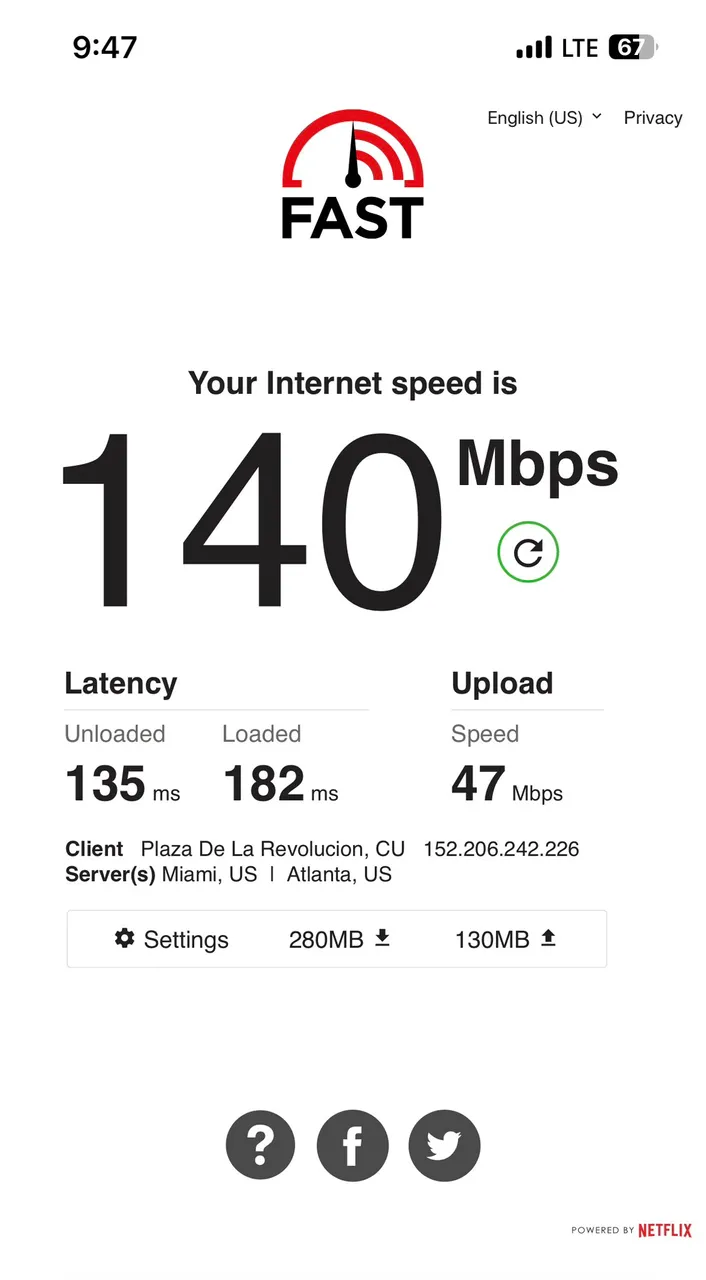
Siempre recomiendo probar con varios servidores para usar el que mejor rendimiento nos dé. Pero la mayoría mejoran nuestra conexión a datos por mucho. Acá les dejo una muestra.
Velocidad sin VPN

Screenshot de mi móvil
Velocidad con VPN

Screenshot de mi móvil
Como puede ver mejoró la conexión bastante, a veces no hay mejoría con la velocidad, pero solo basta como comenté anteriormente ir buscando otro servidor y listo.
Espero que la información les sea útil. Nos vemos``
English Version
It's no secret to anyone (who lives in Cuba) that the connection can be quite frustrating at times. How many of us have put "Airplane Mode" on repeat in an attempt to stabilize the internet connection. Unless it's Manu Photos who, for reasons unknown, speculates on Twitter (now X).
Tweet Capture from ManuPhotos
Well today I bring you an option that I've been using for some time now, it's quite stable in terms of connection and it also has the plus that it gives us security. Today I will talk to you about ShadowsSocks and its uses.
What is Shadowsocks?
Shadowsocks is an open source project that uses SOCKS5 as an intermediary to bypass different obstacles (so to speak) on the internet, which comes in handy when you're Cuban. This protocol is not new at all, it was created in China in 2012 (What a coincidence!). In the end, the programmer who launched the project had to abandon it in 2015 due to judicial issues and police pressure in his country. But fortunately for everyone, numerous programmers continue to support the project.
What does Shadowsocks do?
Unlike VPNs, Shadowsocks does not redirect your traffic through a server. The data that Shadowsocks sends appears in "white" and is not encrypted, all this so that you can browse without restrictions in HTTPS. This protocol sends your traffic through different TCP connections and this optimizes your connection more and you can browse faster than many VPNs, even paid ones. The latter based on my experience.
How to use Shadowsocks
There are several ways to use it, I will show you the one I use (this does not mean that it is the best, nor does it come close). Well, the first thing is to download Shadowsocks from here and install it.
Screenshot Shadowsock Playstore
Nothing out of the ordinary, but with this it is not enough. Then you access Shadowmere (I think one of the main programmers behind this project is Cuban) and there you can choose several locations to connect to.
ScreenShot Shadowmere
After you choose the country you want to connect to, you must import the configuration into the application. In the following image you can see the three options to import the configuration highlighted in red.
ScreenShot Shadowmere
The three options would be, download a file, scan a QR or copy to the clipboard.
Then we go to our installed application and import the configuration.
Screenshot for my phone
You touch the "+" more in the photo above.
Screenshot for my phone
Here you have the options I commented on earlier and you import the configuration.
Screenshot for my phone
Then you select the server you imported (in my case as you can see in the photo I have several), then you touch the circular button at the bottom as shown in the previous image.
Improvements in the connection
I always recommend trying with different servers to use the one that gives us the best performance. But most of them improve our data connection a lot. Here I leave you a sample.
Speed without VPN
Screenshot for my phone
Speed with VPN
Screenshot for my phone
As you can see, the connection improved quite a bit, sometimes there is no speed improvement, but it is enough as I commented earlier to look for another server and ready.
I hope the information is useful to you. See you
Translated and formatted with Hive Translator by 
