

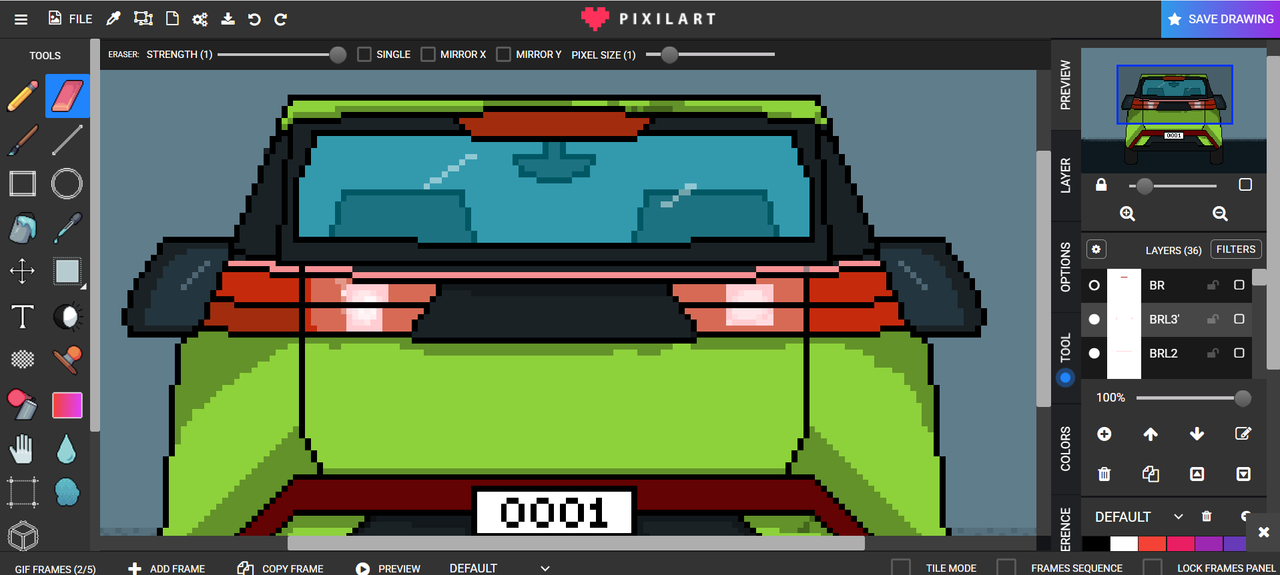
A pixel art animation of the brake lights and signal lights of a car. I used a reference car for this one. Does it look familiar to you? I guess I need to work more on it to make it more similar. But the hint is, it is an electric car and smaller version compared to the other line up of this brand.
This are the usual view that I always see at the road when I am going to work or to somewhere. It is the car's brake lights and signal lights. They are not just a simple lighting or accessories for the car. But act as a safety for you and also the other people at the road. So be wise and use your turn signals at the road.
For its plate number, I used "0001" which means this is the first car and version of my pixel art animation. I am planning to continue this type of art and animation of different cars.
Here is a closer look of the brake lights animation

Then its hazard lights or turn signals.

I started on the main outline of the body of the car. It is a compact car and electric. This type of car can be perfect for going to work and shorter trips.

Adding some details like its opening at the back and one of the brake lights.

Then the outline of its wheels and side mirrors to complete the look of a car.

To add more details, I created an outline of the rear view mirror and some seats. I will just lower the tint of this car to make these details visible.

Changed the color of the background to easily identify which part to color. I started on the main frame of the car.

Next is the details for the interior like the seat.

Adding the glass of the windshield. I adjusted the opacity of the layer of the glass to make it more visible on the inside.

Coloring the other details of the car. This time we can see that it is starting to look more like a car.

Details for the plate number. I explained it a while ago about this number.

Then adding shadings and shadows for added details.

Adding some extra layers for the bottom part as the road.

Now is the experimentation on achieving the brake lights effect. It was a great challenge on how to animate the lights. I tried several ways and hopefully I can find the better way for my next animation.


After adding the main glow color, I adjusted the shadings beside it to make it more glowing. Then for the animation, I manually on and off the layers that contains the brake lights and signal lights. Adjusted the timings to make it more smooth.
This car is ready! See you on the next one.
