


Los ultimos días me he tomado algunos momentos para practicar todo lo aprendido en estos 4 años de carrera en ingenieria en informatica, desde que presente mi tesis no volví a programar ni diseñar absolutamente nada y creanme, en este mundo si no practicas se nota, la mayor parte es logica, pero si no recuerdas conceptos y etiquetas puede ser un problema al momento de escribir codigo.
The last few days I have taken a few moments to practice everything I have learned in these 4 years of computer engineering, since I presented my thesis I did not return to program or design absolutely nothing and believe me, in this world if you do not practice it shows, most of it is logic, but if you do not remember concepts and labels can be a problem when writing code. |
|---|
Quiero hacer videos con cursos basicos para ayudar a las personas que deseen empezar en la programación, de momento me considero un simple Middle, pero con unas ganas inmensas de avanzar hacia senior, esto es algo que toma tiempo y sobre todo experiencia... Justamente lo que yo necesito en este momento, tengo algunos proyectos para este año con respecto a la carrera que estudié.
I want to make videos with basic courses to help people who want to start in programming, at the moment I consider myself a simple Middle, but with a huge desire to move towards senior, this is something that takes time and especially experience ... Just what I need at the moment, I have some projects for this year with respect to the career I studied. |
|---|

Lo primero antes de empezar a leer y escribir codigo es tener un buen editor de codigo, hace un par de años les hable mencione que utilizando el block de notas se puede iniciar con el html, y si, no es mentira, pero es muy limitado trabajar allí cuando existen software que nos facilitan la tarea. Mi favorito en su momento fue "Brackets", pero hoy donde siento que ya tengo un conocimiento un poco más amplio opte por utilizar "Sublime Text", en mi caso la ultima versión.
The first thing before starting to read and write code is to have a good code editor, a couple of years ago I mentioned that using the notepad you can start with html, and yes, it is not a lie, but it is very limited to work there when there are software that facilitate the task. My favorite at the time was "Brackets", but today where I feel I already have a little more knowledge I chose to use "Sublime Text", in my case the latest version. |
|---|
¿Por qué?, bueno, lo principal es que podemos personalizarlo al maximo, temas, colores... Un monton de opciones que nos permitiran trabajar comodamente. Además, siempre estamos buscando tutoriales o guías por google cuando tenemos alguna duda y la mayoría de ellas estan hechas en este programa, lo cual nos hara entender con mayor facilidad y sobre todo resolver alguna duda del mismo copilador en foros y comunidades.
Well, the main thing is that we can customize it to the maximum, themes, colors... A lot of options that will allow us to work comfortably. In addition, we are always looking for tutorials or guides by google when we have any questions and most of them are made in this program, which will make us understand more easily and especially solve any questions of the same copilator in forums and communities. |
|---|
 |
|---|
 |
|---|
 |
|---|
 |
|---|
 |
|---|
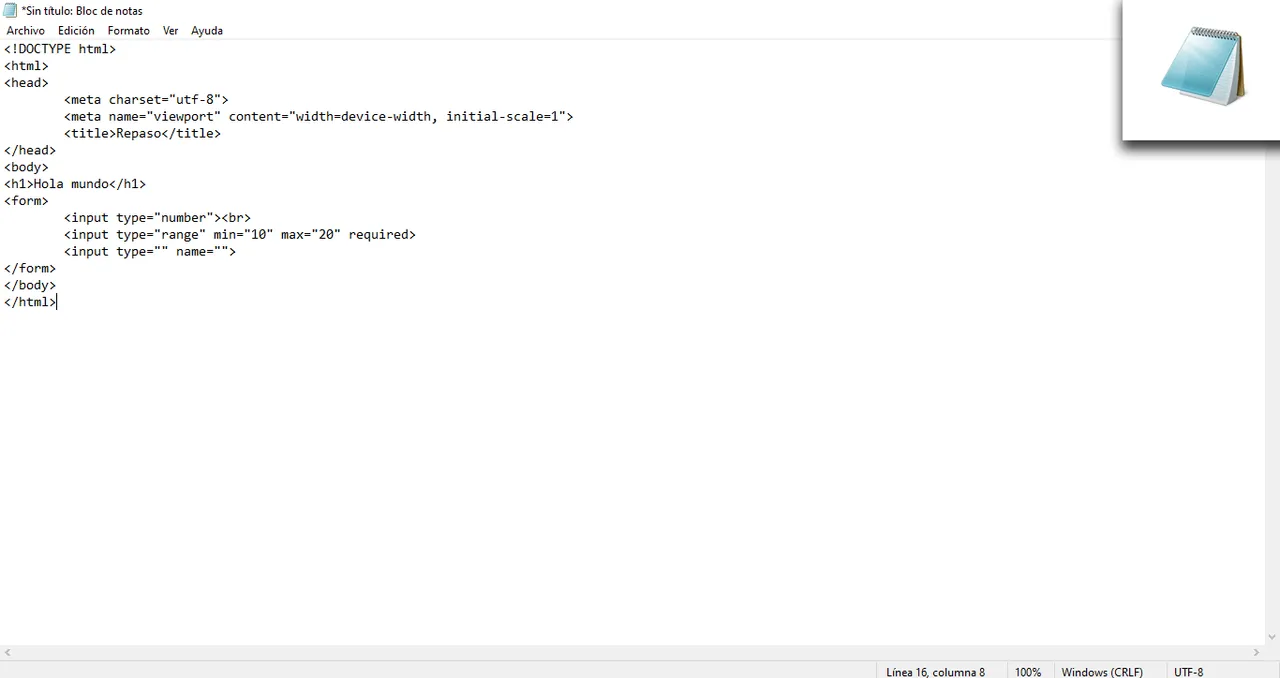
Los colores son lo más importante al momento de leer codigo, puedes ver esta comparación de un "Hola mundo" hecho en bloc de notas y sublime text... Imagina desarrollar codigo con todo en negrita y siempre en fondo blanco, la idea de hacer una interfaz de esta forma me causa TOC 😂. Eres libre de escoger entre la gran variedad de editores de textos gratuitos que existen:
Colors are the most important thing when reading code, you can see this comparison of a "Hello world" made in notepad and sublime text... Imagine developing code with everything in bold and always in white background, the idea of making an interface in this way makes me OCD 😂. You are free to choose from the wide variety of free text editors out there: |
|---|
- Atom
- Brackets
- TextMate
- Geany
- Vim
- Notepad+++
Sublime text es muy utilizado para Front-end que es donde yo realmente quiero trabajar (html, css, javascript... Etc), para el caso de aquellos que trabajen con back-ed probablemente necesiten explorar mejores opciones, más acordes a lo que se realiza "detrás de bambalinas" en el desarrollo web.
Sublime text is widely used for Front-end which is where I really want to work (html, css, javascript... Etc), for those who work with back-ed probably need to explore better options, more in line with what is done "behind the scenes" in web development. |
|---|
 |
|---|
 |
|---|
¿Como instalar?
How to install?

As simple as going to the browser and typing "Sublime Text", it is currently on version 4 and logically I recommend it, no matter the fact that you follow tutorials in previous versions, the code will not change, maybe there are some differences in terms of new tools and keyboard shortcuts, but little else. |
|---|
 |
|---|

Once we are in its official page we just have to click on the download option, it will automatically give us a set up and we just have to follow the installation steps: Accept and continue. It is a very light software, so you will not take more than 10 minutes installing sublime, the hard part will be to dedicate the hours, days and months needed to learn to create solutions through code. |
|---|
 |
|---|
Imagenes capturadas y editadas por mi.