

Today I had a little free time, so I decided to make 3D animation with some cool cards; I will tell you some details of the process.
Getting the material

I took several screnshots of the market at the official Splinterlands website. Do you see something special in this screenshot? Check again. Well, I used a little code experience to delete the card count on each card, because it wouldn't look cool in the design.

After that, I took 4 cards to work with, I picked them almost at random. I know if I picked carefully it would take hours to decide! So I saved each card as a PNG to have good quality.
Let's Blender

I made a plane in blender with the right proportions and as you can see, the shading is very simple to have the plane showing the card.

I always like to play a little in Blender to see the plane in different perspectives.

Four cards already in the layout. Real fun is about to start...
The composition
Of course I wasn't going to leave the cards with such a simple alignment, let's play a little...


In the image above, you can see the camera view, I also added a plane to simulate a floor, and I couldn't wait to make the first render test:
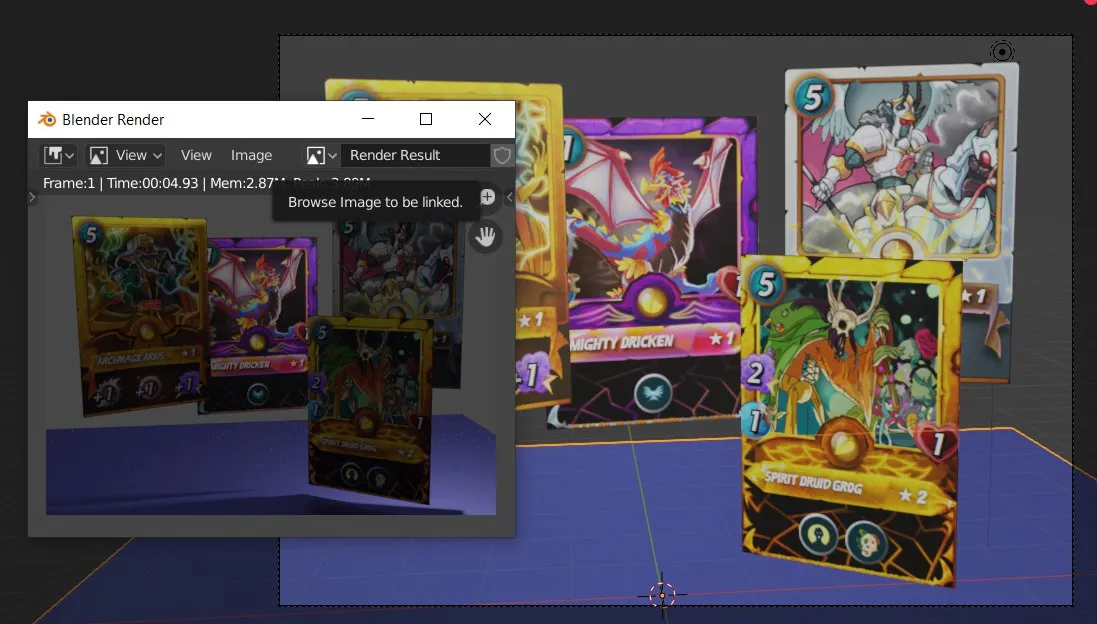
The lighting was terrible, actually it was the default sun, so the final image didn't look well. So next step was to work on the illumination.

Definitely much better, but still needed to improve the composition, align the floor better and add a background:

Then I decided to add the logo too.

In the image above, I show you the render and also the shading of the plane with the logo, it is a bit more complicated since it needed to be transparent to look really awesome.
This was not the final logo position and size, you will see it soon.
The animation

This was the most challenging part, since I am not very experienced on animating on Blender, so it took a little try and error until I got what I wanted.
After getting all the keyframes set. It was time to render the animation frames. While rendering... I had some battles!

After getting each frame, I opened them all in Photoshop. They were a total of 120 frames for a 4 seconds animation at 30fps.

Each frame is so little only 300*216px, because I didn't want it to take forever to render and also didn't want the animation to be ridiculously heavy.
The final result
Animation

I really, really love how it looks ❤️
I want to clarify, this can be used for any post Splinterlands related, also in case official Splinterlands team wants, they can add it to the giphy account to have it.
Higher resolution video
In youtube for easier sharing.
Just last frame

I would highly appreciate if you credit me with a link to my profile if you use the animation or the still image.
I am aware that this animation is very simple, and could have been made in a 2D software, even just Photoshop. But this is just the start, I wanted to try and check what I could do with just the cards and the logo. This is just the begining, my friends 😉
I would like to do something more with the animation, or with the 3D render itself, I am thinking on signatures, maybe. Do you have ideas? I would love to hear your comments.
🐔💢 Play Splinterlands: https://steemmonsters.com?ref=fabiyamada
🍯 Follow me:
🐝 Twitter 🐝 Instagram 🐝 YouTube
🍯 My NFT stores:
🐝 Grand pixEOS Gallery 🐝 Makers place
🍯 My Merchandising stores:
🐝 Society6(buy with fiat). 🐝 Mypixeos(buy with crypto or fiat).