
Today I will discuss how to use SPS to purchased a splinters card. And use other crypto coins to purchase. Because of the late's update on Splinterlands purchased credit using SPS, This update gives an additional way to purchase splinter cards.
In the fast to purchased a splinter card only DEC or Credit, you can use. to use your SPS you must swap SPS to hive using hive engine. From swap.hive swap to DEC to purchase.


These two methods possibly get lost because of market price movement in the market.

Because of a recent update, you can now use your SPS to purchased Coin. no need to convert your SPS to DEC anymore.
In the game, you can direct purchased credit using SPS. Just click BUY Credit Select CRYPTO.
In dropbox select SPS then BUY
Make sure you have in-game SPS, not in hive willet or other crypto wallets supportive of the game.


To purchased using others Crypto coins, you must swap your coin to SPS in pancake swap.
Connect your smart chain wallet in the game. Log in to your account and go to SPS Management or the 3rd box upper right side of the screen.
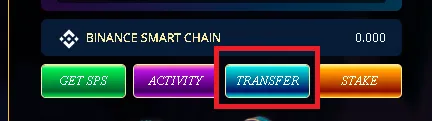
In SPS Management click Transfer. You need to transfer first your converted SPS coin to the game to make purchased credit.
Input the amount of converted SPS, in dropbox select Binance smart chance wallet then click Transfer in.
After transferring your converted SPS in the game. Just follow on how to purchased credit using SPS.



Do you want to play this great game at the same time earning while playing? Just click here: Join SplinterLands
Note: You can help me in my journey in Splinterlands by following me 
Goodbye for now. Always stay safe,