
Clive was created to replace the original CLI Wallet — a tool that for years allowed Hive users to interact with the blockchain from the terminal. The goal was to build a modern and more secure solution, offering both a classic command-line interface and an interactive terminal UI.
Clive offers encrypted profile storage, automatic key selection (autosign), a transaction cart for batching multiple operations, mouse-driven TUI with live data, and over 40 supported blockchain operations.
Two Interfaces in One Application
Clive provides two ways to interact with the Hive blockchain:
- TUI (Text User Interface) - an interactive graphical interface in the terminal with mouse support, inspired by Midnight Commander.

- CLI (Command Line Interface) - classic terminal commands.

TUI focuses on the most commonly used operations. CLI covers almost all blockchain operations and is suitable for scripting.
Financial Operations
Clive supports all financial operations on the Hive blockchain. If the operation includes a memo, the memo can be encrypted.
Operations available in TUI and CLI:
- Transfers (
transfer) - send HIVE and HBD between accounts - Savings operations:
transfer_to_savings- deposit funds into a savings accounttransfer_from_savings- withdraw funds from a savings account (with a 3-day waiting period).cancel_transfer_from_savings- cancel a pending withdrawal.
Operations available in CLI:
- Recurrent transfers (
recurrent_transfer) - automatic, recurring payments - Conversions (
convert,collateralized_convert) - exchange HBD to HIVE and Hive to HBD - Claim rewards (
claim_reward_balance) - collect pending rewards.
Hive Power Management
Hive Power management is available in TUI and CLI.

- Power Up (
transfer_to_vesting) - convert HIVE to Hive Power - Power Down (
withdraw_vesting) - unstake HP in 13 weekly installments - HP Delegations (
delegate_vesting_shares) - delegate voting power to other accounts - Withdraw Routes (
set_withdraw_vesting_route) - automatically redirect power down payouts.
Governance
Governance allows users to vote for witnesses, proposals or set a proxy. It is available in TUI and CLI.
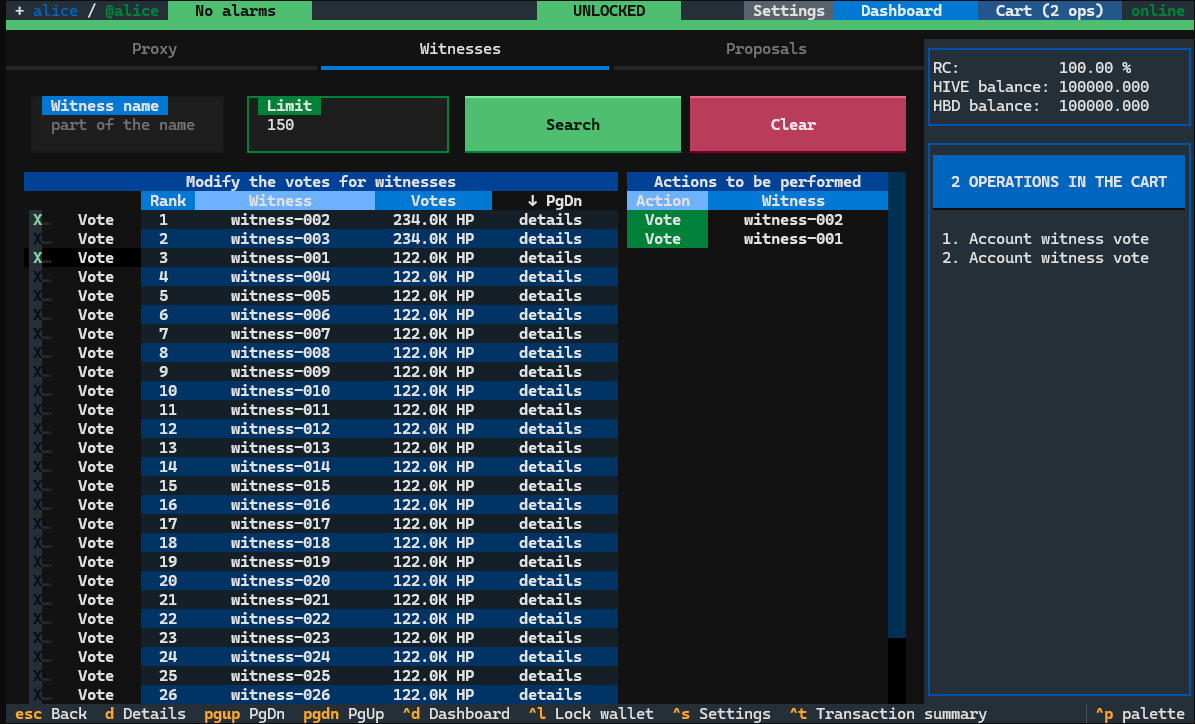
- Witness voting (
account_witness_vote) - vote for up to 30 witnesses - Proposal voting (
update_proposal_votes) - support projects funded by the DHF - Proxy (
account_witness_proxy) - delegate your vote to a trusted account.
Additionally, only on CLI, you may decide to decline your voting rights – for content, witnesses and proposals using decline voting rights operation (decline_voting_rights).
Trading on the internal market
Trading is available only in CLI.
Limit orders:
limit_order_create,limit_order_create2- create two order types buy/sell with different ways of defining pricelimit_order_cancel- cancel orders.

Escrow
Clive supports full escrow transaction cycle in CLI:
- Create escrow transaction (
escrow_transfer) - Approve / reject by parties (
escrow_approve) - Raise disputes (
escrow_dispute) - Release funds (
escrow_release).

Authority management
You can manage your owner, active, posting authority and memo key using TUI and CLI. The operation account_update2 is used.

Account Management
The creation of a new account and claiming account tokens is available only in CLI.
- Account creation (
account_create,create_claimed_account) - you can pay by already claimed token or by Hive - Claim account tokens (
claim_account) - Obtain account creation token, pay either with HIVE or RC.
Please note, that you can create a new account with one simple command using the claimed account creation token:

Support account recovery process
All operations required during the account recovery process or when changing your recovery account are available in the CLI:
change_recovery_account- changes the recovery account for an account.request_account_recovery- requests account recovery. Must be signed with the active authority of the recovery account.recover_account- recovers a compromised account. Requires two signatures: one from the new owner authority and one from the previous owner authority (no older than one month).
Witness Operations
Tools for node operators available on CLI.

The one command update-witness uses the following operations:
- Update witness parameters (
witness_update) - Set witness properties (
witness_set_properties) - Publish price feed (
feed_publish).
Custom JSON and Layer 2 operations
Using CLI, you can broadcast custom JSON (custom_json) by providing content as string.
Additionally, you can easily perform operations built on top of custom_json, such as:
- RC delegations - delegate resource credits (RC) to other accounts.
- Social - follow, unfollow, mute, unmute.
Security and Key Management
Clive integrates with Beekeeper, the key management service for the Hive ecosystem.
Key Storage
- Keys are stored in encrypted wallets.
- Separate wallets can be used for:
- Transaction signing
- Memo encryption and decryption
- Profile data encryption (the profile file is password-protected, and the encryption key is generated automatically during profile creation)
- Wallets can be locked and unlocked, with an optional auto-lock timeout.
Transaction and Key Protection
- Private key leak protection - Clive scans memo fields for private keys matching any tracked account authorities. If a private key is detected, the transaction is blocked.
- Known accounts verification - Before broadcasting, Clive verifies that all target accounts in the transaction are included in the user's known accounts list to prevent accidental transfers to incorrect addresses. This feature can be enabled or disabled per profile.
- Bad account verification - Before broadcasting, Clive verifies that all target accounts are not included in the predefined bad account list.
Advanced Signing Features
- Offline signing - Transactions can be saved unsigned to a file, transferred to an offline machine used for private key storage, signed there, and then broadcast from another machine.
- Multisig support - Transactions can be signed by multiple keys using
--already-signed-modemultisign, enabling multi-signature workflows.
Profile System
Profiles in Clive provide an isolated working environment that allows users to manage different accounts. Each profile operates independently, meaning changes in one profile do not affect others. Profile data is stored encrypted on disk.
A profile defines:
- The working (default) account
- Additional watched accounts
- Network configuration (node endpoint and chain ID)
- Aliases for blockchain keys stored in beekeeper
- Known accounts list
- Transaction Expiration Time
Additionally, TUI offers a cart mechanism — the user adds multiple operations, reviews the summary, modifies expiration time if needed, then signs and broadcasts the entire transaction at once. The created, not broadcast transaction in the cart is persisted in the profile, so it survives application restarts.

The TUI actively monitors accounts and raises alarms for dangerous or important states like expiring governance votes or suspicious recovery account settings. Each alarm includes a suggested corrective action.

Autosign — Automatic Transaction Signing
Automatic transaction signing removes the need to manually select a key for each operation. Clive automatically selects the right key (active, posting, owner) based on the operation type. The feature is enabled by default and requires fetching authority data from blockchain. You can explicitly specify key aliases to be used when signing transactions.
Data presentation
Both in the CLI and in the TUI, all data required to prepare operations is available.
In the TUI, this data is presented either on the dashboard, or within the screens of individual operations.

The CLI provides more than 25 subcommands under clive show, including:
- Account balance, Hive Power details, resource credits
- Authorities (owner, active, posting, memo key)
- Pending operations like power down, conversion, savings withdrawals
- Governance data - witness info, proposals, proxy status
- Transfer schedules
- Chain information and node status

Cryptographic Tools
We added to CLI some useful cryptographic tools:
- Key generation (random, from seed, from secret phrase)
- Public key derivation from private key.
They are available as subcommand clive generate.

Memo decryption available as clive crypto decrypt.
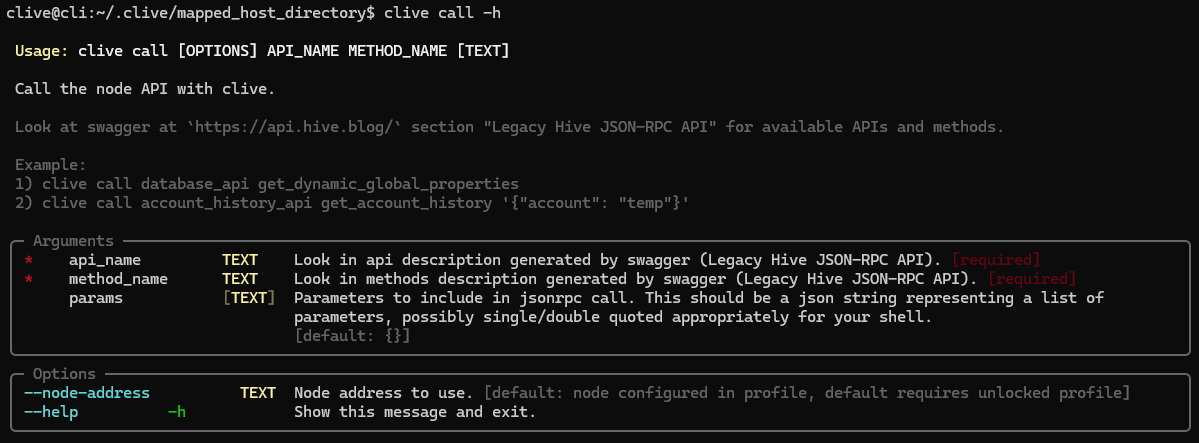
Direct node API calls
You can call the node API.
Clive is available as a Docker image with ready-to-use startup scripts for TUI and CLI.
The scripts that allow you to run Clive are here:
https://gtg.openhive.network/get/clive/
Your feedback is invaluable and always welcome.