

Hi.
Today I want to share with you something that I learned these days and that in many occasions I needed and because I had no knowledge I was limited in doing many things from my phone.
Yes, many times I need to view a page on my mobile as if it were on my computer.
As the title of this post says, we are going to activate the DESKTOP VIEW in GOOGLE CHROME from our phone.
It's super simple.
The first thing we are going to do on our cell phone is to enter Chrome and search for a page that we want to investigate and view in WRITING mode.
Hola
Hoy les quiero compartir algo que aprendí en estos días y que en muchas ocasiones necesite y por no tener conocimiento me vi limitado en hacer muchas cosas desde mi teléfono.
Si, muchas veces necesite ver una página en mi móvil como si estuviera en mi computador.
Tal como lo dice el título de esta publicación, vamos activar la VISTA DE ESCRITORIO en GOOGLE CHROME desde nuestro teléfono.
Es algo súper sencillo.
Lo primero que vamos hacer en nuestro teléfono móvil es entrar en Chrome y buscar una página que deseemos investigar y ver en modo ESCRITORIO.
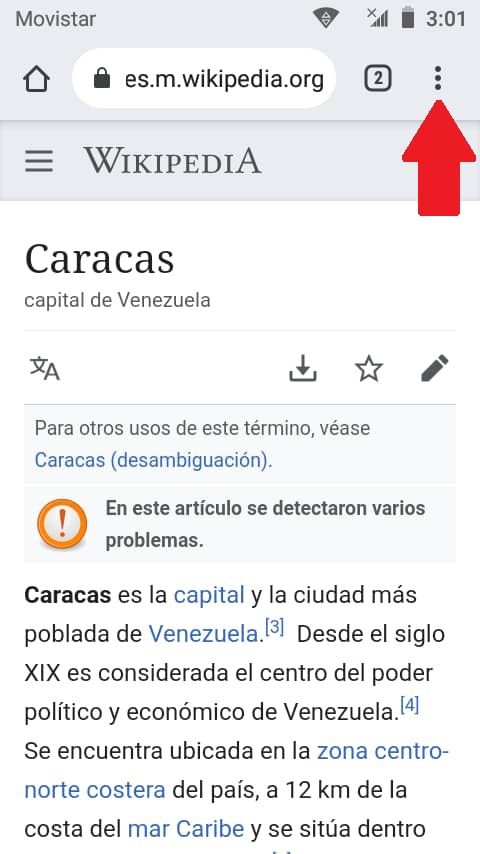
Click on the three vertical dots at the top right of the address bar.
Dale un click a los tres puntos verticales que están en el extremo superior derecho de la barra de direcciones.

There, a menu similar to the previous image is displayed.
Allí se despliega un menú parecido a la imagen anterior.

Then find and click on the Desktop Site verification option located at the bottom of the menu.
Luego busca y dale un click a la opción de verificación del Sitio de Escritorio que se ubica mas abajo del menu.

Ready, you will immediately have activated the WRITING mode.
This will work on the page you are viewing and all the pages you visit from it.
If you open another one, it will be activated with the mobile features.
Listo, inmediatamente tendrás activado el modo ESCRITORIO.
Esto funcionará en la página que estés consultando y todas aquellas que visites desde ella.
Si abres otra, se activará con las características para móviles.

With this, dear friends, I hope to continue contributing to make your day with your devices more enjoyable and you can get more out of it, which in the end would be interpreted as more income.
God the Heavenly Father bless you all.
Con esto, queridos amigos espero seguir contribuyendo a que su día con sus dispositivos sea mas agradable y puedan sacar más provecho que al final se interpretaría como más ingresos.
Dios Padre Celestial les bendiga a todos.
Translated with www.DeepL.com/Translator
(free version)
Follow me by Twitter:
@germanandradeg