
Español
Un saludo mis queridos lectores y a todos ustedes amantes del arte y diseño. Esta semana me he trazado la meta de trabajar sobre el tema de ballenas. Ayer les compartí un isotipo multicolor; hoy les traigo un arte de una ballena la cual tiene un cumulo de estrellas dentro de sí con la luna al fondo. Espero que sea de su agrado. Abrazos
English
Greetings my dear readers and all you art and design lovers. This week I have set myself the goal of working on the theme of whales. Yesterday I shared with you a multicolored isotype; today I bring you an artwork of a whale which has a cluster of stars inside it with the moon in the background. I hope you like it. Hugs

Programa usado: Adobe Illustrator 2020
Colores empleados: 8F067E; D8255C; B8CB33; ECB82B; 579AA0
Tipografía: FrutiguerNextlt
Estilo: Abstracto
Imagen de referencia: Fuente
About the design:
Program used: Adobe Illustrator 2020
Colours used: 8F067E; D8255C; B8CB33; ECB82B; 579AA0.
Typography: FrutiguerNexTlt
Estilo: Abstracto
Imagen de referencia: source
PASO A PASO
PASO 1
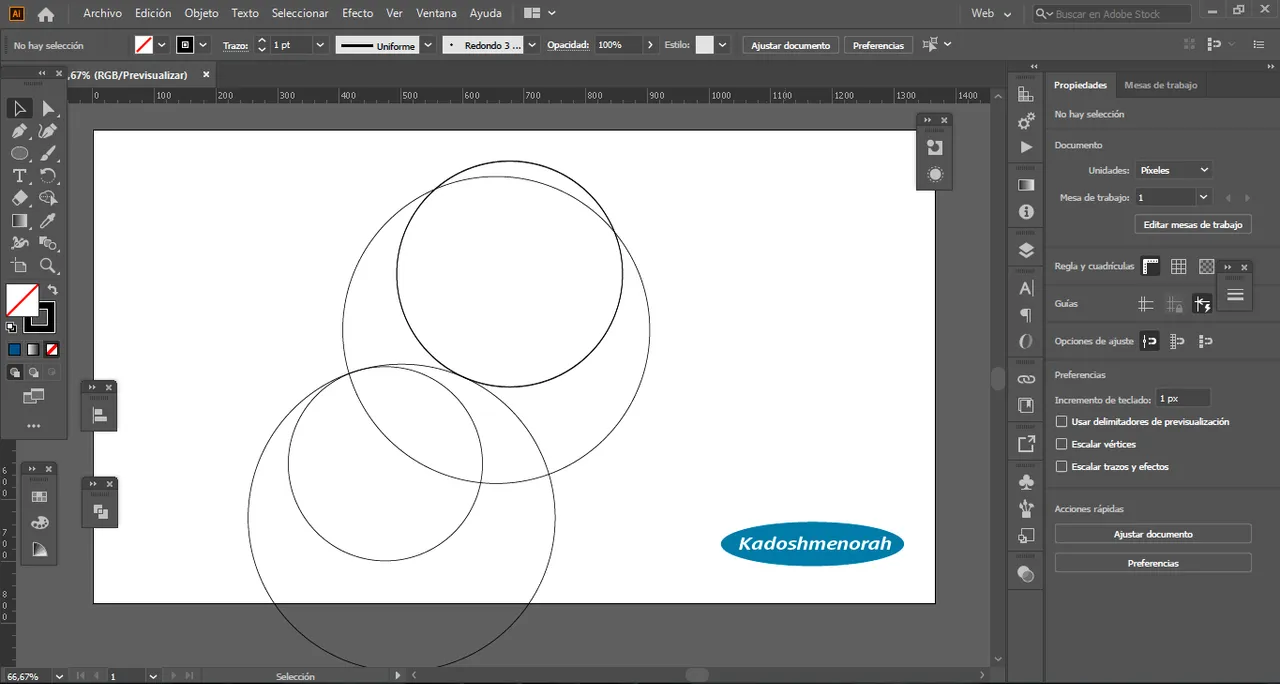
Dibuje una ballena partiendo de varios círculos que hice en proporción áurea.
STEP BY STEP
STEP 1
I drew a whale from several circles I made in golden proportion.



PASO 2
Seleccione todo y segmente en varias partes eliminando las partes que no me interesan hasta tener la silueta de mi ballena. Luego dibuje las aletas y volví a utilizar la herramienta forma.
STEP 2
Select everything and segment it into several parts by eliminating the parts that do not interest me until I have the silhouette of my whale. Then I drew the fins and used the shape tool again.


PASO 3
Establecí mi paleta de colores y aplique un degradado a la ballena de manera libre, estableciendo un degradado múltiple basándome en mi paleta de colores. Luego dibuje dentro de la ballena varios círculos con resplandor y otros no de diferentes tamaños para simular estrellas. Seguidamente contornee la ballena con luces de neón azul y violeta. Y para finalizar hice un circulo con resplandor externo como luna. Todo esto sobre un fondo negro de presentación.
STEP 3
I set my color palette and applied a gradient to the whale freely, setting a multiple gradient based on my color palette. Then I drew inside the whale several circles with glare and others not of different sizes to simulate stars. Then outline the whale with blue and violet neon lights. And finally I made a circle with an external glow like a moon. All this on a black background of presentation.


Soy kadoshmenorah y hasta una próxima oportunidad y no olvides dejar tus comentarios acá abajo.

Me pueden encontrar en las redes sociales:

Español
English
Programa usado: Adobe Illustrator 2020
Colores empleados: 8F067E; D8255C; B8CB33; ECB82B; 579AA0
Tipografía: FrutiguerNextlt
Estilo: Abstracto
Imagen de referencia: Fuente
Program used: Adobe Illustrator 2020
Colours used: 8F067E; D8255C; B8CB33; ECB82B; 579AA0.
Typography: FrutiguerNexTlt
Estilo: Abstracto
Imagen de referencia: source
PASO 1
Dibuje una ballena partiendo de varios círculos que hice en proporción áurea.
I drew a whale from several circles I made in golden proportion.
Seleccione todo y segmente en varias partes eliminando las partes que no me interesan hasta tener la silueta de mi ballena. Luego dibuje las aletas y volví a utilizar la herramienta forma.
Select everything and segment it into several parts by eliminating the parts that do not interest me until I have the silhouette of my whale. Then I drew the fins and used the shape tool again.
Establecí mi paleta de colores y aplique un degradado a la ballena de manera libre, estableciendo un degradado múltiple basándome en mi paleta de colores. Luego dibuje dentro de la ballena varios círculos con resplandor y otros no de diferentes tamaños para simular estrellas. Seguidamente contornee la ballena con luces de neón azul y violeta. Y para finalizar hice un circulo con resplandor externo como luna. Todo esto sobre un fondo negro de presentación.
I set my color palette and applied a gradient to the whale freely, setting a multiple gradient based on my color palette. Then I drew inside the whale several circles with glare and others not of different sizes to simulate stars. Then outline the whale with blue and violet neon lights. And finally I made a circle with an external glow like a moon. All this on a black background of presentation.
Soy kadoshmenorah y hasta una próxima oportunidad y no olvides dejar tus comentarios acá abajo.
Me pueden encontrar en las redes sociales: