
Hello dear Hivers,
here are the:
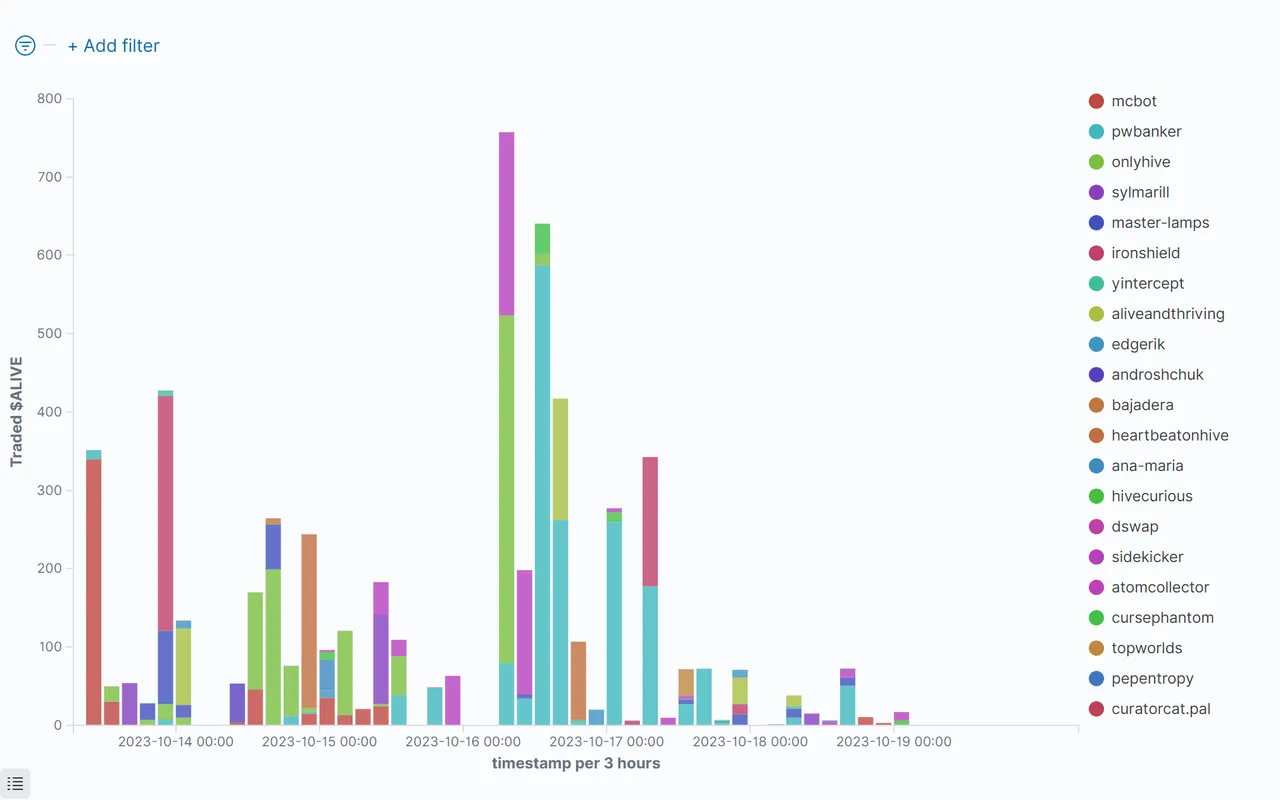
$ALIVE Statistics For The Last 7 Days, 2023/10/13 to 2023/10/19:
Who has bought how many $ALIVE at which time:
Top $ALIVE Buyers And $HIVE Sellers
The inside of the circle shows the buyers of $ALIVE, ordered by $HIVE they have spent. The outside shows the recipients of that $HIVE (sellers of $ALIVE):

Commulated Amount Of Bought $ALIVE Per Person
Top 10 $ALIVE buyers, how much they got and how much $HIVE they spend for this. Sorted by $HIVE, that was spent:

Top 20 $ALIVE Buyers
Sorted by the $HIVE, they have spent:


Commulated Amount Of Sold $ALIVE Per Person
Top 10 $ALIVE Sellers, how much they sold and how much $HIVE they got for this, sorted by $HIVE:

Top 20 $ALIVE Sellers
Sorted by the $HIVE, they have got:


Price Of The $ALIVE

$ALIVE Summarize Metrics

| Request | Received Hive | Received HIVE % | Sold $ALIVE | Avg. Price |
|---|---|---|---|---|
| sell | 106.40848 | 62.29% | 3607.07111 | 0.02944 |
| buy | 64.42118 | 37.71% | 2050.34751 | 0.03118 |
| sum: | 170.82966 | 100% | 5657.41862 | 0.03031 |
Comparison With Other Tokens
$HIVE/Token
This figure shows the value of $HIVE compared to some tokens. Be aware of the nonlinear (root square) y-axes.

US-Dollar/Token
Value of $USD compared to some token. Be aware of the nonlinear (root square) y-axes.


Table Of Token Prices in $HIVE and $USD
Average value of the prices of the token. Hive and US-Dollar compared to the token:


Links:
@achimmertens/posts?filter=stats
@anobel
https://github.com/achimmertens
Some More Words
This week I have worked on the coinmarketcap screenshot. Until then I made a screenshot from https://coinmarketcap.com/currencies/hive-blockchain/ manually every week. Now I have found a method to do it automatecally. I created the folllowing JavaScript:
const { Builder, By, Key, until } = require('selenium-webdriver');
const fs = require('fs');

(async function example() {
  let currentDate = new Date();
  let folderDate = currentDate.toISOString().slice(0, 10)
  var fileFolder = 'screenshots_'+folderDate+'\/Token';
  var fileName = 'coinMarketCapChart.png';
  let driver = await new Builder().forBrowser('chrome').build();
  try {
    await driver.manage().window().setRect({ width: 1040, height: 768 });
    await driver.get('https://coinmarketcap.com/currencies/hive-blockchain/');
    //await new Promise(resolve => setTimeout(resolve, 1500));  // be sure, that everything is loaded
    //let button2 = await driver.findElement(By.xpath("//li[text()='7D']"));
    let button2 = await driver.findElement(By.id('react-tabs-34'));
    await button2.click();

    //let section = await driver.findElement(By.id('__next'));
    let section = await driver.findElement(By.className('main-content'));

    try {
      let button = await driver.findElement(By.id('onetrust-accept-btn-handler'));
      await button.click();
    } catch (error) {
      console.log('Button not found');
    }

    await new Promise(resolve => setTimeout(resolve, 1500));  // be sure, that everything is loaded
    let screenshot = await section.takeScreenshot();
    fs.writeFileSync(fileFolder+'\/'+fileName, screenshot, 'base64');
    console.log('Die Datei '+fileFolder+'\/'+fileName+' wurde erstellt');
  } finally {
    await driver.quit();
  }
})();
Now I don't need this manually step any more and can let run it automately.
The data of today (friday) is missing. I'm gonna check that next week.
Regards,
Achim Mertens