
🔘 Estaré haciendo en esta oportunidad un render en 3D de un edificio en este programa, de una manera fácil y profesional, sin mas que agregar comencemos.
🔘 This time I will be doing a 3D render of a building in this program, in an easy and professional way, without more than adding, let's get started.

🔘 Ubicados en el espacio de trabajo donde haremos nuestro render, tenemos que hacer el suelo en nuestra área de trabajo, para hacerlo, usamos la Herramienta cuadrado y hacemos un trazado dependiendo de las medidas que usemos, tal y como te muestro en la siguiente imagen.
🔘 Located in the workspace where we will make our render, we have to make the ground in our work area, to do it, we use the Square Tool and make a path depending on the measurements we use, as I show you in the following image.

🔘 Ya que tenemos trazado el suelo de nuestro proyecto, usando la Herramienta rectángulo haré una especie de “T” en el medio, tal como te muestro en la siguiente imagen.
🔘 Since we have traced the floor of our project, using the Rectangle Tool I will make a kind of "T" in the middle, as I show you in the following image.

🔘 Y con la Herramienta borrador elimino esa parte de la “T” que no queremos.
🔘 And with the Eraser Tool I remove that part of the "T" that we don't want.

🔘 Ya que hicimos eso, con la Herramienta empujar tenemos que sacar el alto que queremos que tenga nuestra obra.
🔘 Since we did that, with the Push Tool we have to get the height we want our work to have.


🔘 Como pueden ver ya nuestro edificio esta agarrando forma, pero ahora tenemos que hacer unas ventanas, y para eso haremos lo mismo, con Herramienta rectángulo hacemos un trazado a lo largo de nuestro edificio, tal como te muestro en la siguiente imagen.
🔘 As you can see, our building is taking shape, but now we have to make some windows, and for that we will do the same, with Rectangle Tool we make a path along our building, as I show you in the following picture.

🔘 Haremos ese mismo proceso con las demás paredes, tal como te muestro en la siguiente imagen.
🔘 We will do the same process with the other walls, as I show you in the following image.

🔘 Ahora tenemos que agregar unas texturas para que nuestro edificio se vea mucho más real, para eso presionamos la tecla “B” y se nos abrirá ese panel de color donde podemos agregar muchas cosas a nuestro proyecto.
🔘 Now we have to add some textures so that our building looks much more real, for that we press the "B" key and that color panel will open where we can add many things to our project.

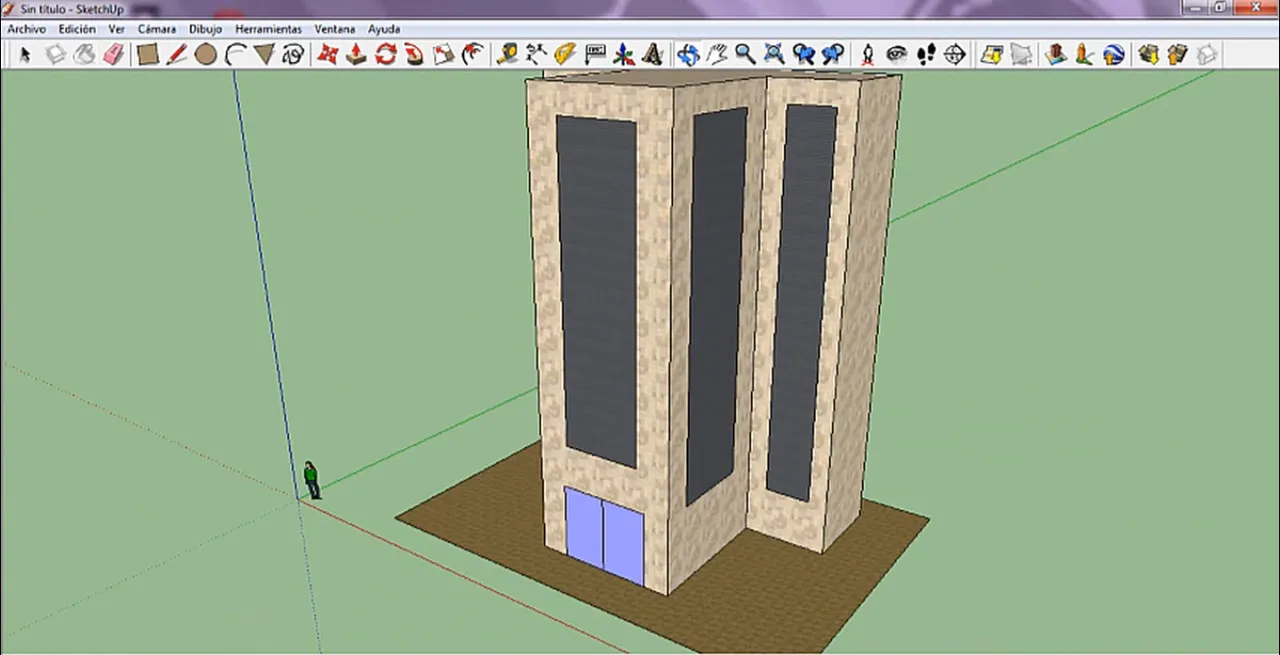
🔘 Y es tan simple como buscar que material queremos y seleccionarlo, en mi caso pinté las paredes con Baldosas tal como te muestro en la siguiente imagen.
🔘 And it is as simple as looking for what material we want and selecting it, in my case I painted the walls with Tiles as I show you in the following image.

🔘 Para las ventanas usé Persianas.
🔘 For the windows I used Blinds.

🔘 Para concluir usé para el suelo de nuestro edificio use madera.
🔘 To conclude, I used wood for the floor of our building.

🔘 Y listo amigos ya lo tenemos, con esto que te acabo de enseñar podemos hacer grande cosas aplicar otras formas, texturas y colores, como siempre digo el límite es tu imaginación.
🔘 And ready friends we have it, with this that I just taught you we can do great things by applying other shapes, textures and colors, as I always say, the limit is your imagination.
➣Y bueno amigos eso es todo por hoy espero te haya gustado si fue así por favor compártelo me ayudarías mucho, nos vemos en unos días con post nuevo, hasta la próxima.
➣Well friends that's all for today I hope you liked it if it was like that please share it, you would help me a lot, see you in a few days with a new post, until next time.
Todas las imágenes mostradas son de mi propiedad. Son capturas tomadas al momento de realizar la explicación.
All the images shown are my property. They are captures taken at the time of the explanation.