
LeoInfra Test ⚙️ - Using Phone as a verification method
As part of the tasks we do in our Zealy campaign today I'm testing the functioning of LEOINFRA, a protocol created by the great team of 
These tasks are great, because the goal is to generate useful information for the team, and we can gladly collaborate with them, doing the tests needed and generating the relevant information. So I am glad that these minutes I spent learning and testing are also of relevance to this valuable group of people who continue to work for us. Let's get started!
How to open a new LeoInfra account?
I have been thinking for a long time that it would be a good idea for my mother, named Lucinda, to have her Hive account and show what she knows on this platform. So I thought it would be a great opportunity to create her account during this campaign. So I opened her Gmail account in one browser tab and in the other tab I started the process of opening her Hive account.

First you must go to the home page of leofinance.io and select the "Sign up to LeoFinance" button so you can learn about the options available to you. It is located at the top right of your screen.
Next, in order to generate the information pertinent to LF, we will show on the right side what the CONSOLE section of the pages we are visiting presents, and thus show what is happening.
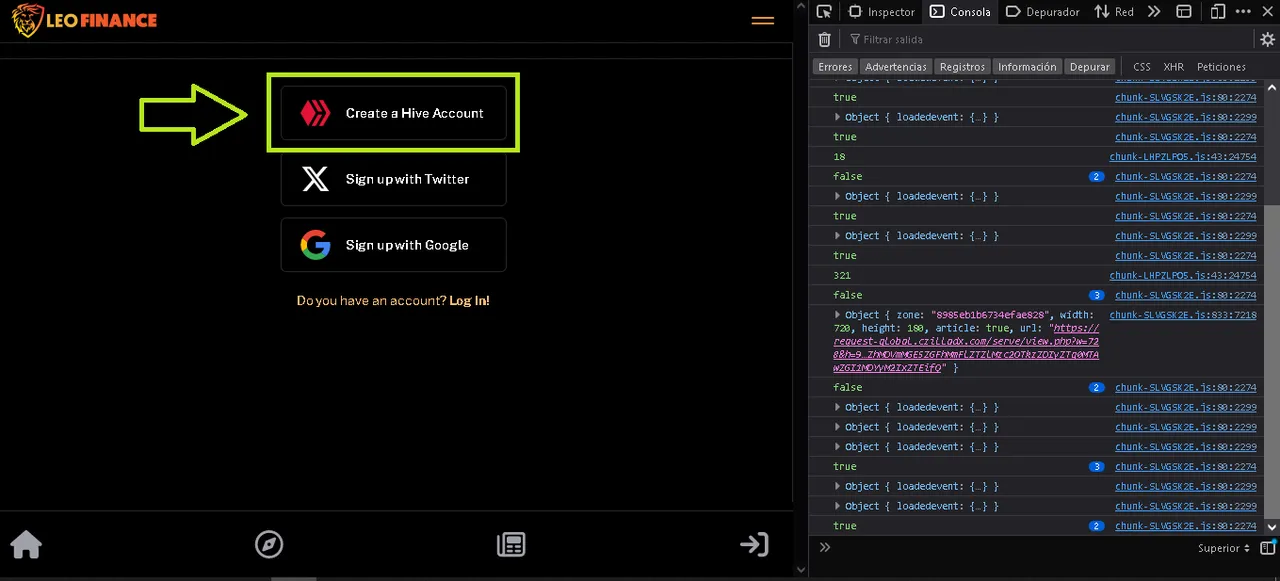
As we want to create the HIVE account, here we must select the first option. The next two are when you already have your HIVE account and you want to log in with your X or Google account that you already have on your device. Cool, don't you think?
In this next window it will explain what are the simple three steps you will have to do, plus the security reasons why they have set it so. Its description is simple and easy to understand. Don't trust it, read it and understand it. When you are sure, you can click "Continue".

Here comes a very fun part, almost life or death: choose your username, the one that will accompany you throughout your entire trajectory within the blockchain (as long as you don't lose your keys), the one that will distinguish you from others and will be one of the foundations of your personal brand. After thinking it through, write it in the first field. In this case, I chose a diminutive that we sometimes use to joke with my mother. Fortunately, it's available!

Now, we must choose the verification method, to verify that she is a real person. I know she is real, but the blockchain doesn't know that. So for that I will use her Gmail account, because so far she has not created an account in the social network called X. What happens if you use as a verification method X? I'll tell you at the end. Let's go on with this.

Underlined you will see the phrase "Download Keys". It will immediately start downloading a text file containing the keys to this new account. You know that you have to keep it in a safe way, preferably physically, not just digitally. Once the text is downloaded, you can press "Continue".
Since I chose "Phone" as the confirmation method, it's time to run it. You type in your phone number including your international country code.

Obviously, for security reasons I'm blurring the number I'm using in this process. When you hit the "Send Code" button there was quite a bit of movement in the Console. Remember, all this yellow stuff on the right side of the screen will not appear to you. It is only informative for the technical team.

In a few seconds the code arrived at the phone number I typed in. Everything works perfectly! It's time to press the "Continue" button.

It is then when the error appeared saying: "Error authorizing user to firebase". What does this mean? I don't know exactly. But the important thing is not that I know it, but that our friends at LeoFinance do. And now that I have documented the whole process, they will be able to take the necessary steps so that users like you, like me, can effectively finish the process of creating new accounts by this means.

This only exemplifies the process using Phone's verification method. If you use the one for account X because you have it and use it, the system will proceed to ask you if you allow the data needed to be taken from there and then it will be able to create the account without any problems. Other friends in the campaign who have used this method have been able to get to the end that way.

I think it's great that our friends at LeoFinance are creating this way of creating accounts through Google and the X social network. That's very appealing to newcomers, and you have to make it easy for them to get in. Of course, security should not be neglected, and they are doing just that.
I'm sure we will soon have a solution to this situation. It has been a pleasure to collaborate generating this information to the blockchain users, see you next time! Have a great week!
🦁

FUENTES / SOURCES
All images in this publication are screenshots on my computer.
Banner: Made by me in GIMP with my own images and free resources from the site pfpmaker.com/
Language: Post written in Spanish and then translated into English through DeepL