



Creating a .JC account is very easy, follow the instructions below:
Open your SQRL wallet and go to the Tools tab, on the left select where it says: "smart contracts"

Enter the name of the account, which in this case will be: heartfarmsio
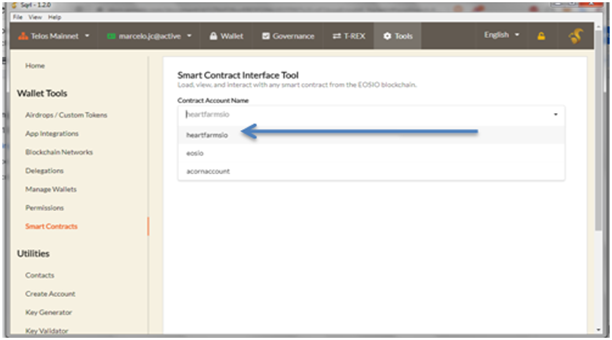
Then select on the tab: “Contract actions” The drop-down menu below contains all the actions within this Smart Contract. Select "createjcacct" to generate a form with the available parameters.

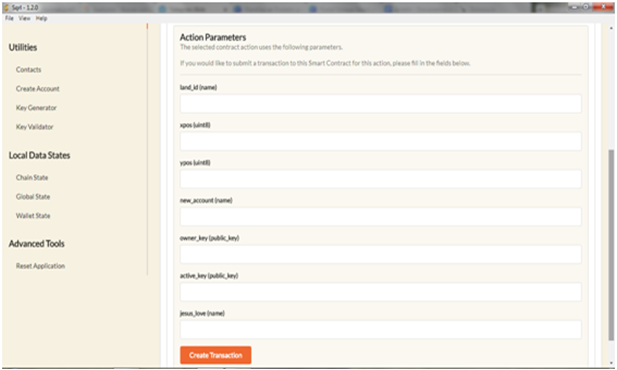
Fill in the following parameters as follows:
- Land_id is the land region... to begin the first land id is always: laa11

- xpos - xposition on the land map so 7 in this case

ypos - y position on the land map so 6 in this case
New_account - This is your new .jc account name! It must be a unique name not already taken and must end in .jc and must be 12 characters or less, such as: emerald.jc
Owner_key - the PUBLIC owner key you want to assign to the new account
Active_key - the PUBLIC active key you want to assign to the new account
Jesus_love - must equal exactly "yes"
Press the button “Create transaction” and Congratulations, you are the owner of a .JC account.

You send a 2nd transaction to claim your 1 HEART token from the contract. Inside SQRL go to Tools at the top, Smart Contracts. Put in "heartfarmsio" again. Select for Contract Action "refund", and type in your newly created .jc account name from the prior step. Then submit the transaction.
