
A weird bug in ITR-2 that prevents to complete the filling

The clock is ticking for the income tax return filling as the date of July 31st is approaching fast. It's always better to fill the return now as usually most people will try to fill them towards the end, and then the site will be slow. Usually I fill it online, but then this year, when I explored the income tax site https://www.incometax.gov.in/iec/foportal/ , I could see an offline utility in the downloads section. I thought it would be better, so downloaded it and ran - its a desktop application that connects to the income tax site to download your prefilled data ( available with them based on your data provided by your employer) after you provide your login information.

The steps are pretty straight as you can see in pictures below :


You need to put your PAN, and I have whitened them, as its a sensitive info.


It defaults to this option above, which is applicable only for few people whose taxable income is not more than basic exemption limit and they do not file the return but they need to fill the return because they fall into these categories. So you need to select the first option : taxable income is more than basic exemption limit - that is the reason you are paying tax and need to fill the return.

Look at that - 20 schedules are selected and on the top they say mandatory schedules are pre-selected. Not all of them are applicable for me, but then there is little I can do. And as it shows, I must ensure the information provided is true, complete and accurate - helpless citizen.

Then comes the schedule questions.

You have to be careful to select the tax regime here. It should match with what you provided to your employer because the tax calculation would have been done by your employer accordingly. After you select press Continue.

Salary Exemption is the most important piece of information that is relevant to many of us. It covers exemption in respect of various expenditures like travel allowance, children education allowance and any other reimbursements ( like Transport Allowance or Fuel Reimbursements, Telephone Reimbursement Meal vouchers), as per actual. And you cannot show it on your own, your company should have provided you the reimbursements based on the actual cost incurred. They clearly mention it in the Form 16 as well. However, I really don't understand why the data is not filled automatically, and we have to fill it.

And even the House Rent under section 10(13A) - the form 16 provided by the employer mentions it very clearly. But its missing here. So it's your responsibility to fill them and save to have the right tax computation. Most of the time people miss this and as a result the tax computation does not match with what it should be ideally.

Another very important section is 80 D that covers medical insurance premium, preventive health check-up and / or medical expenditure. I believe almost each of us definitely pay for medical insurance. And this also covers your parents who could be Senior Citizens ( Senior Citizens have a higher limit). If you click yes, it pops up with a message saying "Schedule 80D is required to be filled", but then there is no direct navigation to Schedule 80D. So you have to find it and fill it, so press Continue and you will land in the Schedules Summary.

From here, you will have to select the 80D Schedule and fill the amounts and save.
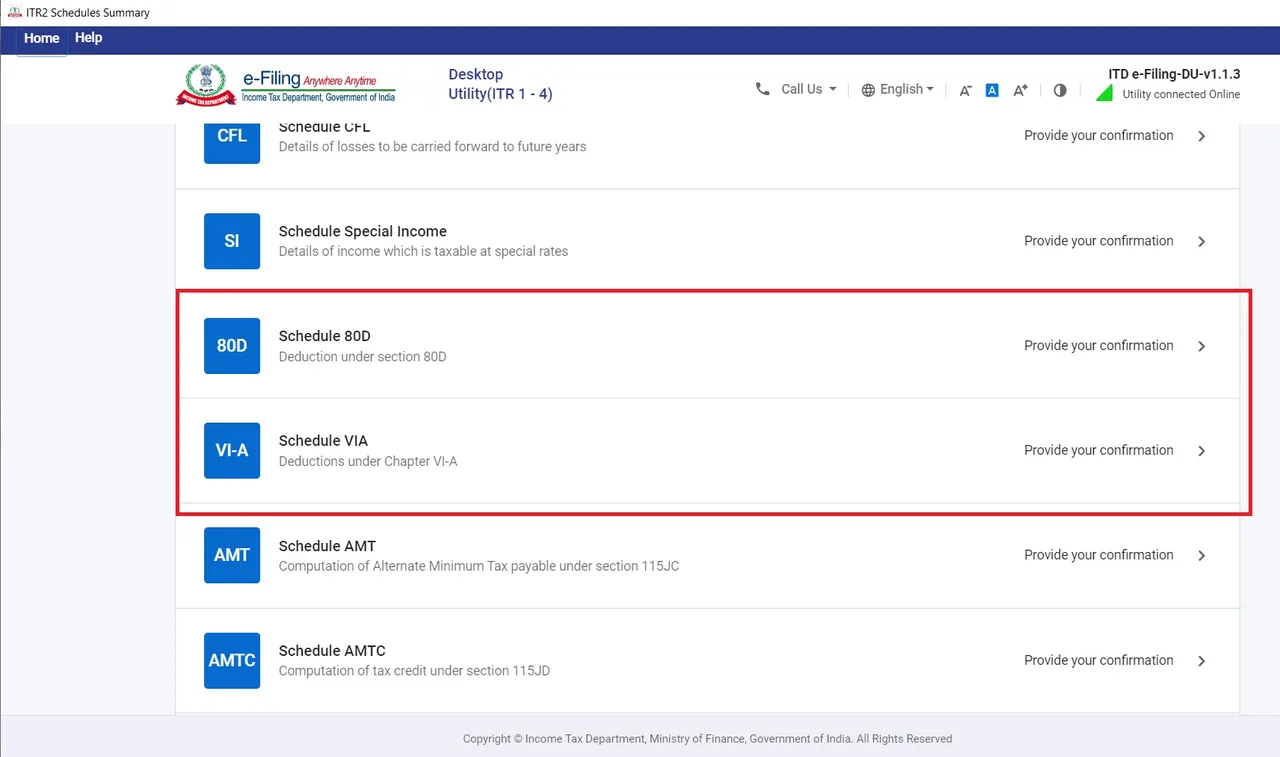

Click on Edit and enter appropriate entries and then confirm. Now this amount should reflect inside Schedule VI-A. You should enter the amounts paid by you. So if your employer gives you medical insurance free , then you don't need to enter anything for that. However, if they provide any add-on insurance for which you pay, then you can enter that here. Also you can include any personal medical insurance premium by clubbing them. It will consider the maximum as per limits. I really did not understand why they included the 80D as part of Schedule questions inside Salary Exemption, if its completely a different schedule.

Before going further let's open the Schedule Salary and check again to make sure the exemptions are taken into consideration.Look at that, it does not consider the House Rent. Check that box and Edit and enter the amount again and you land here.

A weird bug in the ITR-2 form that does not allow to save the House Rent exemption saying : Exemption of HRA u/s 10(13A) shall not be more than minimum of HRA received or 50% of (Basic + DA). You enter any amount, it ends with same result. So this where I am stuck and there is no solution. It feels like the Income Tax Department has published the ITR2 utility without adequate testing - poor quality assurance. I tried to look into the videos they have published and even left my comments on one of their videos.

I have also filled a grievance with them. You can do so by selecting the Grievances drop-down.


I will be waiting for few days to see if they respond or not. In the mean time, I tried one more work around. Instead of filling the House Rent Allowance under Allowances, I added another and put the description and filled the amount. It does not have that validation, so it works and considers that amount. So if I do not hear back from them in next couple of weeks, I will go ahead with this approach as July 31st is the last date. Hopefully, they will fix this bug and let me know - helpless citizen.
And do you notice anything unusual in these images ? If you see closely, then you can see some of the images are from the application and some from the online filling. So I tried online after I faced the issue in the application and the bug exists in ITR-2 form at both places. There is one other option to explore - the excel utility which I have not tried yet.
If you are using ITR-1, then that may not have this issue. So if you good with that, then all you have to do is to go through each other schedules and Confirm each. Most of them may not be applicable to you ( e.g. Schedule Capital Gains, Schedule 112A, Schedule Income from other sources, Schedule BFLA, Schedule CFL, Schedule AMT, Schedule AMTC) but you still have to navigate and confirm them. And then finally look at the most important schedules : Part B - TI, Tax Paid, Part B - TI Computation of Total Income.

If all is well, then you can confirm them and proceed to verification to finalize your returns. Hope this helps to fill your return, in case you need any help, let me know. I can assist you, but promise me, you will help others in a similar fashion.


copyrights 