
¡HOLA!
¡¡Muy buenas noches comunidad de Hive!!
HELLO!
Good evening Hive community!

Foto tomada con mi teléfono inteligente y edición en canva
Photo taken with my smartphone and edited in canva
I have seen several people from the platform change their HIVE DOLLARS (HBD) for Hives, but from which page do they do it?
Today I bring you a short but well explained tutorial so you can learn how to change your HBD for Hives.


Comenzamos con este tutorial, ingresando a este link para visualizar nuestro Hive Wallet, que será donde cambiaremos nuestro HIVE DOLLARS por Hive.
We begin with this tutorial, entering this link to visualize our Hive Wallet, which will be where we will change our HIVE DOLLARS for Hive.
Ya una vez instalado en la página de Hive Wallet, nos vamos a donde dice Iniciar sesión y colocamos nuestro nombre de usuario, sin el arroba, y por último copiamos y pegamos nuestra Clave de publicación, para ingresar.
Once installed in the Hive Wallet page, we go to where it says Sign in and we put our user name, without the at sign, and finally we copy and paste our publication key, to enter.
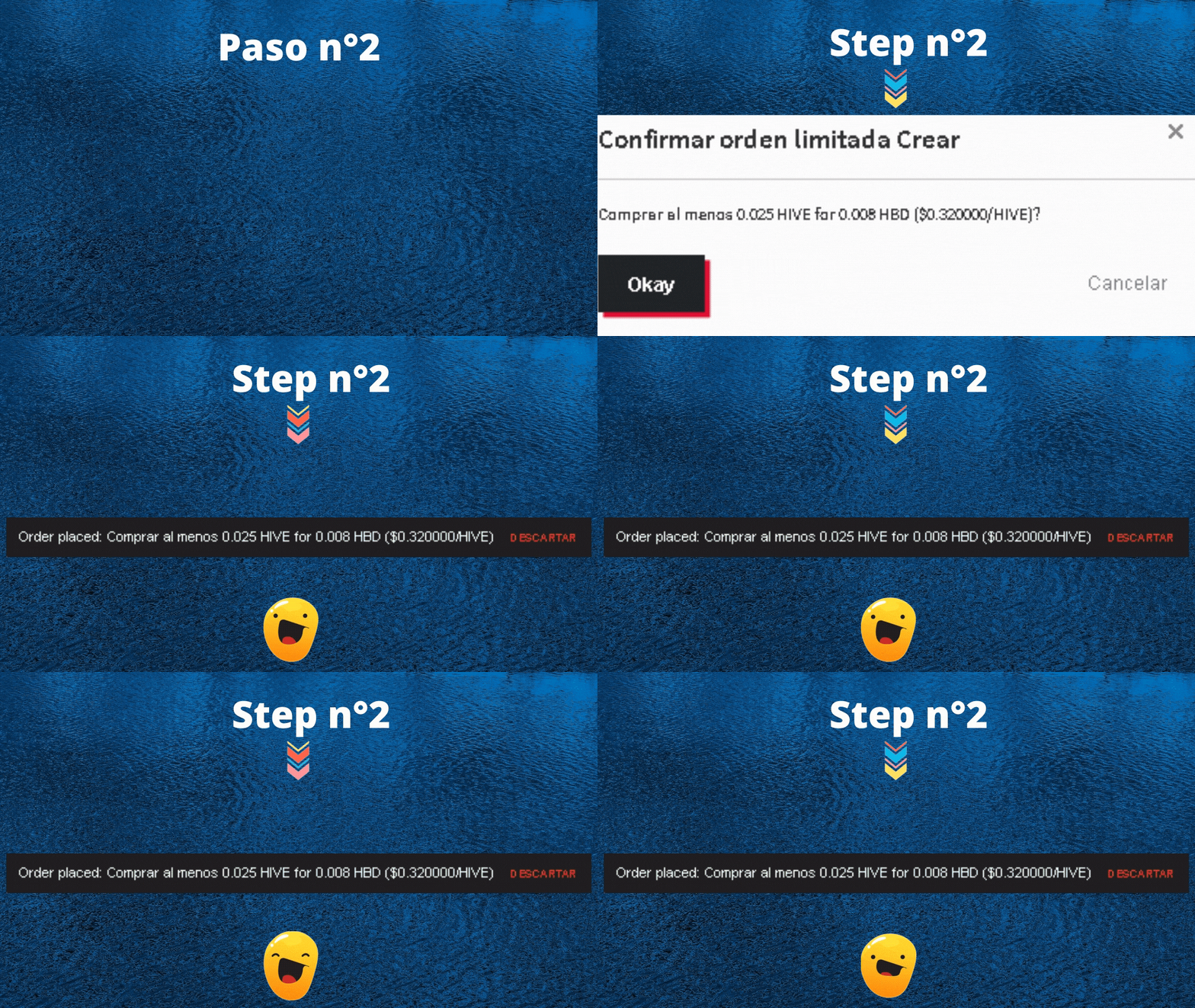
En el segundo paso, nos ubicaremos en la parte izquierda de nuestra Hive Wallet. En mi caso, coloque la cantidad de 0.025 Hive por 0.008 HBD, que son los que voy a pagar para que me den 0.028 HIVE; en la última captura de pantalla de este GIF la verán, pero con 0.025 HIVE.
In the second step, we will be located on the left side of our Hive Wallet. In my case, put the quantity of 0.025 Hive for 0.008 HBD, which are the ones I will pay to get 0.028 HIVE; in the last screenshot of this GIF you will see it, but with 0.025 HIVE.
Luego de darle comprar hive, le daremos en okay, después, nos mandará a colocar nuestra contraseña maestra, para concluir con la compra de al menos 0.025 HIVE por 0.008 HBD.
After giving it buy hive, we will give it in okay, then, it will send us to place our master password, to conclude with the buy at least 0.025 HIVE for 0.008 HBD.
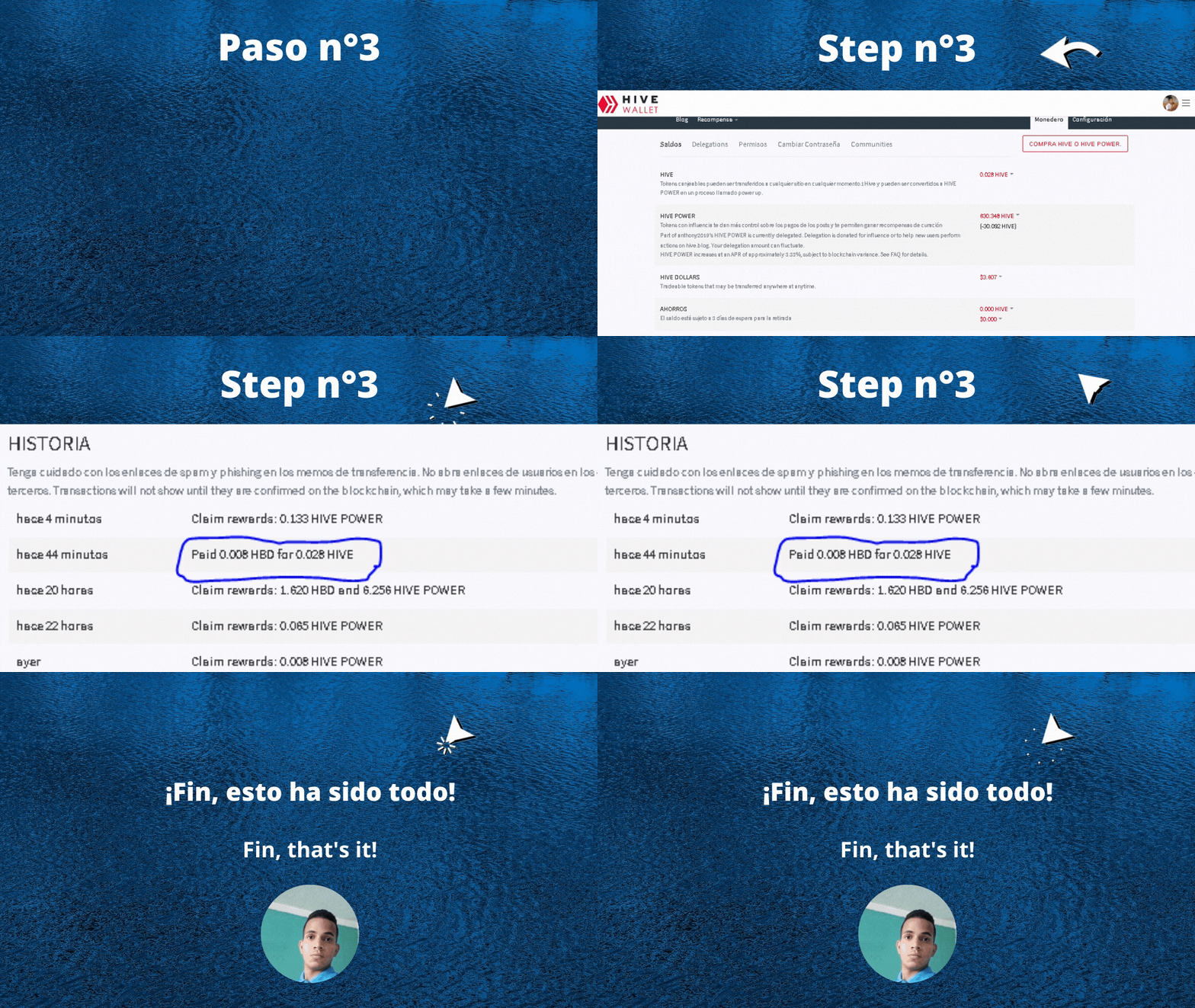
Concluyó con el paso numero tres (3), donde nos dirigiremos a nuestra cuenta de Hive Blog, seguidamente le daremos Wallet para ver lo del cambio. No sé olviden de colocar su clave de publicación.
He concluded with step number three (3), where we will go to our Hive Blog account, then we will give him a wallet to see about the change. Don't forget to put your publication key.
Finalmente, observamos en donde dice, HIVE, en la cual tenemos la cantidad de 0.028 HIVE, pagando un total de 0.008 HBD.
Finally, we look where it says, HIVE, in which we have the amount of 0.028 HIVE, paying a total of 0.008 HBD.
Los GIF fueron realizados desde canva, por mi persona.
The GIFs were made from canva, by me.
