
Hive Business Card Design Contest
I wanted to participate in this contest, which I have participated in before, with another design I prepared. If you want to participate, you can reach the related post from here -> Contest Post But I think there are only one or two days left, so I say hurry up.
Design Process
For this, I used Canva again, where you can make designs for free. I love this app. This time I spent a little more time on the app and tried to set up a different theme.
I created the QR codes using a QR code generator site. I'm adding the link here. QR CODE GENERATOR I realized that it was possible to customize the codes here and I changed various parts of the code in colors that would match the back of the card.

I chose this code for the color #0A56F3 BLUE and I used this code for the color #F18415 ORANGE. I set the dots of the QR Code to be round, to resemble honeycombs, because I made the rest of the card with a honeycomb theme. Let's take a closer look!

Since Hive also means honey hive, I prepared a honey theme and added honeycomb images, but I didn't want them to stand out too much, so I chose a faint pattern.

The third visible shape is the one I chose. I adjusted how much I wanted the pattern to appear on the edges,.

I prepared handwritten detailed main slogans like in the QR code. And I added the terms we use on this platform to make it interesting #post #vote #comment #reblog #boost and finally #promote
Here are the Cardvisit-s I Designed

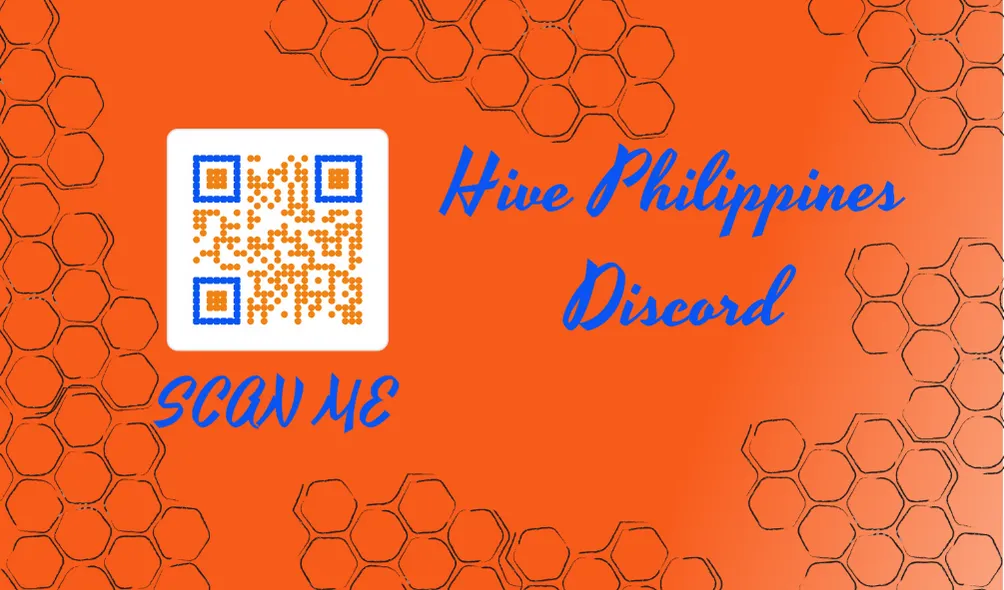
Then, because the orange was too dark for my eyes, I took advantage of the design tools in Canva and played with the colors a bit.


I have prepared these two card visits, a lighter shade and a slightly darker one, I hope you like them.

TR
Daha önce de katıldığım bu yarışmaya hazırladığım başka bir tasarımla katılmak istedim. Eğer ki siz de katılmak isterseniz, ilgili posta buradan ulaşabilirsiniz -> Contest Post Ama sanırım son bir ya da iki günü kaldı elinizi çabuk tutun derim.
Tasarım Süreci
Bunun için tekrar Canva uygulamasını kullandım. Burada ücretsiz bir şekilde tasarımlar yapabilirsiniz. Bu uygulamayı seviyorum. Bu sefer biraz daha uygulamada vakit geçirdim ve değişik bir tema kurmaya çalıştım.
QR kodlarını QR kod oluşturucu bir siteyi kullanarak hazırladım. Linki buraya ekliyorum. QR CODE GENERATOR Burada kodları da özelleştirmek mümkünmüş biraz kurcalayınca fark ettim ve kartın arka yüzüne uyumlu olacak renklerde kodun çeşitli bölgelerini değiştirdim.
#0A56F3 MAVİ renk için bu kodu seçtim ve #F18415 TURUNCU renk için de bu kodu kullandım. QR Kodun noktalarını yuvarlak olacak şekilde ayarladım, bal peteklerini andırsın diye çünkü kartın geri kalanını da bal peteği temasıyla hazırladım. Gelin yakından bakalım!
Hive, aynı zamanda bal kovanı demek olduğu için bal teması hazırladım ve petek görselleri ekledim ama bunların da çok göze çarpmasını istemediğim için silik bir desen seçtim.
Üçüncü görünen şekil benim seçtiğimdi. Desenin kenarlarda görünmesini istediğim kadarını ayarladım, sizce nasıl olmuş?
QR koddaki gibi el yazısı detaylı ana sloganları hazırladım. Ve bu platformdaki kullandığımız terimleri ekledim ilgi çekici olsun diye #post #vote #comment #reblog #boost ve son olarak #promote
İşte Tasarladığım Kartvisit-ler
Daha sonra gözüme turuncusu fazla koyu durduğu için, Canva uygulamasındaki tasarım araçlarından faydalandım ve renklerle biraz oynadım.
Daha açık ton ve biraz daha koyusu olmak üzere bu iki kartvisiti hazırladım, umarım beğenmişsinizdir.
