
Hello, everyone.
Seeing posts of people spending HBD by using it to pay for airtime only left me anxious and eager to try it out. All these years, we have been looking for different ways to put hives in the spotlight, but with this development, I think we have gotten exactly what we needed to put hives in the spotlight. With this development, businessmen and women who are crypto enthusiasts can now join Hive as well as introduce their customers to the platform, and it is a win-win for both individuals.
designed in canva.

If there is one thing I find very difficult to do, it is going out to purchase airtime. Most times, I just purchase it from my bank, and I even charge for it, but with this development, even the banks and the woman selling airtime across the streets won't see me again. Hive has provided a solution, and following 
Step 1: To get started, first of all, log in to your keychain using your hive private key.

Step 2: After logging in, you visit
https://www.bitrefill.com/invite/sdmyqq4z on your keychain browser and create an account using Gmail.

Step 3: Here, you select the service you desire to purchase. I clicked on Airtel and moved on to the next step.

Step 4: I filled in the amount of airtime I desired to purchase along with the receiving phone number. I added it to the cart and then proceeded.

Step 5: After adding to the cart, the checkout option popped up, and I clicked on it.

Step 6: Here you are required to choose a payment method, so I selected Lightning as the method of payment I want to use. I used my mobile phone, and the option to choose a wallet popped up, but I clicked on skip as instructed.


Step 7: You can copy the QR code of the invoice created by tapping Copy. Remember, the code has a time limit and expires after 30 minutes.

Moving to the next phase.
Step 8: Open a new tap on your keychain browser and visit this site: https://www.v4v.app/

Step 9: Click on paste to paste the invoice that was created on Bitrefill.

Step 10: You select the HBD icon with the keychain logo in front of it to make your payment.

Step 11: A message pops up asking you to confirm your order. Confirm your order and wait to receive your airtime.

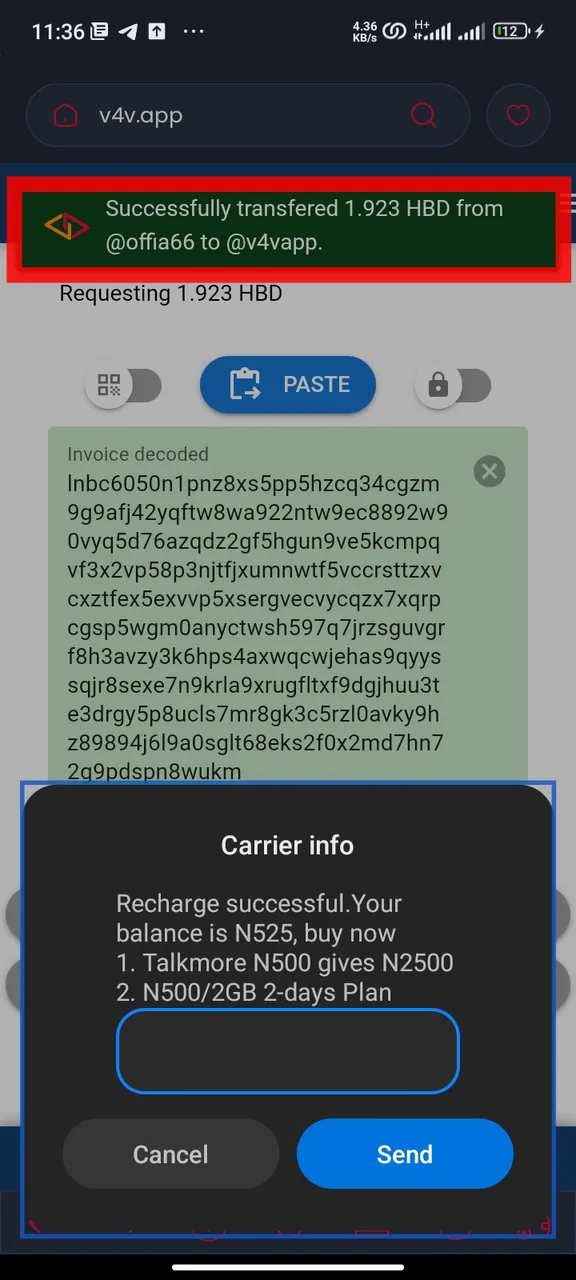
The joy of it is how fast the airtime is received by the recipient; it came with a seed of light, and I did not expect it to be this fast, I have not even left the keychain app and I received my order. This development will definitely help put the hive where it is supposed to be. You, too, can try it by following each step.
Thanks for stopping by.