


Genshin Impact has been the game that I have spent more hours playing in recent years and despite playing it on mobile and not having the same quality as on pc, it still has some really incredible and beautiful landscapes and scenes. Recently I have been completing a series of missions in the Sumeru Desert which I had abandoned and the truth is I have had a love hate relationship with this area, on the one hand, it is an absurdly vast desert and quite empty and equal parts which makes something monotonous to explore, and on the other hand has some areas of temples and incredible ruins which are some of which I will show you.

One aspect that I liked a lot about the ruins is how they combine designs of ancient temples or past civilization with that mix of futuristic and fantasy technology. In the first image you can see a really large room where the structure in the center looks more like a spaceship.


Something that I had not detailed very well in Genshin is how to take pictures we have 3 different options where two of them are with an object called Daguerreotype which simply captures automatically the screen without allowing us to make any modification, the variant between one and another is that with one we will have a more vintage effect on the edges of the frame by generating a somewhat deteriorated effect with sepia tone, in some images it can look very good as in the one that combines that tone with the blue tones of the central pillar.

The sepia tone looks very good in these ruins as was the case of the entrance of the temple where you can see the two giant statues of the guardians that look like some representations of AR, the stairs so extensive give a very cool effect.

The photo mode of Genshin is not really as complete or with many options but it allows you to zoom out to a much wider angle than we can have when playing so I could place on screen large structures and areas that normally could not be seen complete when playing, although it can distort the view a little by expanding the visual range, well used can give very interesting wide photos like the entrances of the temples that I managed to capture or the wide areas that show the vastness of the ruins.
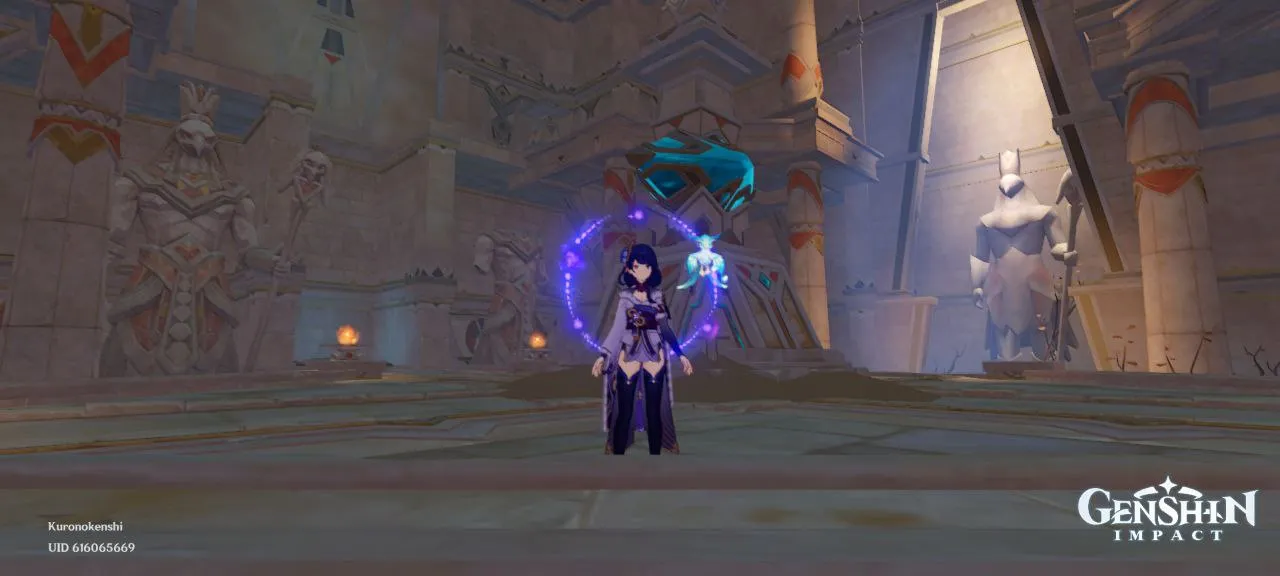
The great thing is that you can modify certain poses and even easy expressions of your character in photo mode and if you want you can also remove the character from the screen, although this photo mode has a defect and that is that to use this mode your character must be static so it can not be used for aerial photographs when you are planning and for them if you must use the photo objects.

All Images Are Screenshots Of My Cell Phone
Separator Images:
1. Source 2. Source 3. Source 4. Source 5. Source
Separator II Images:
1. Source 2. Source 3. Source

Español
Genshin Impact ha sido el juego que más horas le he dedicado los últimos años y que a pesar de jugarlo en móvil y no tener la misma calidad que en pc, de igual manera tiene unos paisajes y escenas realmente increíbles y hermosas. Recientemente he estado completando una serie misiones en el Desierto de Sumeru las cuales tenia abandonadas y la verdad he tenido una relación de amor odio con esta zona, por un lado, es un desierto absurdamente extenso y con partes bastante vacías e iguales lo cual hace algo monótono explorar, y por otro lado cuenta con unas zonas de templos y ruinas increíbles que son algunas de las cuales les mostrare.
Un aspecto que me ha gustado bastante de las ruinas es como combinan diseños de templos antiguos o civilización pasadas con esa mezcla de tecnología futurista y fantasiosa. En la primera imagen se puede apreciar una sala realmente amplia en donde la estructura del centro parece más una nave espacial.
Algo que no había detallado muy bien en Genshin es como para tomar fotos tenemos 3 opciones diferentes en donde dos de ellas son con un objeto llamado Daguerrotipo el cual simplemente captura de manera automática la pantalla sin permitirnos realizar alguna modificación, la variante entre uno y otro es que con uno tendremos un efecto más Vintage en los bordes del marco al generar un efecto algo deteriorado con tono sepia, en algunas imágenes puede quedar muy bien como en la que combine ese tono con las tonalidades azules del pilar central.
El tono sepia queda muy bien en estas ruinas como fue el caso de la entrada del templo donde se aprecian las dos estatuas gigantes de los guardianes que parecen unas representaciones de RA, las escalinatas tan extensas dan un efecto muy genial.
El modo fotografía de Genshin realmente no es tan completo ni con muchas opciones pero permite alejar la vista hasta un ángulo mucho más amplio del que podemos tener al jugar por lo cual pude colocar en pantalla grandes estructuras y zonas que normalmente no se podrían ver completas al jugar, aunque puede distorsionar un poco la vista al expandir tanto el rango visual, bien usado puede dar fotos amplias muy interesantes como las entradas de los templos que conseguí capturar o las zonas amplias que muestran las inmensidad de las ruinas.
Lo genial es que puedes modificar ciertas poses y hasta expresiones fáciles de tu personaje en el modo foto y si quieres también puedes quitar al personaje de la pantalla, aunque este modo fotografía tiene un defecto y es que para usar este modo tu personaje debe estar estático por lo cual no se puede usar para fotografías aéreas cuando estas planeando y para ellas si debes usar los objetos de fotos
All Images Are Screenshots Of My Cell Phone
Separator Images:
1. Source 2. Source 3. Source 4. Source 5. Source
Separator II Images:
1. Source 2. Source 3. Source