
Hi everyone, this is my first tutorial and I hope you will find it useful! I keep reading stories about people getting their coins stolen using a web wallet or by leaving funds on exchange.
The safest way to store your coins (not only NEO) but all coins is to create a paper wallet. Hardware wallet (ledger & trezor) are safe but they don't support NEO yet.
A paper wallet consist of writing down your private key (WIF) on a paper and store it somewhere safe.
After some research I found 2 websites where you can generate a NEO paper wallet.
- https://neopaperwallet.org
- https://snowypowers.github.io/ansy/
In this tutorial I use neopaperwallet.org but you can use one or the other to generate your private key.
Part I: Create a NEO paper wallet
As you can see on the screenshot below taken from https://neopaperwallet.org when you generate a new wallet you will get the public address and your private key (WIF).
- 1 - Your public key: This is the address where you can send your coins.
- 2 - Your private key (WIF): This is your private key and YOU NEED IT to access your funds! WRITE IT DOWN on a paper and store it safely.
You now have a paper wallet where you can store your coins! For security reasons, you should have at least 2 copies of your WIF key and store them at different locations.
I will create a more advanced tutorial in the next days to explain how to create the paper wallet using a ‘LiveCD’ Linux distribution, such as Ubuntu.

Part II: Restore from WIF key
In this example I am restoring form the WIF key and I am using the neo-gui. You can download it from the official website https://neo.org
Step 1: right-click on the white area and click on "Import from WIF..."

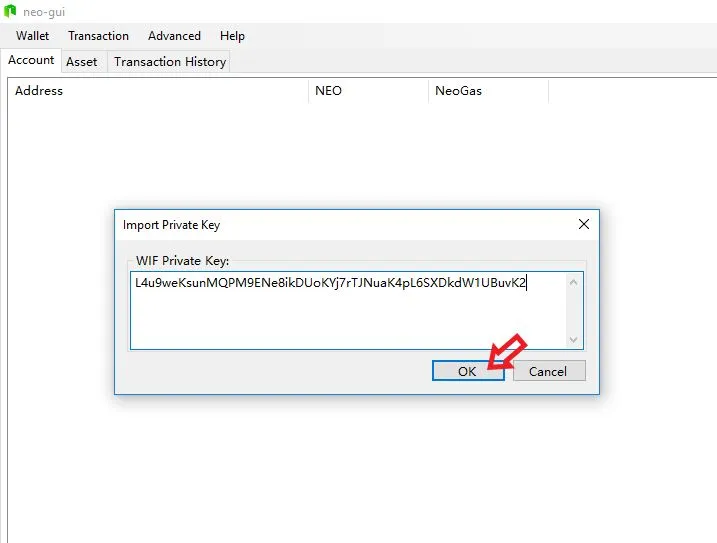
Step 2: input your WIF key and click "OK"
Step 3: Rebuild the index to view all your transactions.

Voilà! I hope this tutorial will help some of you to safely store your coins!