

I have a Nexus 5 running on Ting --> http://www.burnoffyourbeerbelly.com/ting
I have a Nexus 5X running on Google Project Fi --> https://fi.google.com/
My girlfriend also has a Nexus 5X running on Google Project Fi
I have a Nexus 9 tablet strictly on Wi-Fi.
I can confirm that these simple steps will make whatever Nexus device you have, lightning fast!
Here Are The Simple Steps To Make Your Nexus Lightning Fast:
1 | Wake up your lil Nexus

2 | Pull down from the top

3 | Tap the gear for settings

4 | Scroll to the bottom for about phone

5 | Scroll to the bottom for build number

6 | Tap build number a bunch of times until it says "you are now a developer"

7 | Back out of all that jazz

8 | Tap your NEW developer options
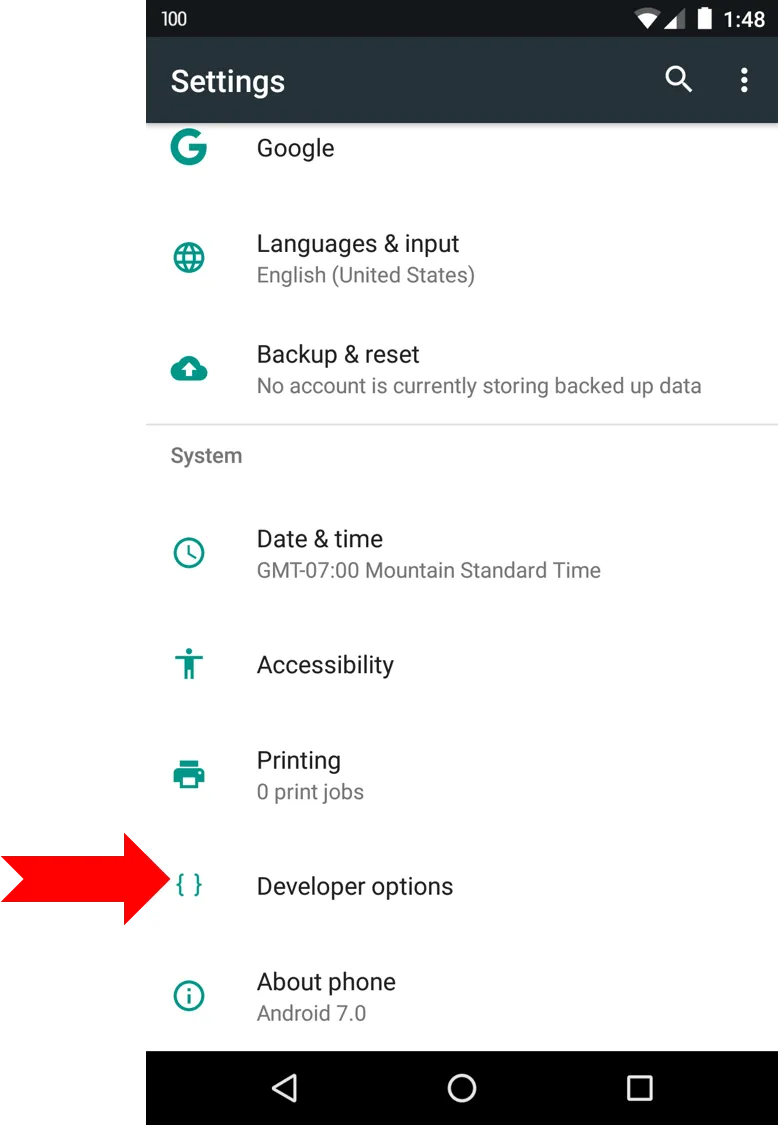
9 | Scroll to find (3) scales - window animation scale, transition animation scale & animator duration scale

10 | Tap each scale and set them to off

11 | Back the hell outta everything

12 | Notice & Enjoy Lightning Fast Speeds
If these steps helped you make your Nexus device lightning fast, comment below to let me know. Also, vote this up so other Nexus owners can get the best performance out of their device!
Cheers!