https://www.youtube.com/watch?v=BYBiCHGGIzQ
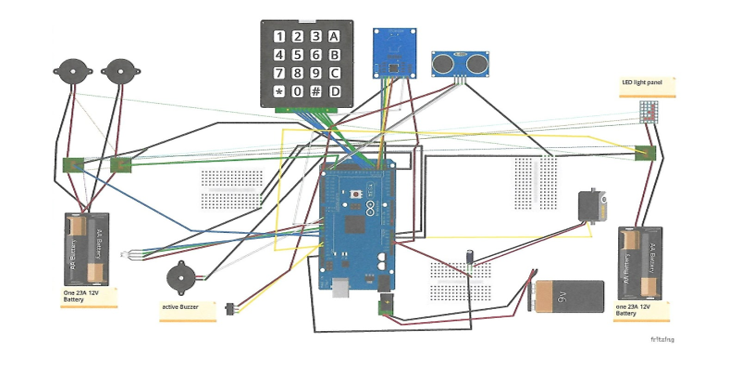
A friend and I teamed up at school for a capstone project. We built a safe powered by an Arduino. The safe can be unlocked by either putting in a pin code or scanning an RFID tag. 3 wrong attempts will cause a timeout and not allow anything to happen. A correct password or RFID tag will open the door. There are alarms that will sound if the safe is picked up. The alarm can be deactivated by flipping a switch on the inside of the box.
Here is the info:
Components:
1 Arduino Mega 2560
1 RFID Module -RC522
1 Ultrasonic Sensor
1 Servo Motor
1 Active Buzzer
1 Membrance Switch Module (4x4 keypad)
1 RGB 10mm LED
1 Resistor (330Ω)
3 Relays, TE (OMR-C-105H)
2 Buzzers, Radio Shack 7-14VDC 108dB
1 9V battery with power supply adapter battery holder
2 23A 12V Batteries with battery holder
1 Electrolytic Capacitor (100uF 50V)
3 170 tie-Points Mini Breadboard
1 Mega 2560 case
1 main power switch
Jump wires
22 AWG stranded
22 AWG solid
The Code:
#include <Servo.h> // servo motor library (0-180 degrees)
#include <MFRC522.h> // Include of the RC522 Library
#include <SPI.h> // Used for communication via SPI with the Module (RC522)
#include <Keypad.h> // 4x4 keypad library
#include <Password.h> // password library (holds password)
int ledGreen = 6; // Green LED
int ledRed = 4; // Red LED
int ledBlue = 7; // Blue LED
int val = 0; // variable to store the read value
int count = 0; // counter
int relayLED = 11; // 12 LED panel inside the safe
int alarmRelay1 = 8; // 108dB buzzer for ultrasonic sensor
int alarmSwitch = 10; // switch to turn off alarm
int alarmState; // detects change of state on the alarm switch
int alarmRelay2 = 26; // 108dB buzzer for ultrasonic sensor
int trigPin = 22; // trigger pin on the ultrasonic sensor
int echoPin = 24; // echo pin on the ultrasonic sensor
int setDistance = 6; // 6cm set max distance
long duration; // return ping detection variable, duration of ping
int distance;// variable storing distance
#define SDAPIN 53 // RFID Module SDA Pin is connected to the MEGA 53 Pin
#define RESETPIN 5 // RFID Module RST Pin is connected to the MEGA 5 Pin
#define Buzzer 3 // Pin 3 connected to + pin of the Buzzer
byte FoundTag; // Variable used to check if Tag was found
byte ReadTag; // Variable used to store anti-collision value to read Tag information
byte TagData[MAX_LEN]; // Variable used to store Full Tag Data
byte TagSerialNumber[4]; // Variable used to store only Tag Serial Number
byte GoodTagSerialNumber[4] = {0x13, 0xB8, 0xC0, 0x1}; // The Tag Serial number we are looking for
String newPasswordString;// hold new password
char newPassword[6]; // up to 6 digits for password
Password password = Password("2234"); // the correct password is 2234
byte maxPasswordLength = 6; // 6 digits max input for password
byte currentPasswordLength = 0; // same as above
const byte ROWS = 4; // 4 rows on keypad
const byte COLS = 4; // 4 colums for keypad
char keys[ROWS][COLS] = {
{'1','2','3','A'},
{'4','5','6','B'},
{'7','8','9','C'},
{'*','0','#','D'},
}; // keypad map layout
byte rowPins[ROWS] = {48,46,44,42}; // Pin out for rows on keypad
byte colPins[COLS] = {49,47,45,43}; // Pin out for colums on keypad
Keypad keypad = Keypad(makeKeymap(keys), rowPins, colPins, ROWS, COLS); // keymap inputs
MFRC522 nfc(SDAPIN, RESETPIN); // Init of the library using the MEGA pins declared above
Servo myServo; // Naming the servo motor
void setup() {
myServo.attach(A1); // Servo motor connected to pin A1
pinMode(Buzzer, OUTPUT); // Set buzzer pin to an output pin
pinMode(ledGreen, OUTPUT); // Set green LED to an output pin
pinMode(ledRed, OUTPUT); // Set red LED to an output pin
pinMode(ledBlue, OUTPUT); // Set blue LED to an output pin
pinMode(alarmRelay1, OUTPUT); // Set alarm relay1 buzzer to an output
pinMode(alarmSwitch, INPUT); // Set alarm switch to an input
pinMode(relayLED, OUTPUT); // Set relay LED panel to an output
pinMode(alarmRelay2, OUTPUT); // Set alarm relay2 buzzer to an output
pinMode(trigPin, OUTPUT); // Set trigger pin to an output
pinMode(echoPin, INPUT); // Set echo pin to an input
digitalWrite(relayLED, LOW); // Relay LED panel off at startup
digitalWrite(alarmRelay1, LOW); // alarm relay1 buzzer off at startup
digitalWrite(alarmRelay2, LOW); // alarm relay2 buzzer off at startup
digitalWrite(Buzzer, LOW); // Buzzer Off at startup
digitalWrite(ledGreen, LOW); // Green LED Off at startup
digitalWrite(ledRed, LOW); // Red LED Off at startup
digitalWrite(ledBlue, LOW); // Blue LED Off at startup
SPI.begin(); // communication begins for the RFID
Serial.begin(115200); // communication will print on serial monitor 115200
// Start to find an RFID Module
Serial.println("Looking for RFID Reader"); // searching for RFID reader, printed on serial monitor 115200
nfc.begin(); // start near field communication with RFID
byte version = nfc.getFirmwareVersion(); // Variable to store Firmware version of the Module
// If can't find an RFID Module
if (! version) {
Serial.print("Didn't find RC522 board."); // the RFID module could not be found, printed on serial monitor 115200
while(1); //Wait until a RFID Module is found
}
// If found, print the information about the RFID Module
Serial.print("Found chip RC522 "); //RFID found, printed on serial monitor 115200
Serial.print("Firmware version: 0x"); // print RFID reader software version for RC522
Serial.println(version, HEX); // print on binary hex decimal
Serial.println(); // print RFID card or fob on serial monitor 115200
}
void loop() {
char key = keypad.getKey(); // password to be entered on keypad
if(key!=NO_KEY){
delay(60); // if no key is intered delay .06 seconds
switch(key){
case'#':checkPassword(); break; // # button on the keypad will check password
case'*':lockSafe(); break; // * button on keypad will lock the safe
default: processNumberKey(key); // process password for correct password
}
}
digitalWrite(trigPin, LOW); // trigger pin on low state
delayMicroseconds(2);// delay 2 micro second
digitalWrite(trigPin, HIGH); // trigger pin turns high
delayMicroseconds(10);// delay 10 micro seconds
digitalWrite(trigPin, LOW); // trigger pin turns low
duration = pulseIn(echoPin, HIGH);// waits for the pin to go HIGH, starts timing, then waits for the pin to go LOW and stops timing.
distance = duration*0.034/2; // duration x .034cm/Micro Second / 2
String GoodTag="False"; // Variable used to confirm good Tag Detected
// Check to see if a Tag was detected
// If yes, then the variable FoundTag will contain "MI_OK"
FoundTag = nfc.requestTag(MF1_REQIDL, TagData);
if (FoundTag == MI_OK) {
delay(200); // delay .2 second
// Get anti-collision value to properly read information from the Tag
ReadTag = nfc.antiCollision(TagData);
memcpy(TagSerialNumber, TagData, 4); // Write the Tag information in the TagSerialNumber variable
Serial.println("Tag detected."); // tag detected printed on serial monitor
Serial.print("Serial Number: "); // print serial number: on serial monitor
for (int i = 0; i < 4; i++) { // Loop to print serial number to serial monitor
Serial.print(TagSerialNumber[i], HEX); // print tag number in hex decimal
Serial.print(", "); // print tage numbers after Serial number:
}
Serial.println(""); // print on next line
Serial.println(); // space printed
// Check if detected Tag has the right Serial number we are looking for
for(int i=0; i < 4; i++){
if (GoodTagSerialNumber[i] != TagSerialNumber[i]) {
break; // if not equal, then break out of the "for" loop
}
if (i == 3) { // if we made it to 4 loops then the Tag Serial numbers are matching
GoodTag="TRUE"; // tag maches code
}
}
if (GoodTag == "TRUE"){
Serial.println("ACCESS GRANTED!"); // access grented printed on serial monitor
Serial.println(); // space printed
myServo.write(180); // servo motor moves from 0 to 180 degrees (safe unlocks)
digitalWrite(relayLED, HIGH); // LED panel turns on
for (int y = 0; y < 3; y++){
digitalWrite (Buzzer, HIGH) ;// Buzzer On
delay (50) ;// Delay .05 seconds
digitalWrite (ledGreen, HIGH); // green LED turns on
delay (50); // delay .05 seconds
digitalWrite (Buzzer, LOW) ;// Buzzer Off
delay (50) ;// delay .05 seconds
digitalWrite (ledGreen, LOW); // green LED turns off
delay (50); // delay .05 seconds
count = 0; // counter reset to zero
}
delay(1500); // delay 1 1/2 seconds
}
else {
Serial.println("ACCESS DENIED!"); // access denied printed on serial monitor
Serial.println(); // space printed
for (int y = 0; y < 3; y++){
digitalWrite (Buzzer, HIGH) ;// Buzzer On
delay (300) ;// Delay .3 seconds
digitalWrite (ledRed, HIGH); // red LED turns on
delay (300); // delay .3 seconds
digitalWrite (Buzzer, LOW) ;// Buzzer Off
delay (400) ;// delay .4 second
digitalWrite (ledRed, LOW); // red LED turns off
delay (400); // delay .4 seconds
count ++; // counter incresses
}
delay(500); // delay 1/2 seconds
}
}
// when counter reaches 9 the safe times out for 15 seconds
if (count >= 9){
count = 0; // counter reset when couter reaches 9 or over 9
digitalWrite(ledBlue, HIGH); // blue LED turns on
delay(15000); // delay 15 seconds
digitalWrite(ledBlue,LOW); // blue LED turns off
}
alarmState = digitalRead(alarmSwitch); // the alarm switch will determind the alarm state
if(alarmState == HIGH){
digitalWrite(alarmRelay1, LOW); // if alarm switch is high, then the alarm relay1 turns off (disables the alarm)
digitalWrite(alarmRelay2, LOW);} // if alarm switch is high, then the alarm relay2 turns off (disables the alarm)
else{
if(distance>setDistance){
digitalWrite(alarmRelay1, HIGH); // if the the distance measured of the ultra sonic sensor is greater then the set distance, then alarm realy1 goes high (alarm turns on)
digitalWrite(alarmRelay2, HIGH); // if the the distance measured of the ultra sonic sensor is greater then the set distance, then alarm realy2 goes high (alarm turns on)
}
else{
digitalWrite(alarmRelay1, LOW); // if the the distance measured is less then the set distance then the alarm relay1 goes low (alarm turns off)
digitalWrite(alarmRelay2, LOW); // if the the distance measured is less then the set distance then the alarm relay2 goes low (alarm turns off)
}
}
}
void processNumberKey(char key){
Serial.print(key); // serial print the keys being pressed on the keypad
currentPasswordLength++; // keep adding inputed keys to the current password
password.append(key); // add password key
if(currentPasswordLength==maxPasswordLength){
checkPassword(); // if the max length of the password allowed is met, then check password
}
}
void checkPassword(){
if(password.evaluate()){
Serial.println("ACCESS GRANTED!"); // if password is a mach then access granted is printed on the serial print
myServo.write(180); // servo motor turns to 180 degrees ( opens)
digitalWrite(relayLED, HIGH); // LED light panel turns on
for (int y = 0; y < 3; y++){
digitalWrite (Buzzer, HIGH) ;// Buzzer On
delay (50) ;// Delay .05 seconds
digitalWrite (ledGreen, HIGH); // green LED turns on
delay (50); // delays .05 second
digitalWrite (Buzzer, LOW) ;// Buzzer Off
delay (50) ;// delay .05 seconds
digitalWrite (ledGreen, LOW); // green LED turns off
delay (50); // delays .05 seconds
count = 0; // counter goes back to zero
}
delay(1500); // delays 1.5 seconds
}
else {
Serial.println(" ACCESS DENIED!"); // access denied printed on serial print
Serial.println(); // space printed
for (int y = 0; y < 3; y++){
digitalWrite (Buzzer, HIGH) ;// Buzzer On
delay (300) ;// Delay .3 seconds
digitalWrite (ledRed, HIGH); // red LED turns on
delay (300); // delays .3 seconds
digitalWrite (Buzzer, LOW) ;// Buzzer Off
delay (400) ;// delay .4 seconds
digitalWrite (ledRed, LOW); // red LED turns off
delay (400); // delays .4 seconds
count ++; // counter starts countin up
}
delay(500); // delays .5 seconds
}
resetPassword(); // conduct resetPassword proccess
}
void resetPassword(){
password.reset(); // password for keypad reset
currentPasswordLength=0; // password goes to zero inputs
}
void lockSafe(){
Serial.println("SAFE LOCKED!"); // safe locked printed on serial monitor
Serial.println(); // space printed
myServo.write(90); // servo motor moves back to 90 degrees
digitalWrite(relayLED, LOW); // LED panel turns off
}