
In my last two posts...
I have shared the details about completing the first two quests of Reviewhunt Campaign, running on Reviewhunt. This campaign is still running and has 23 days left (at the time of writing this post), so anyone, who hasn't join the campaign yet and has plan to do so, can follow the procedure I have described so far.
My last submitted proof of quest was moderated on the same day and I was proceeded to the next quest (Red rectangular box). Here is the interesting part, instead of the Quest 3, Reviewhunt gave me a chance to earn some extra HUNT tokens by giving me a Bonus Quest (Green rectangular box) as an Optional Quest to complete...

BONUS QUEST
If Reviewhunt Campaign is not your first campaign to get bounty, and you have already completed any other campaign, then you can attempt this quest.
(Unfortunately, this wasn't the case with me, Reviewhunt Campaign is my first campaign for bounty. I am sharing the details, how anyone one can complete this quest, for those who are feeling difficulty in understadning this Bonus Quest or for those who would be facing this situation in their next campaign, though.)
As I mentioned above, this quest is for those who have already completed any one of the other campaigns, meaning all of the quests, and have got all the submitted proofs of quests moderated and approved.
This campaign would look like this...

As you can notice, all the of the quests' icons have small green glowing icons at their right sides near the bottom, which is the indication of moderation and approval of all the submitted quests.
steps to complete the bonus quest
.
Steps for this quest are almost same as that of the two previous quests.
First, join the Quest 2 by clicking the button "JOIN QUEST" at the bottom of the page...

Like the previous Quests, it'll pop up a small window, describing the period/duration to complete the Quest and a warning as well, about what would happen in case of not meeting the deadline...

Check both the boxes and click "OK", then click "SUBMIT QUEST" at the bottom of the page.

Source
Proof Submission page will pop up, click "choose the file" (Green Rectangular Box), select the file where you saved it, and submit it by clicking "SUBMIT YOUR PROOF" button at the bottom of the page (Red Rectangular Box).
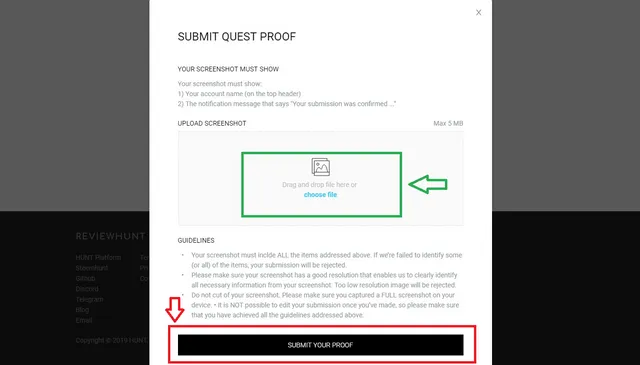
shortly, you'd get the message of successful submission, and a small glowing yellow icon would appear on Bonus Quest's icon.
and, let me remind you once again, the screenshot, you'd submit, must be showing the following three details...
- Your Account Name (Blue rectangular box),
- Other incomplete campaign/s (Red rectangular boxes), and
- Completed campaign with small glowing green icons on all the quests icons (Green rectangular box).
See the picture below as an example...

NOTE: If you are like me, and haven't completed any campaign yet, simply skip the quest by clicking SKIP THE QUEST (Green box in the first picture of the post), as I did.
WISH YOU A NICE EXCITING & THRILLING DAY ON REVIEWHUNT...
and, don't forget to visit the launching post (those, who haven't visited it yet, links are shared at the bottom of this post), many exciting news are waiting for you.
to be continued...