In the Send Area: Click the arrow down and select STEEM DOLLAR . In the Recieve Area: Choose BITCOIN
Input the amount you want to withdraw, the minimum SBD on Blocktrades currently is 16 SBD.
To make a transaction, you have to sign up to Coin.ph, if you don't have any yet. Fill in the personal information and verify using any Valid ID. It will take 24-48 hours to process.
Go to your Coins.ph account, copy and paste your wallet address. Click the GET DEPOSIT ADDRESS
Select the MANUAL TRANSFER you will see the ACCOUNT NAME and Memo.
Go to your Steemit Account Wallet, Transfer Steem Dollars.
In the Pop-up input the Account Name: "blocktrades" and the "memo" from the blocktrades you can copy-paste it. Click SUBMIT.
This will direct you to Users Login.
Hooraaayyy! You are Almost Finish! Wait for 10-15 minutes on transferring your money into Coins.ph, sometimes it may take longer.
This is how it looks like when your transfer your money to Coins.ph.
Cashing Out Using Over the Counter. I usually use Cebuana Lhuiller because it's the most convenient, faster and less fee.
You may choose different methods to cash out, it can be transferrable to other over the counter, banks, Gcash and so on.
Put the amount you are going to cash out. Click NEXT STEP.
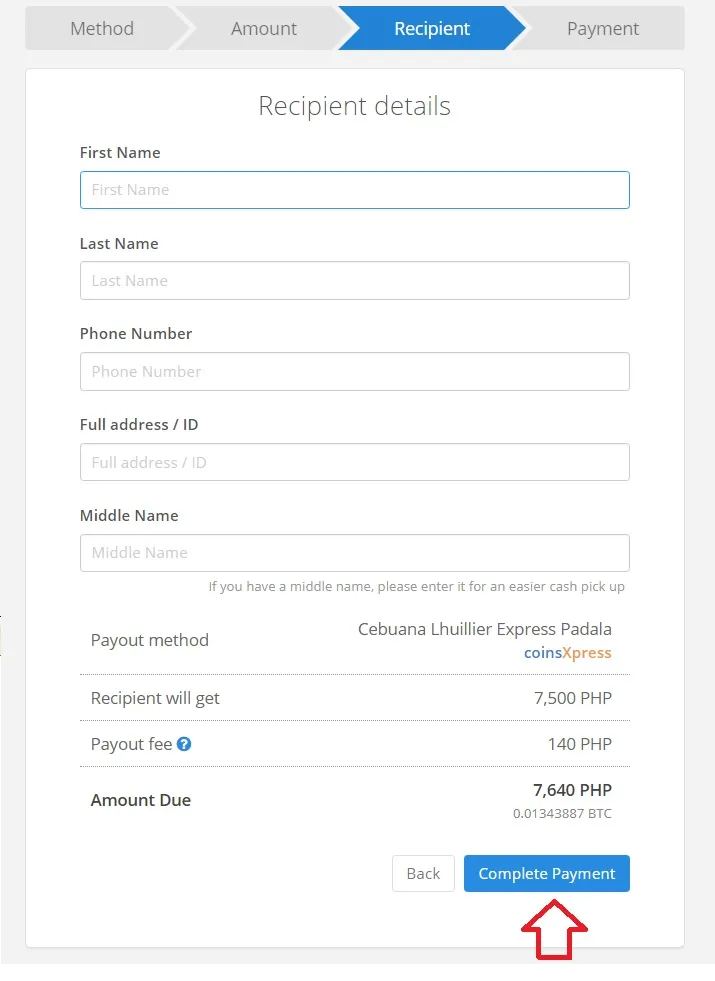
Fill in your Personal Information. Double Check and Click Complete Payment.
Processing time mostly takes place for 30 minutes. You will receive an SMS and email.
Tadaaaaa! Check your phone and email. Process Completed! They will send you information on how to get it as easy as 123!
You may now go to any Cebuana Lhuillier branch near you! :)
Hope this tutorial can help you. If you have any questions, don't hesitate to ask on the comment section. _
About the Author
Hive account@fernwehninja is a lover of knowledge, travel junkie and a seeker of adventure. She is passionate about doing Charity Projects and one of the Steemit Bloggers Coordinator. Her motive is simple: to make others smile, making other people happy is always been her virtue.





is a lover of knowledge, travel junkie and a seeker of adventure. She is passionate about doing Charity Projects and one of the Steemit Bloggers Coordinator. Her motive is simple: to make others smile, making other people happy is always been her virtue.