
This post is intended as a quick guide to all steem users that would like to promote their posts using @tipU voting service.
Key Points:
- ROI from +1% up to +20% after curation (no negative ROI -> always profitable upvotes)
- profit sharing tokens for all vote buyers
- instant upvotes (or at 15 minute mark if post has just been created)
- fair upvoting: auto refunds of any unused part of the payment
- minimum payment: 0.1 SBD or 0.1 STEEM
- max upvote: $40 (may change over time)
- check out @tipU profile to see current voting profitability and max upvote

Buying @tipU Upvote
To buy @tipU upvote and increase your post visibility, simply send at least 0.1 SBD or 0.1 STEEM to @tipU with link to your post in the memo:
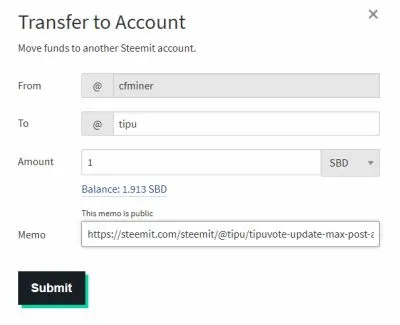
Currently the max upvote is around $50 so there is no need to transfer more than 40 SBD / 80 STEEM. Of course if you send more, any excessive part will be auto-refunded.
@tipU Profit Share Tokens Reward
Voting service users can receive TPUs - profit share tokens that instantly start to generate profit for the holder. TPUs were created using steem-engine platform and are fully transparent and tradable on the tokens market.
After the upvote on a new post is done, the user that requested the upvote instantly receives TPUs with the following message (example):

Users can receive twice the amount of tokens for new posts (not older than 20 minutes).
The amount of TPUs awarded depends on the payment and equals to 1% of the payment for new posts and 0.5% for posts older than 20 minutes. Of course TPUs can be sent to users multiple times with each upvote request.
The TPUs investment and the profit generated can be monitored real-time at https://tipu.online website (be sure to check out demo mode to see how it works).

No other actions are required to receive the daily profit payouts. Awarded TPUs can be also sold at the steem-engine tokens market but remember that they also gain value over time so it might be worth to hold them :)
You can learn more about the TPUs in the announcement post.
Checking Voting Status
@tipU works in daily shifts - it has certain amount of voting power to spend each day and if it runs out - @tipU goes to sleep to recover the VP. If you will make a upvote request during the recovery time, your payment will be automatically refunded.
To check if @tipU is currently voting or sleeping, simply go to @tipU profile: https://steemit.com/@tipu
The profile image and text will inform you about current @tipU voting service status:

Green: voting is active (and the profile description informs about the current max available upvote).
Blue: sleeping (and the profile description informs when voting will be active again :)
Please note that you can also check this info at: https://steembottracker.com
Automatic Refunding
If by whatever reason @tipU can't upvote your post, for example because of recovering voting power, your payment will be automatically refunded with information when the upvotes will be available again.
Also any difference between your payment and the upvote value will be automatically refunded so the situation where for example you send 1 SBD and receives only $1 upvote is not possible ($ refers to post value in STEEM Dollars). You will always receive upvote of at least 100% value of your payment - even after taking the curation part.