
It is now two months I haven’t given any update about the developments of the SteemSTEM app, steemstem.io. Whilst I was quite busy with physics, I also did some work, as available on our GitHub folder and summarized in this pull request.
By the way, this post is better formatted on steemstem.io. Feel free to give our app a try! A less technical summary will be released soon (i.e., when I will have time, so that we may need to wait).

Most changes concern the experience of the user, and in particular comment posting and editing. To celebrate this long-awaited development, SteemSTEM has started to upvote (2%-4%) some of the comments posted through the app.
Moreover, I remind that setting @steemstem as a beneficiary to a post and use steemstem.io automatically yield a stronger upvote (up to 10% more) to any curated post.
1. Post editing
Article preview is now available when an already-posted article is edited by its author. This development necessitated to modify the two files article.html and article.js in the client/views/pages/article/ folder. Some of the changes are given in the picture below to illustrate the adopted strategy.
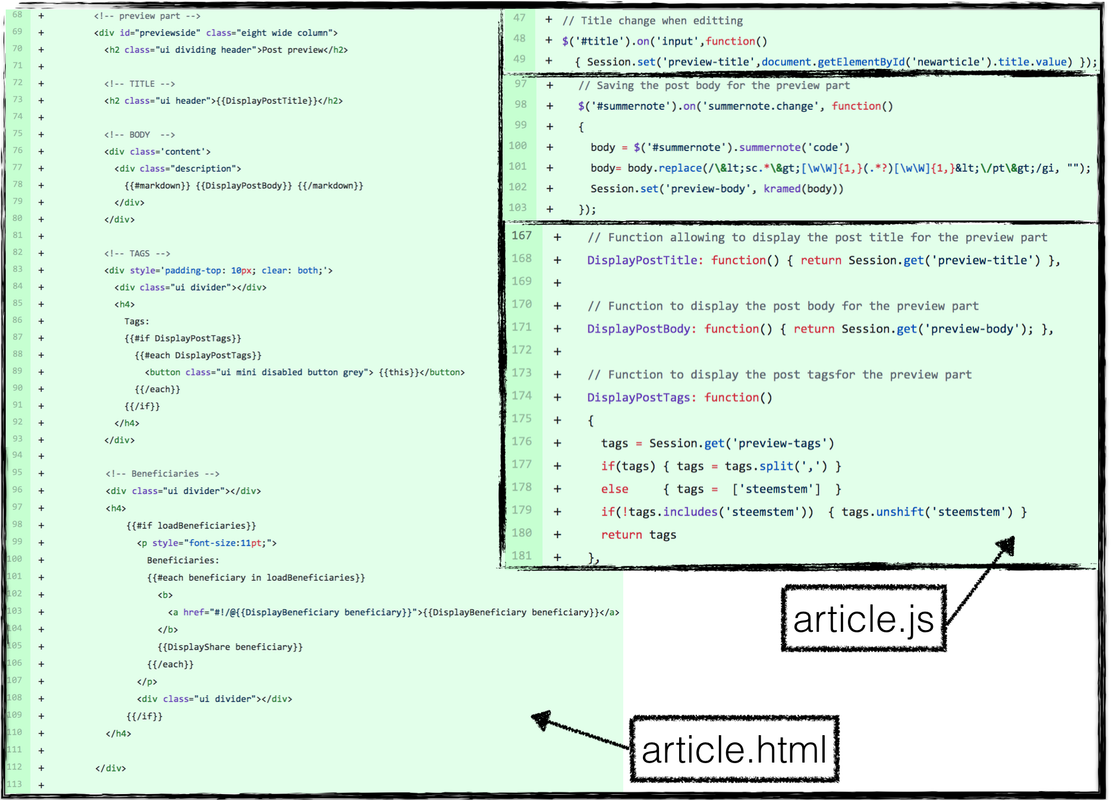
On the left side of the image, we can see how the article content (title, body and tags) are extracted from helpers, following the standard way the meteor platform (on which steemstem.io is developed) should be used. Those helpers are connected to content updated via the editing form (that has been introduced in a former update) and the Session variable allowing to share information globally through the app client.
On the right side of the image, we can see some of the javascript methods tracking the changes to the post title (top panel) and to the post body (middle panel). Moreover, some of the above mentioned helpers (post title, body and beneficiaries) are shown in the lower right panel of the figure.
In this way, every time an attribute (like preview-body) of the global Session variable is updated by the user editing the post, the corresponding (like preview) part of the HTML page is automatically updated via the helper used on the HTML side.
2. Comments posting, preview and editing
The way comments to posts are handled has been completely changed.

First of all, as shown on the above image, we have more noticeable buttons everywhere: to edit posts, to reply to a post, to reply to a comment to a post, to edit a comment, etc.
The preview of the replies is handled following a strategy similar (but with some differences) to what has been implemented for post preview. First of all, we start with reply.html in the client/views/pages/article/components folder. In this file, we define how a ‘reply’ environment works.
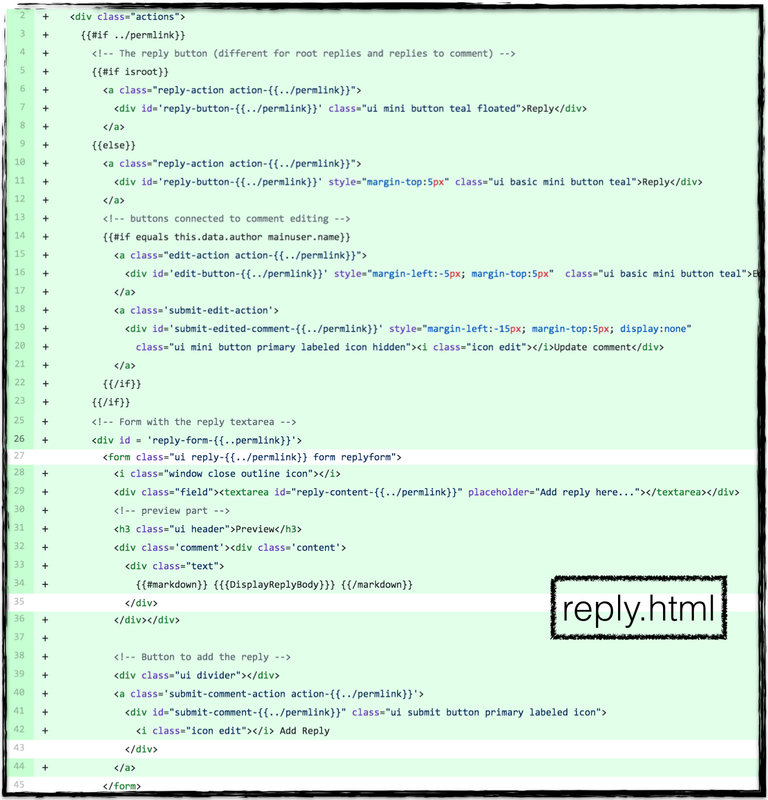
The key point is to assign (via different div environments) different identifiers to the reply buttons, the associated actions, the form in which a reply is typed/edited, etc. This is illustrated in the above image where we can see the association of the parent’s permlink with any button identifier. Similarly, the form in which a reply can be typed in has a permlink-dependent identifier through the class attribute of the corresponding HTML form,
<form class="ui reply-{{../permlink}} form replyform">
All of this hence allows us to assign independent on-click methods with every single button at the javascript level, and consider independently as many reply forms as needed at the HTML level.
The body of the comment is managed in the files comment.html and comment.js stored in the client/views/pages/article/components folder. These two files rely as well on a visible part (the comment itself) and an invisible part (the editing form). The visible/invisible nature of these two parts is controlled by the buttons above-mentioned.
To make a long story short, when clicking on a button, the visible/invisible attributes of both parts are exchanged, and some buttons may appear or disappear.
For instance, in the image below (taken from the reply.js file of the same folder), we present what is going on when a given reply button is clicked: the clicked button is hidden (its style.display attribute is set to none), the content of the reply form is saved in the global Session variable, and the element (i.e. the form) is eventually shown. Moreover, what ever is typed by the user is globally recorded and the preview part updated via an appropriate helper (as for articles, see above).
The image also shows a second example, in which a reply window is closed. Its content is globally saved (through a Session attribute carrying the permlink name) so that it could be retrieved later, the reply form is hidden and the corresponding reply button is made again visible.

Every single click hence acts on what is visible and what is invisible and stores any modified form globally, at the level of the client. Other examples can be found on the GitHub folder (direct links: reply HTML, reply javascript, comment HTML and comment javascript files).
3. Getting post comments from Steem
The way comments to a post are obtained from the Steem blockchain has been improved. This can be found in the file comments.js (stored in the client/js/collections folder) and in the image below.
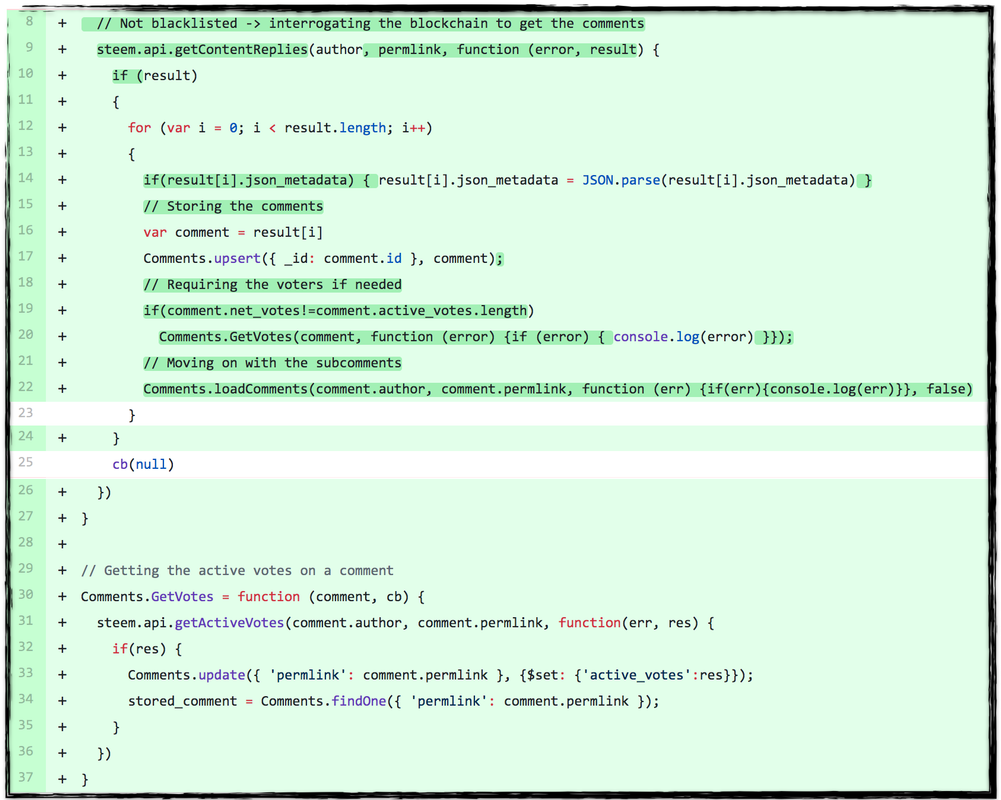
All comments are locally stored, by the client, into a Mongo database called Comments and a recursion relation allows to get the replies to a comment. A formatting of the json meta data is performed, and the vote information is extracted and stored as well (see the GetVotes method in the image).
This allows to show the individual contributions of the different votes to a comment, as presented in the image below. The code is extracted from the comment.html and comment.js files.
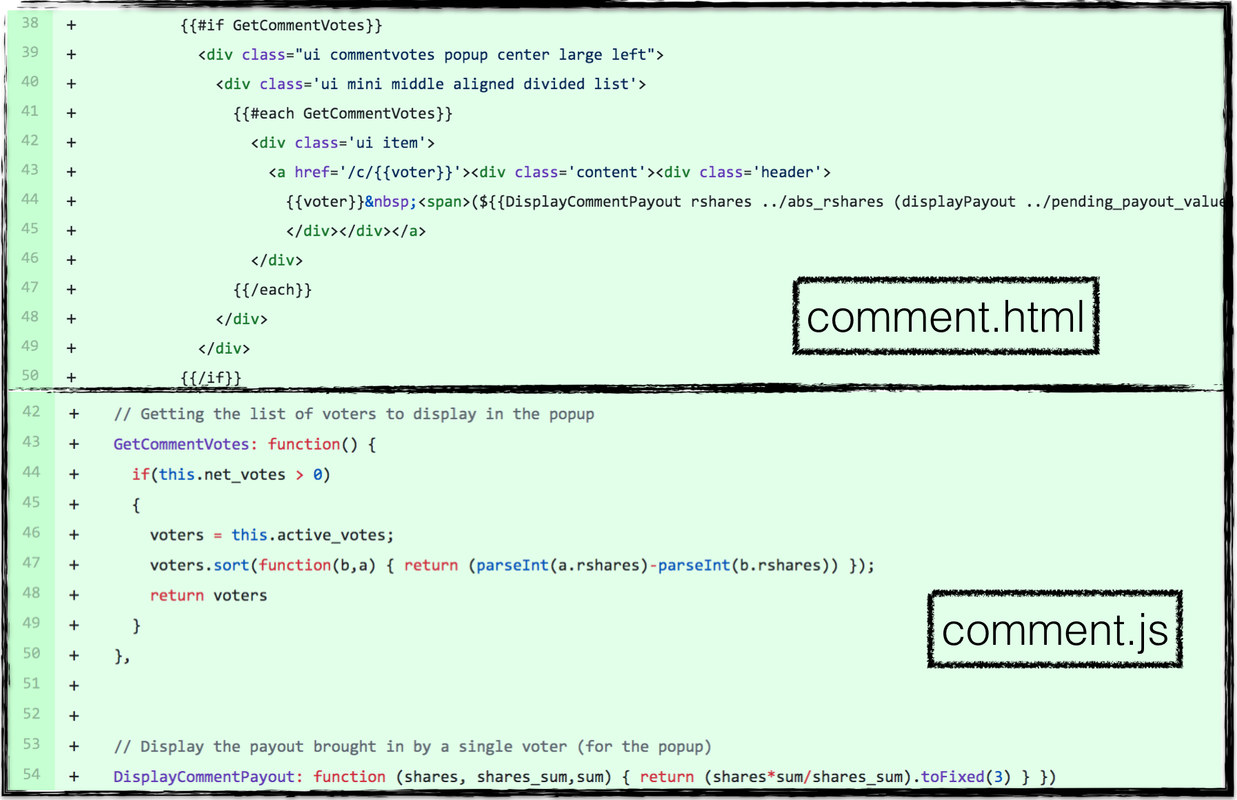
This illustrates how the list of voters is organized within a popup (see the HTML part), ordered according to their contributions (see the javascript part). The calculation is done as for articles, with a method available from the v0.1 of the app (and thus not displayed here).
4. The blog page on a user profile
Another big development of this v0.7 release concerns the main blog page displayed for any given user. In the previous versions, the app was solely displaying the last 100 posts written by a user. From v0.7 onwards, all blog posts are displayed, organized in pages of 75 entries through which the user can navigate, as illustrated below.
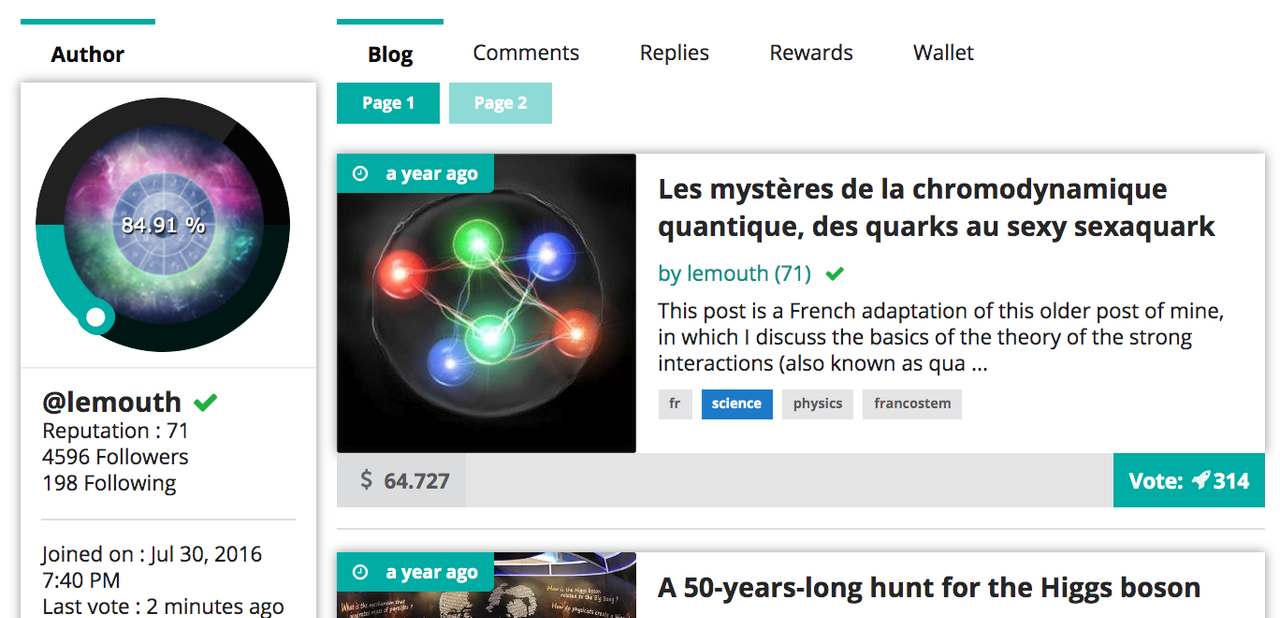
On a given page, posts are shown 25 by 25 and when all 75 posts are shown, a button requesting the next page appears.
First of all, the way posts are obtained from the Steem blockchain has been modified. Queries are made so that posts are retrieved 50 by 50, and a new query is casted only if it is needed to get the next set of 50 posts. This has been implemented in the file blog.js (in the client/js/collections folder), in the routing configuration (in client/router.js) and in profile.js (in the client/views/pages/profile folder).
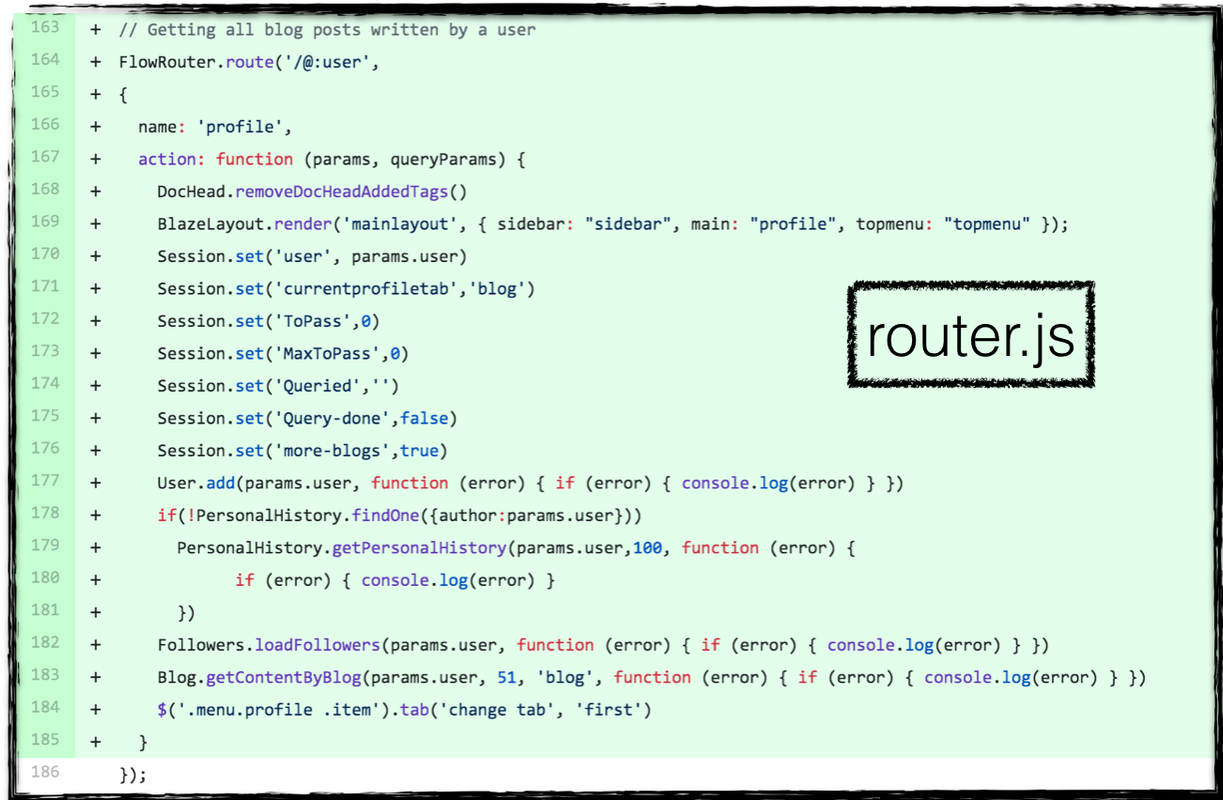
In the above figure, one observes that when a user blog page (like https://www.steemstem.io/#!/@lemouth) is requested, a bunch of global session variables are set. These variables control the requests to the Steem API, the display of posts and the navigation through the different pages of the user blog. Then, the first 51 posts are retrieved via the call to Blog.getContentByBlog described below.
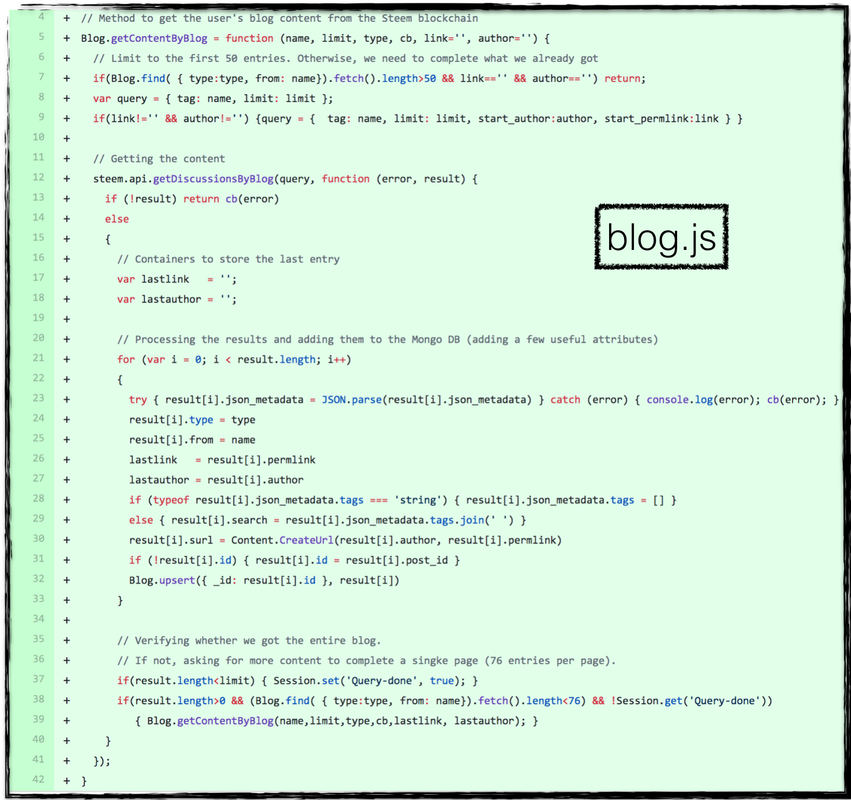
This last method first sets up the API query (that is different if the first posts of a blog are retrieved or if we complete an existing list). The query is then made and the results stored in a Mongo database called Blog. Information on the last retrieved entry is kept so that a second query is recursively made if more posts are needed.
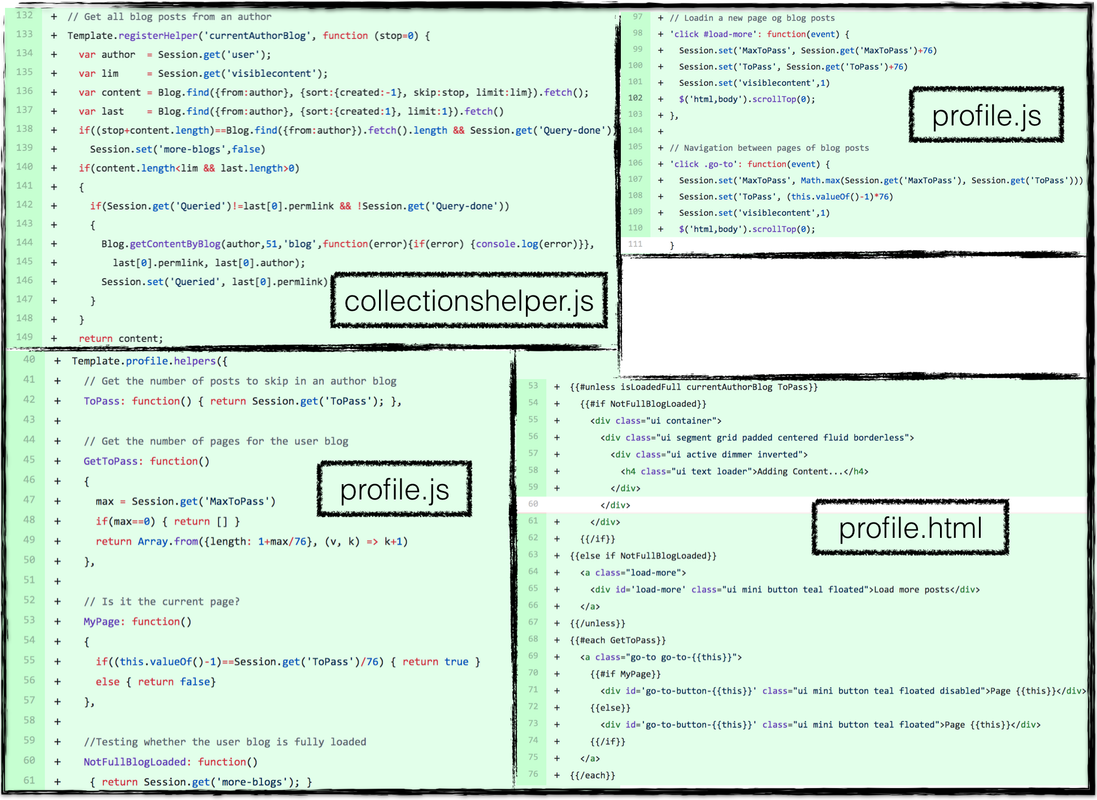
The list of posts to display is obtained from a global helper defined in client/js/collections/collectionshelper.js that browses the Blog database to order and get the posts. If needed, this also triggers a new query to the Steem API to get more content through the usage of the session variable above-mentioned. These variables are also used in the profile.html page through dedicated helpers (defined in profile.js). Both files are located in the client/views/pages/profile/components folder. Moreover, the behavior of the various navigation buttons is also implemented in this profile.js file. We refer to the image above for various snippets of codes related to this navigation system (that is the key novelty for the user blog).
5. Minor improvements
- Markdown is now fully supported thanks the joint usage of the ```kramed``` (on the javascript side ) and standard meteor ```markdown``` packages (via helpers on the HTML side). None of these is perfect, but the usage of both of them at the same time makes it working like a charm. Thanks to @phage and @ikchris for testing these changes.
- There were changes in the way steemconnect was working. The app has been adapted accordingly. For instance, beneficiaries must be ordered, etc.
- The list of tags for posts only carrying the steemstem tag was appearing as a grey square. This has been fixed (checking the presence of at least one tag different from steemstem).
- The about us page has been rewritten.
- The FAQ page has been rewritten.
- The guidelines for post creation have been clarified.
6. Bug fixes in v0.7
- Comments and posts are not bleeding vertically out of their cell when too large images are used. This relies on a standard ```div``` environment embedding each comment/post and carrying the attribute ```style='clear: both;'```.
- Some badges (see the v0.6 update) were not correctly displayed. The spacing was wrong when both of them were needed. This is fixed.
- There were various Firefox-related bug fixes due to a wrong usage of the ```preventDefault()``` and ```stopPropagation()``` method related to ```event``` objects. Beneficiary, votes, shares can now be handled correctly on Firefox, thanks @medro-martin and @eniolw who reported these bugs. Call to these methods have been removed from the ```beneficiarymodal.js``` file (in the ```client/views/pages/create/components``` folder), the ```sharemodal.js``` and ```votemodal.js``` files (in the ```client/views/pages/post/components``` folder) and the ```transfermodal.js``` (in the ```client/views/pages/profile/components``` folder).
- Giving a beneficiary 100% of the post rewards is now possible (strict inequalities have been replaced with non-strict inequalities (see ```beneficiarymodal.js``` file (in the ```client/views/pages/create/components``` folder).
- A few links were not redirecting correctly.
- Blog posts mot upvoted by SteemSTEM are now correctly displayed (when the appropriate box is ticked).
7. More
- Comments have been added in the HTML ```article.html``` (in the ```client/views/pages/article/``` folder) and ```comments.html``` (in the ```client/views/pages/article/components``` folder) files.
- Comments have been added in the javascript ```router.js``` (in the ```client``` folder), ```reply.js``` (in the ```client/views/pages/article/components``` folder), ```blog.js``` (in the ```client/js/collections``` folder) and ```collectionhelper.js``` (in the ```client/js/collection``` folder) files.
- No more dependence on the ```autolinker``` package.
- The files ```edit.html``` and ```edit.js``` from the ```client/views/pages/article/components``` folder have been removed, as comment editing is now handled with buttons.
SteemSTEM
SteemSTEM aims to make Steem a better place for Science, Technology, Engineering and Mathematics (STEM) and to build a science communication platform on Steem.
Make sure to follow SteemSTEM on steemstem.io, Steemit, Facebook, Twitter and Instagram to always be up-to-date on our latest news and ideas. Please also consider to support the project by supporting our witness (
