

I'm curious how everyone else stays organised and on top of their task list?
I've always kept a To-Do list. In the past, it was on paper, in my journal. I still do for work. I'm not sure why, but I find in that environment I'm more productive with the paper-based list. Perhaps because so much of the rest of my job is digital? Or maybe just because the paper-based list is very visible, front and centre on my desk.
At home though, I use Todoist for all my personal and study tasks. I tried a few different task apps out before I decided on this one. In 2019 I started a trial to see if it was a good fit for me. By that Christmas, I was convinced and purchased a Premium subscription. It's become my daily assistant, tracking everything from my shopping list to a list of TV shows to check out.

This was a trial using the Board List feature to track work tasks.
What I love about Todoist:
- It has a clean and simple interface, no visual clutter
- Ability to set up my system as I need - lists, projects, tags, task priorities
- Web version for the PC and mobile App for my Android devices - fully synced
- Shortcut keys on PC/Web version to quickly add tasks
- It now has a Board List view with cards! (see image above)
- Notification reminders on my phone
- Very stable
- Configurable timezone, calendar and date settings
- Frequent updates and great communication from the developers
I really have to emphasise that ability to configure the calendar and date. I have it configured with the week starting on Monday, DD-MM-YYYY date format, and of course set to my own timezone. It's always so frustrating to find a great App that everything but this, so you're locked into American date format, for some reason the week starts Sunday (I don't get this - Sunday's the weekend still?) and your daily reminders arrive at some weird time overnight. Todoist lets you customise it all.
How I use Todoist
I use a little bit of the Getting Things Done (GTD) method, in that everything first goes into my Inbox. I then have four projects set up - At Home, At Computer, At Work, At Study. On Sunday night I usually do a weekly review and drag items from the Inbox into it's correct "At" folder.

I also have a shopping list set up that Alexa can add things to for me. This is so handy. I can be checking the fridge and pantry shelves and just call out "Alexa, add milk to my shopping list" and it's done.
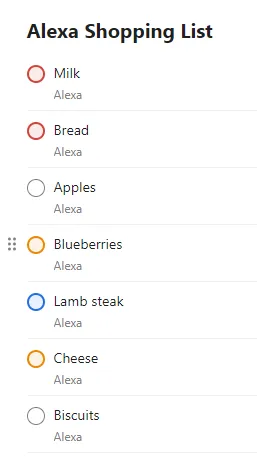
Any largish projects I have going get their own list. I also have lists for ideas (there's a Post Ideas List), Life Plans (kind of like a bucket list, but more focused), reading/watching lists, and
a packing list I can duplicate and reuse for any trips. For regular recurring tasks I created a Daily Weekly list that keeps them all together and easy to manage.
There is a feature to change the colour scheme of the app. I was all excited to switch to a blue theme, but found it didn't work for me, I had so strongly associated the colour red with my To-Do list that I had to switch back.
Gamification
Todoist has some gamification built-in, with a system for accruing Karma and building streaks. I'm not too flash at the Daily streaks, but do okay with the Weekly ones :-) It adds a bit of fun and challenge to the experience, and I found it useful reinforcement when first building my habit to remember to use and refer to my To-Do list.

Sunday Reviews
Aside from the "At" lists, the bit that really makes the system work for me is the Sunday Review. This is the same as the GTD Weekly Review. Every Sunday I do a review of my tasks and braindump any new tasks. I have some Daily Weekly tasks set up to appear each Sunday and remind me of the different things I need to review.
One of my favourites is simply titled House Walk. I go for a walk around the house, inside and outside, and note down any tasks that need doing. This is especially good for picking up on maintenance tasks that may have cropped up or become more obvious during the week.
One rule I have for the Sunday Review is that I don't have to do everything on this list. If I miss something, it will be there for next Sunday. As long as I can mark one thing off the Review list each Sunday I'm good. This is really important for managing anxiety - I don't want to be stressing over a missed task, they're merely delayed by a week.
I hope this has given you a bit of an overview of Todoist. I have just been so impressed with its functionality and the ability to mould it into a workflow that suits me. If you're keen to check out Todoist yourself, use this referral link to get 2 free months of Todoist Premium.
Until next time,
@Sammie

Original content created by @Sammie.