
Here's another useful tool for new steemit users - steem.supply.
Revision disclaimer
This post was revised and re-posted so that it will fit to the new version of the website/tool. As sir 
With this tool you can see your voting power, voting worth, account age, rewards, post stats and comment stats. A reward calculator is also available if you want to joggle in calculating various amounts of rewards.
Steemit is best used when partnered with a tool like steem.supply use it to your advantage and to monitor your steemit activity and progress.
Accessing steem.supply (option 1)
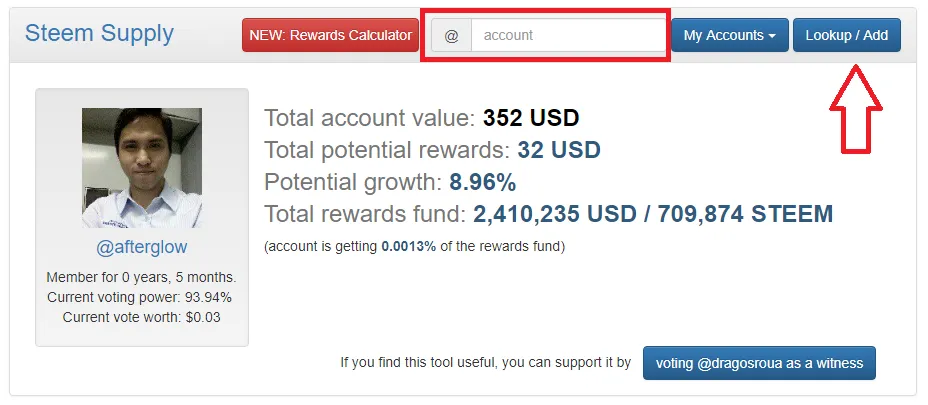
On your browser go to steem.supply then type your username at the account portion then click lookup.
Accessing steem.supply (option 2)
Type steem.supply/@YOUR_USERNAME directly on your browser, if your username is johndoe you have to type steem.supply/@johndoe then press enter.
Using steem.supply
User section
In this section you can see the information about your account.

Member for 0 years, 5 months. - account age
Current voting power: 93.94%
Current vote worth: $0.03
Total account value: 352 USD
Total potential rewards: 32 USD
Potential growth: 8.96%
Total rewards fund: 2,389,629 USD / 711,593 STEEM
(account is getting 0.0013% of the rewards fund)
You can vote the creator of steem.supply

SBD and STEEM chart section
In this section you can see your potential payout, value of SBD against STEEM and a chart showing the evolution of SBD and STEEM.

Payout table - Post Figure 1, Comments Figure 2
In this table you can see the estimate payout of your post in USD
Figure 1

Comment payout in USD
Figure 2

In this table you can see the estimate payout of your posts in SBD and SP (Steem Power). You can view this table by clicking the button 'Toggle USD / STU Rewards Display' twice (2x)

Comment payout in SBD and SP (Steem Power). You can view this table by clicking the button 'Toggle USD / STU Rewards Display' twice (2x)

Rewards calculator
You can access rewards calculator by clicking the red "NEW Rewards Calculator" button, wait for it to load.

You should see like the screenshot below after it loads. To use the calculator click "Reset to current market value" to load the current market value of SBD and STEEM then at Total potential rewards type the amount that you want to compute. Computation is automatic, try it.

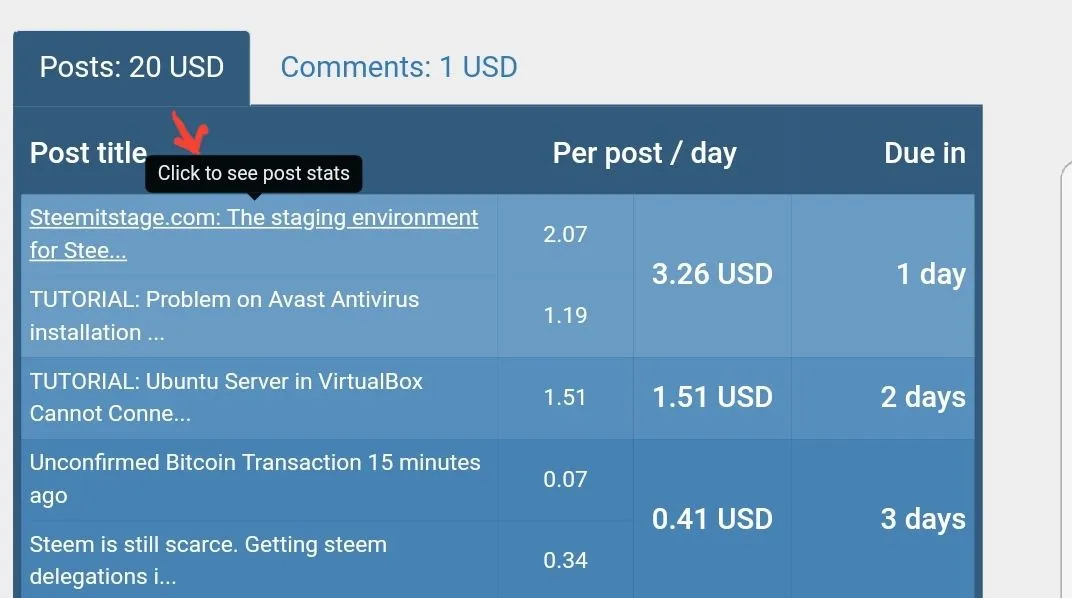
You can see the stats of a POST by clicking it (Figure 1) and its stats will show with a corresponding pie graph (figure 2).
Figure 1

You can see the stats of a COMMENT by clicking it (figure 1) and its stats will show with a corresponding pie graph (figure 2).
Figure 1


Adding multiple account
To add multiple account just type your intended account to be added in the "account" section then click "Lookup/Add". After it loads click "My Accounts" you should see the recently added account. To switch account just, click "My Accounts" then choose the account then wait it to load.

