
What Will I Learn?
I intend to cover the following concepts in this tutorial.
- You will learn how to setup the project environment for Web Scraping using MechanicalSoup
- You will learn different classes & functions in MechanicalSoup used for scraping data from webpages
- You will learn to create a basic web scraper.
Requirements
The reader is expected to have the following requirements
- Basic knowledge on Python programming language.
- Python 3+ installed PC (For practical understanding)
Difficulty
This tutorial is of Basic difficulty. Anyone with a basic knowledge on Python can easily understand this tutorial.
Tutorial Contents
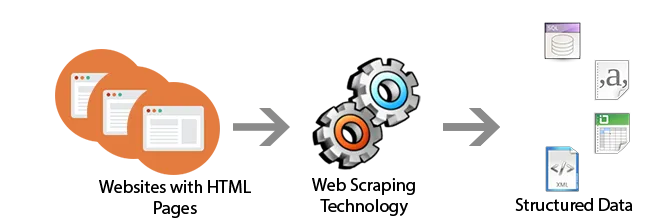
Through this series of tutorials, I intend to give you all a basic idea on how to use MechanicalSoup to make applications to interact with webpages. This part as a beginning, mainly concentrates on how to scrap data from webpages with the help of MechanicalSoup.
Source
Introduction
First of all, MechanicalSoup isn't a library whose sole purpose is scraping. But it can be used for scraping, MechanicalSoup utilizes another cool library, BeautifulSoup for this purpose. MechanicalSoup is a python library for automating interaction with websites. MechanicalSoup automatically stores and sends cookies, follows redirects, and can follow links and submit forms, but doesn't do JavaScript.
1. Setting up the Environment
It is a good practice to use a virtual environment when you create an application using Python. It helps you get a separate environment for your app to run on without affecting the global packages installed in your Computer.
Install virtualenv if you haven't already by,
pip install virtualenv
Create a new directory, say 'scraping' for our web scraper.
mkdir scraping
cd scraping
Create a new virtual environment using :
virtualenv scrape-env
The above command will create a new virtual environment in the directory from which you run the terminal.
Activate the virtual environment
source scrape-env/bin/activate
Install MechanicalSoup to the virtual environment using pip
pip install MechanicalSoup
OK, we have now completed setting up the environment we will require for our web scraper.
2. Classes and functions used.
The first thing we are going to do is create a Browser instance for making the requests, and accepting the responses.
Browser Classes
In MechanicalSoup, we have two classes for Browsers.
- Browser Class
- StatefulBrowser Class
The main difference between the both classes is that, StatefulBrowser is inherited from the Browser class and contains the features of Browser class with some additional facilities to store the browser’s state and provides many convenient functions for interacting with HTML elements. We will use it soon in this tutorial for the creating the web scraper.
You can create a browser instance according to your needs,
Either like this:
import mechanicalsoup
browser = mechanicalsoup.StatefulBrowser() #StatefulBrowser instance
Or like this:
import mechanicalsoup
browser = mechanicalsoup.Browser() #Browser instance
More on Browser Classes from the documentation
open() method
open() is a callable method of a Browser instance, which is used to open a particular webpage associated with a URL. The URL to the webpage is given as argument to the open() function
browser.open("https://google.com")
get_current_page() method
Once the open() method is called with a URL for a webpage, we can access the contents of the webpage using get_current_page(). get_current_page() is a callable method of a StatefulBrowser object, which returns a bs4-BeautfulSoup object containing the whole content of the webpage, as well some useful methods to perform a lot of cool things with the content.
Further data scraping is done on the BeautifulSoup object.
3. Create a basic Web Scraper.
For web scraping the first thing we need is a target. The target is the webpage from which we intend to take the data. In this tutorial I will build a scraper for Steemit that will scrape the top 10 trending posts.
Let's Begin
As we have learnt already, first we have to create a StatefulBrowser instance for this purpose.
import mechanicalsoup
browser = mechanicalsoup.StatefulBrowser()
Now we need to open the homepage URL of Steemit in the browser instance.
browser.open('https://steemit.com')
Our browser instance is now at the Steemit home page. Now we need to get the list of articles that is present on that page. This part is a bit tricky, since we need to uniquely identify an attribute of the tag that contains the list of articles. But it can be easily done with the help of a browser like Chrome.
- First of all open the target page in a browser, here https://steemit.com

- Then inspect the area where the articles are present

- You can see that the articles are inside an
<article>tag, (We are lucky!). But we don't need the whole tag since it also contains a heading which says 'Trending'. So we check out it's child tags and we can see a<ul>tag with class attribute asPostsList__summaries hfeed, which only has what we need.

So we have identified the post lists. Now we have to get it inside our python script.
For that we will just do the following:
articles = list(browser.get_current_page().find('ul', class_='PostsList__summaries'))[:10]
We use the find() method associated with the BeautifulSoup object to uniquely identify the needed tag, by specifying tag_name as the first argument and the class_ argument which takes the class attribute of the tag. The return type of browser.get_current_page().find('ul', class_='PostsList__summaries') is an iterator object, hence we convert it to a list in order to apply slicing because I mentioned that we need only the top 10 posts.
articles list when printed will display a list of 10 <li> tags, which contains the details of each post in the list.
Since we have the list of posts, we will just get the Username, Post title, Summary and the link of the posts in the list and print them separately.
Each element inside the articles list is a BeautifulSoup object, so we can apply the same procedure we used for finding the unique and suitable tag for post lists to find the username, post title, summary and link to the post.
So for collecting the username, we can do the following
for child in articles:
    user = child.find('span', class_='author').text
Above code implies that a <span> tag with class attribute 'author' which contains the username. The text attribute of the BeautifulSoup object will return just the text inside those tags, ie. It strips all tags present inside the content and returns only the text.
For example assume the tag from which we scrap the username be like this
<span class="author"><strong>username</strong>(25)</div></span>
user = child.find('span', class_='author').text will only return username (25).
So just like that we get the title:
title = child.h2.text
child.h2 will return the first <h2> tag inside the child object. It was chosen like that since the <li> tag doesn't contain any other <h2> tags, in our case, otherwise we would have used find() method, instead.
Similarly we can get the post link from one of the <a> tag's href attribute. To get value from a tag's attribute, we can use get(attr_name) function.
link = 'https://steemit.com' + child.h2.a.get('href') # Since the links are relative in the webpage, we should make it an absolute URL
For summary of the post
summary = child.find('div', class_='PostSummary__body').text
Finally, our python script will look like this:
import mechanicalsoup
browser = mechanicalsoup.StatefulBrowser()
browser.open('https://steemit.com')
articles = list(browser.get_current_page().find('ul', class_='PostsList__summaries'))[:10]
for child in articles:
    user = child.find('span', class_='author').text
    title = child.h2.text
    link = 'https://steemit.com' + child.h2.a.get('href')
    summary = child.find('div', class_='PostSummary__body').text
    # Printing the collected data
    print('User : ' + user)
    print('Post title : ' + title)
    print('Post summary : ' + summary)
    print('Post link : ' + link)
    print()
When I run this script it gives a output like this:
User : utopian-io (64)
Post title : What is Utopian? State Of The Art Forever Stored In The Blockchain. 107 Days Since The Beginning.
Post summary : Find here all the details about the   state of the art   of the Utopian.io platform as of today, January 13 2018.…
Post link : https://steemit.com/steem/@utopian-io/what-is-utopian-state-of-the-art-forever-stored-in-the-blockchain-107-days-since-the-beginning
And that's it. We have successfully created a basic web scraper. Hope the tutorial is clear about everything mentioned.
NOTE: Webpages may contain copyrighted contents. It is illegal to use copyrighted contents from webpages and this should not be used for such activities.
Useful Links:
MechanicalSoup Documentation
BeautifulSoup Documentaion
..Thanks..
Posted on Utopian.io - Rewarding Open Source Contributors