
This is my first contribution to the open source project through the utopian.io platform. I contributed a tutorial on ckeditor project, hopefully my contribution can be useful for web application This is my first contribution to the open source project through the utopian.io platform. I contributed a tutorial on ckeditor project, hopefully my contribution can be useful for web application developers, ckeditor users in general and especially on myself.
A form editor is very important to edit the information or news that we will publish as a medium of information to users and visitors, but to create an information we will need to have html tags to set the size and the size of the letters and the thickness of the letters etc, and it should require special tags like < h3 >, < font>, and such troublesome if we just use textarea only, but calm aja now have many news editor plugin like CKEDITOR to facilitate write a news / information.
Ckeditor is a plugin that is used to make the display text area into a dynamic view, making it easier for users of web applications in news coverage. ckeditor is often used on CMS like wordpress, drupal, blogspot and others, because in ckeditor users can by setting the size of text, text color, and others, the ckeditor has the WYSIWYG element (What You See Is What You Get).
User friendly view makes the ckeditor very suitable for a web, because with ckeditor users who do not understand in using HTML can degan easily make posts, like writing in microsoft word.
okay now we just go into the making stage of the use of ckeditor:
1. WHAT IS A CKEDITOR
CKEditor it is WYSIWYG web editor (What You See Is What You Get). WYSIWYG (What You See Is What You Get Editor) is an editing screen with what full component we use available instantly in place, for example Microsoft Word.
This editor is very useful when you want to do typing that requires many components in it like bold, image contents, pairs of links, change color, alignment of text, text style, etc. You must have used CMS to input articles. Well, what if your PHP application uses CKEditor maybe for web portal application or many input data.
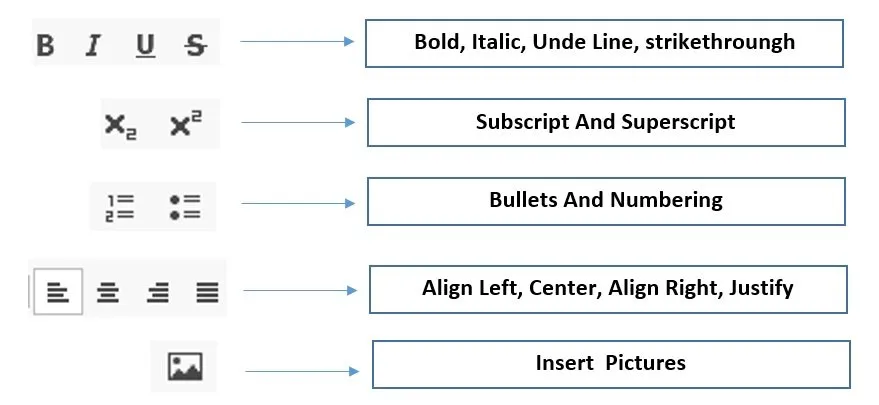
Ckeditor is a textarea that has been combined with javascript, ajax, and css. The ckeditor will declare the type of font of the input attribute. We can make bold with bold "B", make make form left right we can press icon "I". This image will explain the frequently used ckeditor function :
2. HOW TO DOWNLOAD CKEDITOR
Step 1 :
the first step you should prepare the ckeditor, you can download the ckeditor for free at the link https://ckeditor.com/ckeditor-4/download/.

Step 2 :
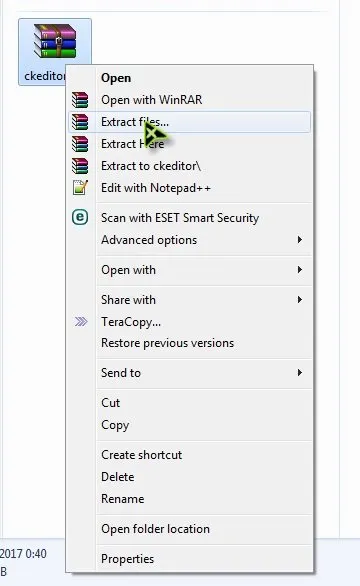
On the link are available four types of ckeditor that is, basic page, standard package, full packege and custumize, in this tutorial I download the full package. after the download is completed we arrange the winrar file like in the picture.
3. PROCESS INSTALLATION
When finished downloading the ckeditor we have to do the ckeditor installation, basically the ckeditor becomes a textarea in modification using javascript and css, then the instalsi stage is needed to call the function of css and javascript from the ckeditor so the textarea can look more dynamic. We just explain the installation...
Step 1
Create the basic structure of HTML, the basic structure of HTML berugsi to write code from HTML
<html>
     <head>
           <title>ckeditor</title>
      </head>
           <body>
               ........
         </body>
</html>
Step 2
create CSS styles, CSS styles to make web appearance more interesting, the code is:
body{
    background: #fcfcfc;

}
h1{
    text-align: center;
    font-family: sans-serif;
    font-weight: 300;
    color: #fff;
}
.box{
    margin: 20px auto;
    background:#FFCC00;
    width: 900px;
    padding: 20px 50px 50px 50px;
    border-radius: 3px;
}
Step 3 :
If we call the javascript function of the ckeditor, and put the code above </ head>, its function will change the appearance of textarea that become ckeditor, the code is:
<script type="text/javascript" src="ckeditor/ckeditor.js"></script>
Step 4
Write code to display the ckeditor and place it under <body>
<div class="box">
       <h1>STEEMIT</h1>
        <textarea class="ckeditor" id="ckedtor"></textarea>
        <button class="tombol">Simpan</button>
</div>
Step 5:
Save in .html format and place it in the folder you extract

Step 6:
Open the storage location earlier then right click and select openwidt, and then select the browser to run your web application

and this is the final image of the source code we have written
the overall look of the source code is

<html>
<style type="text/css">
body{
    background: #fcfcfc;

}
h1{
    text-align: center;
    font-family: sans-serif;
    font-weight: 300;
    color: #fff;
}
.box{
    margin: 20px auto;
    background:#FFCC00;
    width: 900px;
    padding: 20px 50px 50px 50px;
    border-radius: 3px;
}
</style>
<head>
    <title>how to installation ckeditor plugin</title>
    <script type="text/javascript" src="ckeditor/ckeditor.js"></script>

</head>
<body>
    <div class="box">
       <h1>STEEMIT</h1>
        <textarea class="ckeditor" id="ckedtor"></textarea>
        <br/>
        <button class="tombol">Simpan</button>
    </div>
</body>
</html>
4. SOURCE CODE EXPLANATION
function is used to declare CSS to make the display more interesting

used to call javascript function from ckeditor

, serves to convert plain textarea into textarea into ckeditor display
so the first tutorial, may be useful and I apologize if there is a shortage in this tutorial. thank you

Posted on Utopian.io - Rewarding Open Source Contributors