

Hello guys! Anidel here for another simple tutorial for your perusal. Today I would like to share with you how to install and setup an electrum wallet in linux. I will try to keep the instructions as simple as possible so that newbies can follow (Experts might see some process here trivial but to newbies those are not as trivial as we might think)
Introduction
Electrum is an open source light wallet of bitcoin. As opposed thick clients or full node wallets that downloads the whole Blockchain of bitcoin. This wallet enables the user to interact with the Bitcoin Blockchain without having to download the whole transaction records if you know to learn more about this wallet you may go to their different official sites:
Project website
Project source
Requirements
Hardware
Computer that is running at least a dual core processor with 2GB of RAM and 80 GB of Hard disk space.
Note: I will be running the Linux Operating System in a virtual environment (emulation mode) where in I will be running it under Windows OS as an application. User experience will be the same. If you plan to do it in emulation mode you may read a tutorial about running Virtualbox and Lubuntu here.
Software
Linux Operating system. I am using a ubuntu linux variant called Lubuntu. It should work with other variants as well.
Web browser with internet connection.
You should have root or administration access to the host operating system of Electrum be sure you know the root password.
Procedure
Step 1 Install dependencies of the Electrum wallet
The first thing we would like to do is to go to the a terminal to access the command line of the linux operating system.

Once you are in the terminal command prompt we must type in these commands to install the file dependencies (just a fancy word for required files for installation of Electrum):
sudo apt-get install python3-setuptools python3-pyqt5 python3-pip
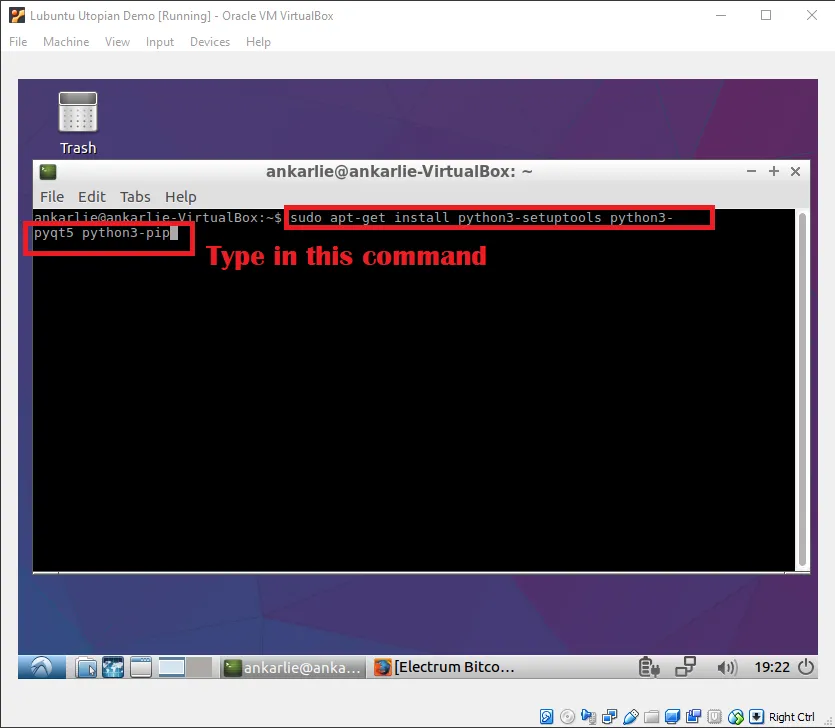
We need to access root therefore we need to input root password. Just input the password and press enter to proceed with the installation.

Once you inputted the password it will output a rather long explanation what the command we just inputted. Just Type in "Y" to continue.

After proceeding to the installation process it will show you the progress of the downloading and the installing process of the depencies. Just wait for it to finish.

Step 2 Install Electrum bitcoin wallet
After installing the file dependencies we install the Electrum wallet itself by typing in these commands:
sudo pip3 install https://download.electrum.org/3.0.3/Electrum-3.0.3.tar.gz

Once we type in the commands stated above it will immediately download and install the Electrum wallet. There is no need to interact with the installation process. There might be some errors or warning messages just ignore them the installation process with proceed. Wait until you get the message shown below.

Once you have reached the screenshot shown above you have already installed the Electrum Wallet successfully. Now we will create our Electrum wallet in linux.
Step 3 Create Electrum bitcoin wallet
We access the Electrum wallet by following the screenshot shown below.

Once we click on the Electrum bitcoin wallet icon it will immediately ring us to the window below.

In this window just select the "auto connect" radio button and press the "Next" button to proceed.

After setting the connection we now input the desired name of the wallet file and press the next button.

After which we select what type of wallet we want to create. We just choose standard and press next to proceed with the installation. You may experiment with the other types as you wish but for this tutorial we are only covering the standard wallet.

The next page will ask us to choose if we want to create a seed. Since we do not have one yet we choose create new seed and press next.

In creating the seed we will be asked for the seed type. Just choose standard as it is the one that is widely used.

The next page will show you the generated secret pass phrase. This phrase will be use to recover your bitcoin wallet. Copy and save this pass phrase in a safe place. If anyone gets access to this they will be able to access to the bitcoins in the created Electrum bitcoin wallet. Again keep this one safe. Copy it as we will be using it at the next page.

In this page we input the the pass phrase we just copied and press the next button.

After pressing the next button of the prior page if done successfully we will be ask to create our access password for the wallet. Input your desired password, tick the encrypt wallet and click on "Next" button to continue.

Once we click "Next" button we will be presented with the dashboard of our newly created bitcoin wallet. You can get your Bitcoin address by clicking on the "Receive" tab on top of the window as shown in the screenshot above. Congratulations! You have just installed and created your bitcoin wallet in linux.
That is it for now guys. I hope you enjoy my tutorial and you found it simple enough to follow. Bye!
Posted on Utopian.io - Rewarding Open Source Contributors