
As the free SSL Certificate expires in 90 days so you need renew it within 90 days.
To renew your free SSL Certificate which generated from https://zerossl.com/free-ssl/#crt you should have the domain-csr.txt and account-key.txt saved otherwise you have to generate a new one.
Step 1, paste your CSR
Please leave blank if you do renew your SSL Certificate. The CSR is the content of your domain-csr.txt so just copy and paste it to the text area.

Step 2, paste your account key
It's the content of the file account-key.txt

Step 3, verify domain
If you renew your certificate within 60 days then it doesn't require verification.
Create two files with given filenames and file content and upload to your site .well-known/acme-challenge


Step 4, new domain certificate
After several seconds when clicked "Next" button you'll see new domain certificate.

Step 5, update certificate in your cPanel in Godaddy
Go to your cPanel open your cPanel and go to SSL/TLS.

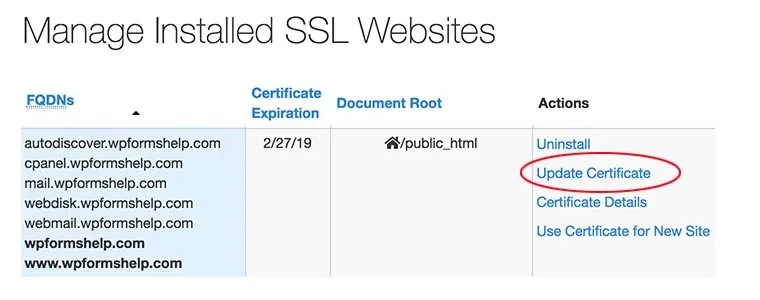
Click "Manage SSL sites"

Scroll to "Manage Installed SSL Websites" section you'll see installed domain certificate. Click "Update Certificate" on the "Action" column for right domain.
Step 6, paste domain certificate
When you copy certificate content it includes two certificates indeed. The top one is for "Certificate: (CRT)" text area while the bottom one is for "Certificate Authority Bundle: (CABUNDLE)" text area.

Step 7, paste Private Key (KEY)
The content for Private Key (KEY) was generated when you first generate your certificate and won't be shown when you renew certificate. The file which you should kept is from domain-key.txt

That's all, now when you visit your site you'll see certificate renewed
Posted from my blog with SteemPress : https://waytowp.com/how-to-renew-your-free-ssl-certificate-for-you-godaddy-hosting/