
Just My Tags
Update your Steemit menu to display the list of tags you specify, in case life, photography, and kr aren't your main interests.
We have two scripts, first for the primary sidebar menu:
And also for the responsive layout:
Did you know this menu even exists? Go to Steemit.com and resize your browser smaller (narrower really) and you'll see this appear.
Technology Stack
In the most basic sense, everything here is javascript but more specifically a userscript that allow us to execute that javascript as well as a little jQuery on specified web pages.
We'll install a userscript manager to execute our javascript on URLs that we specify and we'll cover Tampermonkey and Greasemonkey for Chrome and Firefox browsers here.
Roadmap
- Combine both into a single script
- Build UI to define/edit tags
- Implement new features for these scripts
- Discover new scripts to build
How to contribute?
Start using it and share your thoughts! I'd love to get some new ideas to implement.
You can comment here, create an issue on github, or catch me on steemit.chat
Install the Browser Extension
In order to execute these userscripts, we need a userscript manager for our browser. There are two popular managers available for these browsers:
- Chrome: Tampermonkey
- Firefox: Greasemonkey
Just click the link for your browser and install the extension.
Update userscript
First, pull down a local copy of one or both scripts and open a text editor such as Sublime Text or even just Notepad to modify the script.
The only change you need to make is the tags definition. Set this list to those tags you prefer, as many as you want.
var tags = ['utopian-io','linux','steemsql','sql','linux','programming','coding','technology'];
Create New userscript
In Chrome, we can click the Tampermonkey icon and select Create a new script...
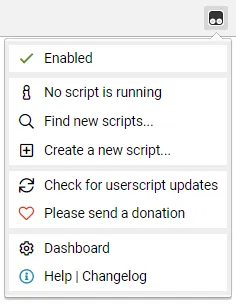
Then, we just paste in our modified script with the specific tags we want to browse and save.

In Firefox, click the Greasemonkey icon and click New userscript...

Again, we just paste in the script and save.

Repeat this process for the second script if you also want this for the responsive menu.
Browse By Tag!
Once your scripts are saved, go to Steemit and you'll see all your tags in the menu!


My entire Steemit experience has dramatically improved with these scripts, I hope you have the same results!
Posted on Utopian.io - Rewarding Open Source Contributors