
What Will I Learn?
- You will learn how to upload multiple form data that was displayed from database
- You will learn how to upload data using PHP Array
Requirements
For the purpose of this tutorial, the following are required:
A computer system.
PHP/MySQL web server utility stack which may be WAMP/MAMP/LAMP/XAMPP or any other .
A Text Editor(Notepad ++, Sublime text3, Brackets, Atom or any other text editor).
A Basic Knowledge on HTML, CSS, PHP and MySQL.
Difficulty
- Intermediate
Tutorial Contents
In many web applications, they are some module that require you to take action on multiple data which are being selected/displayed from the database with just a click of a button. For instance you have list of students that are displayed from database and you intend to make an update on all of their records at once, this tutorial will help you achieve that aim. But in this tutorial I will be using the INSERT query to explain the process.
STEP 1: Create a Database:
For the sake of this tutorial I created a database called livi
STEP 2: Create a Database Table and populate it with data:
Here You will have to create a database table using phpmyadmin. The database table will have three columns id, student_name and student_age or by using the following code:
CREATE TABLE IF NOT EXISTS `new_student_tbl` (
  `id` int(11) NOT NULL AUTO_INCREMENT,
  `student_name` varchar(16) NOT NULL,
  `student_age` int(11) NOT NULL,
  PRIMARY KEY (`id`)
) ENGINE=InnoDB  DEFAULT CHARSET=latin1 AUTO_INCREMENT=17 ;

INSERT INTO `new_student_tbl` (`id`, `student_name`, `student_age`) VALUES
(9, 'livinus', 34),
(10, 'ifunanya', 75),
(11, 'Nkechi', 88),
(12, 'Nkiru', 65),
(13, 'Jane', 98),
(14, 'Ben', 7),
(15, 'francis', 97),
(16, 'Goddes', 86);
STEP 3: Create a file in your project directory called index.php
In the index.php we will write all our codes.
STEP 4: Create a database connection:
In the index.php create a database connection using the following code:
$connection = mysqli_connect("localhost", "root", "", "livi");
localhost: Servernameroot: Usernmelivi: Database name
STEP 5: Write query to select the data that are in the database:
$query = "SELECT * FROM new_student_tbl";
$result = mysqli_query($connection, $query);
STEP 6: Create an HTML interface where the fetched data will be displayed
Note: This fetched data are displayed in a for so that they can be controlled using a form button.
<html>
<head>
    <title>Livia</title>
</head>
<body>
<form method="post">
<?php $i = 0;$k=1;  while($row = mysqli_fetch_assoc($result)){
    echo $k.".  ";
   echo 'Student name
    .$row["student_name"].'">
    Student Age
    .$row["student_age"].'" >
';
    $i++;$k++;
 } ?>
    <input type="hidden" name="total_num" value="" />
    <input type="submit" name="submit_now" value="Submit" />
</form>
</body>
</html>
Web Browser View of the code above:

STEP 7: Let's now create an upload query that will upload back all the displayed data at once using Array
if( isset($_POST["submit_now"])){
    $sql = "INSERT INTO new_student_tbl(student_name,student_age) VALUES ";
    for($j = 0; $j < (int)$_POST["total_num"]; $j++){
        $sql .= "('".$_POST["student_name"][$j]."','".$_POST["student_age"][$j]."'),";
    }
    $sql = rtrim($sql,",");

    if(mysqli_query($connection, $sql)){
        echo "inserted successfully";
    }else{
        echo "Insertion failed";
    }
}
?>
- The code above inserts displayed data into database using an array which means it will insert the displayed data one after the other until all of them are been uploaded.
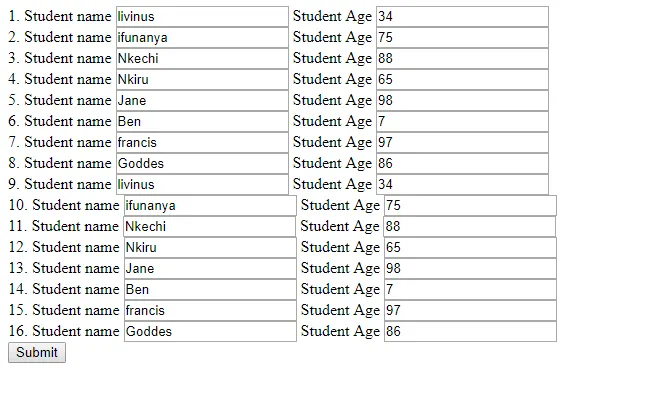
If the the button is clicked, the displayed records will all be duplicated at once:
All the code used in this tutorial
<?php
$connection = mysqli_connect("localhost", "root", "", "livi");
$query = "SELECT * FROM new_student_tbl";
$result = mysqli_query($connection, $query);
if( isset($_POST["submit_now"])){
$sql = "INSERT INTO new_student_tbl(student_name,student_age) VALUES ";
for($j = 0; $j < (int)$_POST["total_num"]; $j++){
$sql .= "('".$_POST["student_name"][$j]."','".$_POST["student_age"][$j]."'),";
}
$sql = rtrim($sql,",");
if(mysqli_query($connection, $sql)){
echo "inserted successfully";
}else{
echo "Insertion failed";
}
}
?>
<html>
<head>
<title>Livia</title>
</head>
<body>
<form method="post">
<?php $i = 0;$k=1; while($row = mysqli_fetch_assoc($result)){
echo $k.". ";
echo 'Student name
.$row["student_name"].'">
Student Age
.$row["student_age"].'" >
';
$i++;$k++;
} ?>
<input type="hidden" name="total_num" value="" />
<input type="submit" name="submit_now" value="Submit" />
</form>
</body>
</html>
```

#### Curriculum
- [How to Create a Secured User Login Authentication and Display User Details of a Logged in User Using PHP and MySQLi(Procedural)](https://utopian.io/utopian-io/@casweeney/how-to-create-a-secured-user-login-authentication-and-display-user-details-of-a-logged-in-user-using-php-and-mysqli-procedural)
- [How to Create a User Registration Script Using PHP and MySQLi(Procedural)](https://utopian.io/utopian-io/@casweeney/how-to-create-a-user-registration-script-using-php-and-mysqli-procedural)
<br /><hr/><em>Posted on <a href="https://utopian.io/utopian-io/@casweeney/how-to-upload-multiple-form-data-that-was-selected-from-database">Utopian.io - Rewarding Open Source Contributors</a></em><hr/>