

Kivy Repository
What Will I Learn?
- You will learn how to get weather forecast from openweathermap.org and get appikey from openweathermap.org
- You will learn familiar with kivy's network module
- You will learn make request from http protocol
- You will learn use of python json module and learn how to import kivy complementation setting jar file.
2.Requirements
- Python 2.7 :https://www.python.org/downloads/
- Kivy https://kivy.org/#download
- Pycharm https://www.jetbrains.com/pycharm/download/#section=windows
- For complementation jar file
- https://github.com/Zen-CODE/kivybits/blob/master/IDE/PyCharm_kv_completion.jar?raw=true
(optional)
Python experiment and Object Oriented Programming skills
Difficulty
- Intermediate
Description
Hi friends in this tutorial you will register openweathermap.com for obtain apikey then you will familier with request thoughout openweathermap and get response from site.
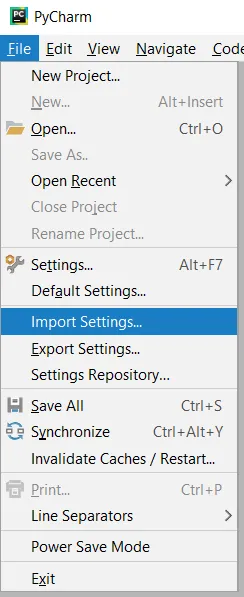
Before implementation you will download kivy complementation jar file and import to settings for pycharm editor. For do this task follow file>import settings and find your downloaded jar file.
After import settings then you will request to “http://api.openweathermap.org/data/2.5/forecast?q=London,us" url and print your response with this implementation, which is given below.
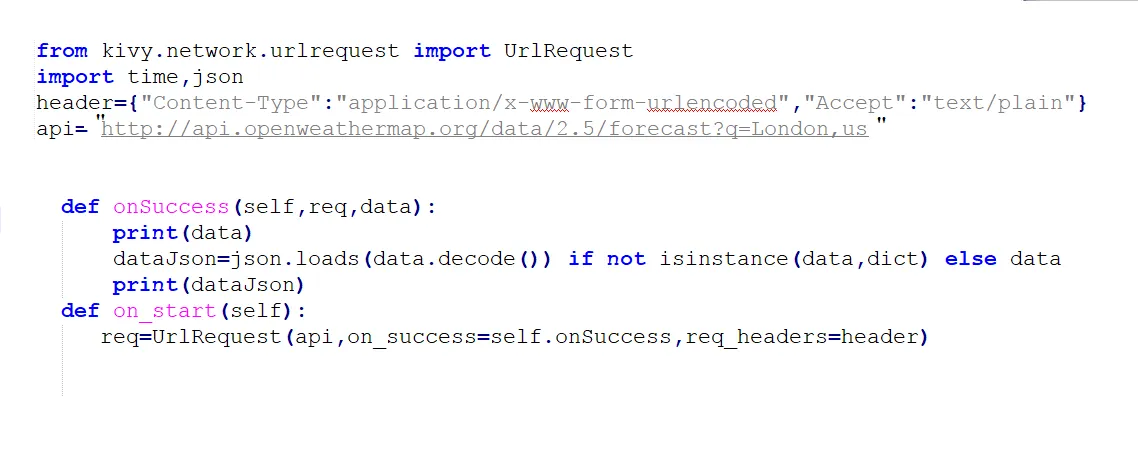
You will learn kivy application on_start function and give ids to your widgets. And learn how to parse json response simplify with online tools. (given below)

Wheather App Project Source Code Github Link
Github My Profile
Video Tutorial

Curriculum
Create A Weather App whith Kivy
Create a login application with kivy
Create weather app tutorial part2
Creating draggable widgets in kivy
create a scrollable area and move objects with touch