
What Will I Learn?
- You will learn how to connect php with gis.
- You will learn how to calculate the distance of a place
- You will learn how to calculate the travel time to get to the destination
Requirements
- You have basic about php
- You have basic about html
- You have basic about css
Difficulty
Either choose between the following options:
- Basic
Tutorial Contents
The map is the surface image of a location, where if only depending on the map we can not know the distance traveled during the trip, by knowing the distance we can adjust the travel time more easily.
- in the first stage create an html file with the name hitung_jarak.html, then enter the code below.
<html>
<head>
<title>Mencari Jarak</title>
    <link rel="stylesheet" href="style.css">
</head>
<body>
<form name="form" action="distance.php" method="post">
<div class="konten">
        <div class="kepala">
            <div class="lock"></div>
            <h2 class="judul">Mencari Jarak</h2>
        </div>
        <div class="artikel">
                <div class="grup">
                    <label for="text"><font size = "4" color = "blue">Alamat Asal</font></label>
                    <input type="text" name="asal" placeholder="Masukkan alamat asal anda">
                </div>
                <div class="grup">
                    <label for="text"><font size = "4" color = "blue">Tujuan</font></label>
                    <input type="text" name="tujuan" placeholder="Masukkan tempat tujuan anda">
                </div>
                <div class="grup">
                    <input type="submit" name="submit" value="cari jarak">
                </div>
            </form>
        </div>
    </div>
</table>
</form>
</body>
</html>
- this is the output
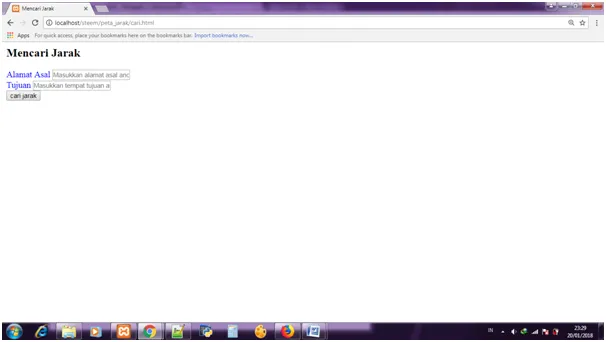
The above program will generate a display of forms that will be used to fill the destination address.
- Next, create a css file, and save it with the name style.css, then input the code below.
*{
    padding: 0;
    margin: 0;
    box-sizing: border-box;
    font-family: sans-serif;
}
div.konten{
    background: #8FC0C5;
    width: 350px;
    margin: 222px auto 0;
    border-radius: 16px;
    min-height: 256px;
    overflow: hidden;
}
div.kepala{
    background: #f85252;
    padding: 10px 22px;
    height: 60px;
}
div.kepala h2.judul{
    color: #fff;
    font-weight: normal;
    line-height: 40px;
    display: inline-block;
}
div.lock{
   # background-image: url("lock.png");
    background-position: center;
    background-size: 38px;
    display: inline-block;
    width: 25px;
    height: 25px;
    margin-top: 8px;
    float: left;
    margin-right: 10px;
}
div.artikel{
    padding:10px 22px 0;
    color: #808080;
}
div.artikel div.grup{
    margin: 16px 0;
}
div.artikel div.grup label,
div.artikel div.grup input{
    display: block;
}
div.artikel div.grup label{
    font-size: 13px;
    margin-bottom: 10px;
}
div.artikel div.grup input[type="text"],
div.artikel div.grup input[type="password"]{
    width: 100%;
    height: 30px;
    padding: 0 10px;
    background: #eeeeee;
    border:none;
    color: #808080;
}
div.artikel div.grup input[type="submit"]{
    background: #33cd77;
    padding: 4px 16px;
    margin: 0 auto;
    border: 1px solid #33cd77;
    border-radius: 2px;
    color: #fff;
    cursor: pointer;
}
div.artikel div.grup input[type="submit"]:hover{
    background: #28a45e;
}
The above code serves to beautify the look of the form that will be used later. this is the output :

- The next step is to create a php program with the name distance.php, the first stage input command to capture data to be entered through the form behind, here is the code:
$asal   = !empty($_POST['asal']) ? urlencode($_POST['asal']) : null;
$tujuan = !empty($_POST['tujuan']) ? urlencode($_POST['tujuan']) : null;
- Then, the next step is to enter the function to call gis that is available on the google map, at this stage program will perform calculations to determine the distance of a location.
$urlApi = "https://maps.googleapis.com/maps/api/distancematrix/json?origins=".$asal."&destinations=".$tujuan."&language=id-ID";
$result = file_get_contents($urlApi);
$data   = json_decode($result, true);
- Next, input code to accommodate the value entered from the form.
<p>
Alamat Asal :
<strong><?php echo $data['origin_addresses'][0] ?></strong>
</p>
<p>
Alamat Tujuan :
<strong><?php echo $data['destination_addresses'][0] ?></strong>
</p>
- In the last stage create a code to accommodate the calculation values performed above :
<p>
Jarak Tempuh :
<strong><?php echo $data['rows'][0]['elements'][0]['distance']['text'] ?></strong>
</p>
<p>
Waktu Tempuh :
<strong><?php echo $data['rows'][0]['elements'][0]['duration']['text'] ?></strong>
</p>
Here is the full code.
<?php
$asal   = !empty($_POST['asal']) ? urlencode($_POST['asal']) : null;
$tujuan = !empty($_POST['tujuan']) ? urlencode($_POST['tujuan']) : null;
$urlApi = "https://maps.googleapis.com/maps/api/distancematrix/json?origins=".$asal."&destinations=".$tujuan."&language=id-ID";
$result = file_get_contents($urlApi);
$data   = json_decode($result, true);
?>
<p>
Alamat Asal :
<strong><?php echo $data['origin_addresses'][0] ?></strong>
</p>
<p>
Alamat Tujuan :
<strong><?php echo $data['destination_addresses'][0] ?></strong>
</p>
<p>
Jarak Tempuh :
<strong><?php echo $data['rows'][0]['elements'][0]['distance']['text'] ?></strong>
</p>
<p>
Waktu Tempuh :
<strong><?php echo $data['rows'][0]['elements'][0]['duration']['text'] ?></strong>
</p>
<button onclick="history.back()">Kembali</button>
here is the output


Curriculum
- how to enter a location description into the map
- how to insert multiple data into the database simultaneously
Posted on Utopian.io - Rewarding Open Source Contributors