
The Chrome Extension: Video Downloader that I have written is on fire! The current number of users using this plugin is: 10143.

I am adding a very useful feature to this Chrome Extension at the version 2.5.5, which is the m3u8 Video Downloader/Parser.
What is m3u8 File?
A .m3u8 is a text file that contains a list of video segments, like this:
#EXTM3U
#EXT-X-PLAYLIST-TYPE:VOD
#EXT-X-TARGETDURATION:8
#EXT-X-VERSION:6
#EXT-X-INDEPENDENT-SEGMENTS
#EXT-X-MEDIA-SEQUENCE:0
#EXTINF:2.000,
chunk_0.ts
#EXTINF:2.000,
chunk_1.ts
#EXTINF:1.999,
chunk_2.ts
#EXTINF:2.000,
chunk_3.ts
#EXTINF:1.999,
chunk_4.ts
#EXTINF:2.000,
chunk_5.ts
OK, so if you are looking for a simple and easy to use m3u8 downloader, you now don't need to because this feature is integrated in the video plugin.
All you have to do is to click the button in the plugin:

It will popup a window asking for the URL of m3u8, for example:

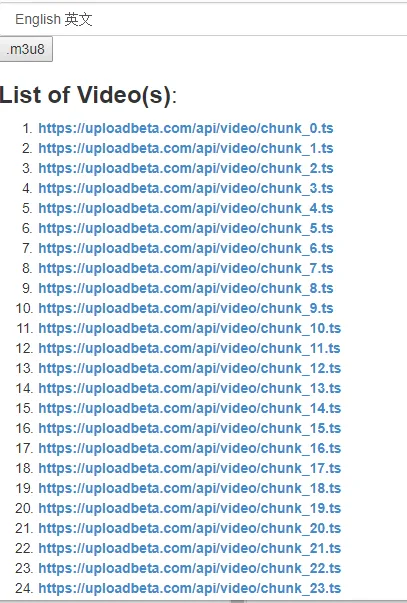
And, if you click OK, the list of video segments will be listed (you can click to download or using any batch downloader)
Project pages:
- Github: https://github.com/DoctorLai/VideoDownloadHelper
- Available at Chrome Webstore: https://chrome.google.com/webstore/detail/simple-video-download-hel/ilcdiicigjaccgipndigcenjieedjohj

This commit
Proof of Work:
doctorlai is my github ID, and you can navigate to https://github.com/DoctorLai that will show as:

How to implement?
The following is the code to extract m3u8
  function process_m3u8(url) {
    if (url.endsWith("m3u8") || (url.includes("m3u8?"))) {
      var tmp = url.lastIndexOf("/");
      if (tmp != -1) {
        var base_url = url.substr(0, tmp + 1);
        var m3u8 = url;
        $.ajax({
           type: "GET",
           url: m3u8,
           success: function(data) {
              var lines = data.trim().split(/\s*[\r\n]+\s*/g);
              var len = lines.length;
              var m3u8arr = [];
              for (var i = 0; i < len; ++ i) {
                var line = $.trim(lines[i]);
                if ((line != null) && (line != '') && (line.length > 2) && (line[0] != '#')) {
                  if ((line.startsWith("http://") || line.startsWith("https://") || line.startsWith("ftp://"))) {
                    m3u8arr.push(line);
                  } else {
                    var theurl = base_url + line;
                    m3u8arr.push(theurl);
                  }
                }
              }
              if (m3u8arr.length == 1) {
                setUrlOffline(m3u8arr[0]);
              } else {
                setUrlOfflineArray(m3u8arr);
              }
           },
           error: function(request, status, error) {
           },
           complete: function(data) {
           }
        });
      }
    }
  }
and you just need to add a button and add relevant JS handling using jQuery:
<button id="m3u8">.m3u8</button>
  $("#m3u8").click(function() {
    var url = prompt(".m3u8 URL", "https://uploadbeta.com/api/video/test.m3u8");
    process_m3u8(url);
  });
And this feature is also integrated in the online tool.
Posted on Utopian.io - Rewarding Open Source Contributors