
What Will I Learn?
- You will learn how to create form validation
- You will learn how make your database more valid
- you will learn how to make secure website
Requirements
- you must understand PHP basic programming
- you must know how to implement isset and empty function
- you must understand how to create form structure
Difficulty
- Intermediate
Tutorial Contents
validation process is needed on a website form, function so that the data inputted into the database of your website becomes more valid, would make it easier if you want to create a report data from your website because there is no wrong data format.
- Okay, just start our tutorial.
- first you have to open the text editor, i suggest you to use notepad ++ as i use so this tutorial is easy to understand.
- then create two files, form.php file and warning.php file
- form.php file serves as the form where we fill in the data, and warning.php file serves as a warning if the form is not filled correctly.
- type the script below and intersect with the name form.php

<!DOCTYPE html>
<head>
<meta http-equiv="Content-Type" content="text/html; charset=UTF-8" />
<title>utopian-io tutorial</title>
</head>
<body>
<h2>how to create validation form </h2>
<form action="proses.php" method="get">
NAME: <input type="text" name="nama" />
<br/>
E-Mail: <input type="text" name="email" />
<br/>
<input type="submit" value="Proses Data" >
</form>
</body>
</html>
- I will explain a bit about the script above
- This script serves as an account to the warning.php page
<form action="warning.php" method="get"> - then for the design of the form we use the script below
<form action="warning.php" method="get">
NAME: <input type="text" name="nama" />
<br/>
E-Mail: <input type="text" name="email" />
<br/>
<input type="submit" value="Proses Data" >
</form>
- then we will create a warning page, type the script below and save it with the name warning.php
<?php
if (isset($_GET['name']) AND isset($_GET['email']))
{
$nama=$_GET['name'];
$email=$_GET['email'];
}
else
{
die("sorry, you must acces this page from form.html page");
}

if(empty($name))
{
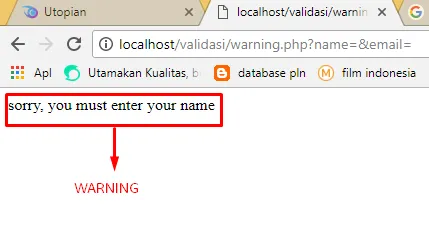
die("sorry, you must enter your name");
}
else
{
if (is_numeric($name))
{
die("sorry, name must containing alphabet");
}
else
{
echo "Nama: $name
 Email: $email";
}
}
?>
- I will explain about the script above
- this serves as a warning if the form is not filled
if(empty($name))
{
die("sorry, you must enter your name");
}
- then this as a warning if the variable name has no letter character in it
if (is_numeric($name))
{
die("sorry, name must containing alphabet");
}
- This is a script that serves to display a warning when we access the file warning.php without entering the form page first.
else
{
die("sorry, you must acces this page from form.html page");
}
- now we try to run the form we have created, whether it is working like yag we want.
- run the file form.html by typing the filename in your browser search field as shown below.
the form already appears

- now to try it we will hit the submit button without filling the data first we see whether to perform warning.
error message
- then we try to fill in the name with a number character.
then press submit button

- Let's see what will come up
error format message

- now we try to run the file warning.php without accessing the file form.html first. we'll see what will come up.
warning that we access the file form.html first

- okay, all warnings have been successful when there is an error, meaning we have successfully mebuat a form with more valid data.
Curriculum
- How To Create Input And Output Form Using PHP
- How Create Charts or Graphics On Your Web Page Using PHP and MySQL
- How To Create Dynamic Pages Using PHP and CSS
- How To Add Comment Field On Your Website Using PHP-MySQL
Posted on Utopian.io - Rewarding Open Source Contributors