
DBeaver Universal SQL Client is a multi-platform tool for SQL coders, database admins and analysts. Its a very useful tool to work with SQL Data Base and SQL query.
Since we have the SteemSQL Date Base running a lot of steemians started to do analysis with these data.
My objective with this tutorial is provide information and how to use one free and open-source application that makes this process much easier.
Dbeaver tool can be a powerful ally on this analysis.

In this Tutorial you will learn how to install DBeaver and connect with the SteemSQL data base . Let's begin:
First we need to download it, Go to: https://dbeaver.jkiss.org/download/
Dbeaver is available in two types, 'Community Edition' and 'Enterprise Edition'. The open-source one is the 'Community Edition':
Choose Community Edition 4.3.1 and your version. Here I'm using Windows(64-bit) Installer + JRE

Open the .exe file you downloaded
Click 'Next'. Click 'I agree'

Check the box 'Associate .SQL files'
Click Next. Click Install

Open DBeaver:

Now you have your DBeaver open, he will ask for a connection:
(if he don't ask for a new connection press'CTRL + N')
Select Dbeaver > Data Base Connection > Click 'NEXT'

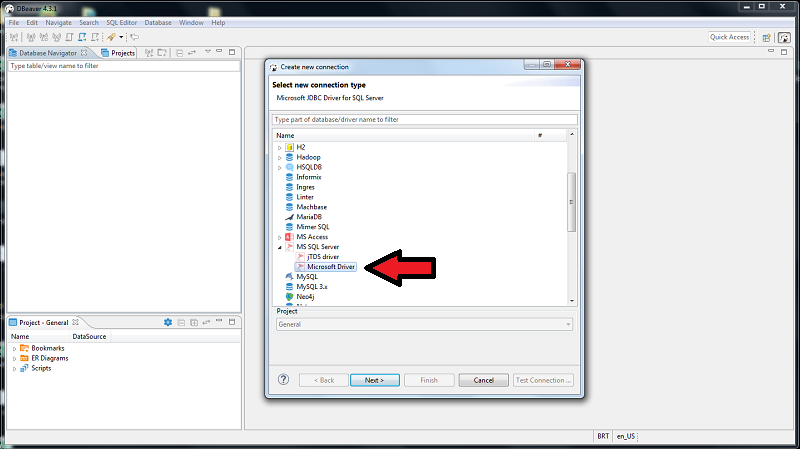
To connect with SteemSQL : Choose MS SQL Driver > Microsoft Driver. Click 'NEXT'.
SteemSQL Settings:
Host: sql.steemsql.com | User Name: steemit | Password: steemit . Click 'NEXT'

Click 'NEXT'

Click 'FINISH'

Now you have a connection in your 'Data Base Navigator'
Click 'MS SQL Server - sql.steemsql.com'

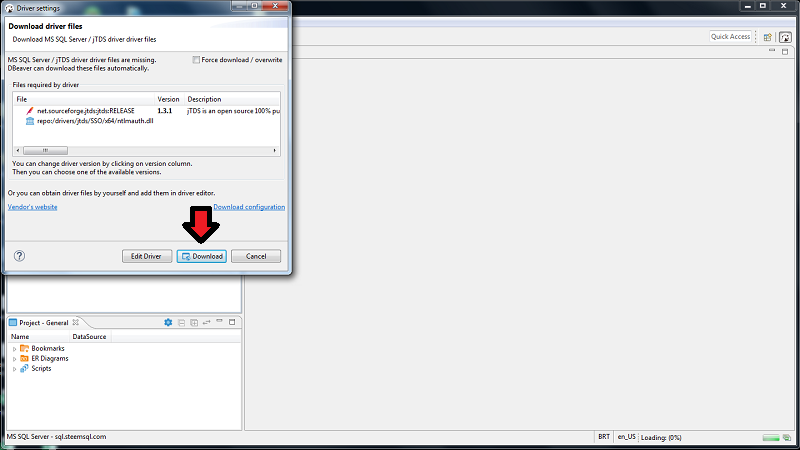
As this is your first time connecting MS SQL Server with DBeaver he will ask to download drivers:
Click 'Download'
That's it:
You are connected with SteemSQL Data Base

Now you can easy navigate thru the data base, check tables, schema, data types and much more:
The main information of Steem Block Chain is stored at 'dbo' file
To access that, Select DBSteem on your 'Data Base Navigator'
Double Click on 'dbo'

Select views:
Now you can see all tables that stores data of Steem block chain and get info of it. Enjoy!

End of Tutorial
Stay tuned for the next DBeaver Tutorial !
added: Part #2: https://utopian.io/utopian-io/@lpessin/tutorial-or-dbeaver-sql-client-2-how-to-search-filter-and-sql-query
That's all for today. I hope you all enjoyed.
Thank You
Posted on Utopian.io - Rewarding Open Source Contributors