

Introduction
This is the end of the fourth final week of the bot contest - Byteball Bot Wars. In four weeks, the SocialBoost project has entered the MVP stage - account connection, task creation, task performance, payment, statistics. Therefore, I am pleased to announce the launch of the SocialBoost Bot on the Byteball testnet network. Anyone can order article promotion on SteemIt by already connected accounts or connect your account and get testbytes. Soo, Welcome to the SocialBoost Bot!


How to use SocialBoost Bot?
- I want get some bytes
So, in order to start getting the bytes you need to link your steem account to the bot and indicate the wallet to which you will output the received bytes. To do this, click on the “Earn Bytes” button:

The first step, the bot will ask you the address of your byteball wallet, insert and send it:


Next, the bot will ask you for the login from the SteemIt account that you want to link to the bot:

After that, the bot will ask SteemPrivatePostKey from your account that you want to link to the bot and tell you how to find it:
Go to the link that the bot sent you and on the page of account permissions click on the 'SHOW PRIVATE KEY' button, highlighted in the screenshot below:

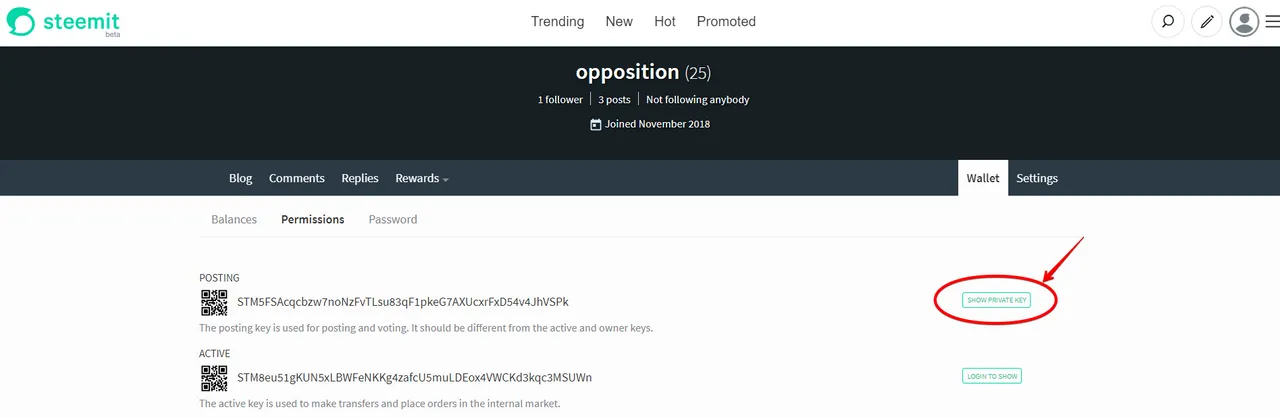
After that, copy the key that appears and send it to the bot:


After binding the key you will see the statistics of your account actions and the balance of earned bytes. From now, if you have specified everything correctly when binding, your account will begin perform tasks and receive reward. Just 4 steps and you can start getting bytes!
- I want boost my post on SteemIt
So, in order to promote the post on SteemIt, the first step is to press the “Boost Post” menu button, after which the bot will ask author’s SteemIt login (for example, I took the article https://steemit.com/byteball/@byteball.org/weekly-draw-for-the-byteball-community):

After sending an author of the article to the bot, he will ask you a link to the article:

In the following steps the bot will ask you desired amount of upVotes and Reposts, indicating the maximum amount that the bot can now implement and the cost of one action:

Next, bot will ask the address of your wallet and bill you for the promotion:
After payment and confirmation, task will get ‘paid’ status and accounts will start promoting ordered post.


- Statistics
At any time you will be able to see statistics on the implementation of your orders, how much has already been done and how much is left. To do this, you need to click on the menu button “Boost statistics”. Maybe your order already completed:


Future of SocialBoost
The future of the project does not stop after the end of the competition, but on the contrary this competition motivated me even more to continue working on it. The main stages of further development will be:
- Polishing code and refinement of the SteemIt platform
- Account Empowerment
- Adding new networks with open API's
Conclusion
During the contest for the development of the SocialBoost bot: ~ 10 sheets of paper were torn, ~ 30 cups of tea and coffee were drunk and as a result ~ 500 lines of code were written, however, before were deleted a couple of thousands of failed lines.If Seriously, “Byteball Bot Wars” gave a good opportunity to upgrade my project development skills. I thank the organizers of the contest @xJenek, @Punqtured and @Slackjore. I really want to have more of these opportunities at the Byteball, and in turn,I want that these opportunities promote Byteball to the Moon!
P.S.: While i wrote guide of the task ordering, I made a couple of testbytes on my bound account(that i bound in "I want boost my post on SteemIt" part), it would be necessary to withdraw them and also show you how to make this. Let’s follow to the account statistics, by clicking on “Earn Bytes” button and click “Withdraw balance”. If you have something, the bot will send you earned bytes:
(since the bot belongs to me, I get my share of the order 50%)


Usefull links:
SocialBoost github repository - click
Byteball developers telegram group - click
Byteball developers portal - click
For all questions write me on telegram - @kaiurin