
beta.thunkable.com is a open source platform where you can make your own app by drag and drop. Today I will show you how to make an auto impression app for admob earning. It also an open source project from me.
What Will I Learn?
- You will learn how to work with beta.thunkable.com
- You will learn how to make apps
- You will learn how to make auto impression app
Requirements
- Computer
- Internet Connection
- Some knowledge
Difficulty
- Basic
Tutorial Contents
First go to this link: beta.thunkable.com

Now click Create New App

This interface will come. Give your apps name. Look I already gave a name,

Now this interface will come.

now go to left side bottom Set the sizing to responsive so that app works in all size's screen. Also check out the Title visible.

Look I did.

Now click Layout and drag Horizontal Scroll Arrange to app screen like this screen shot.

Set the width Fill percent

Now go to Experimental and drag admob banner in Horizontal Arrange.

Look I did.

Now do the same thing again and again and add totall 7 admob banner ad.

Now click sensors and add 2 clock.

Now click blocks this interface will come. We have to work here very carefully.

Now click admob banner 1 and drag what I mark to the block screen.

Also drag this one.

Now go to logic and take true and set there.
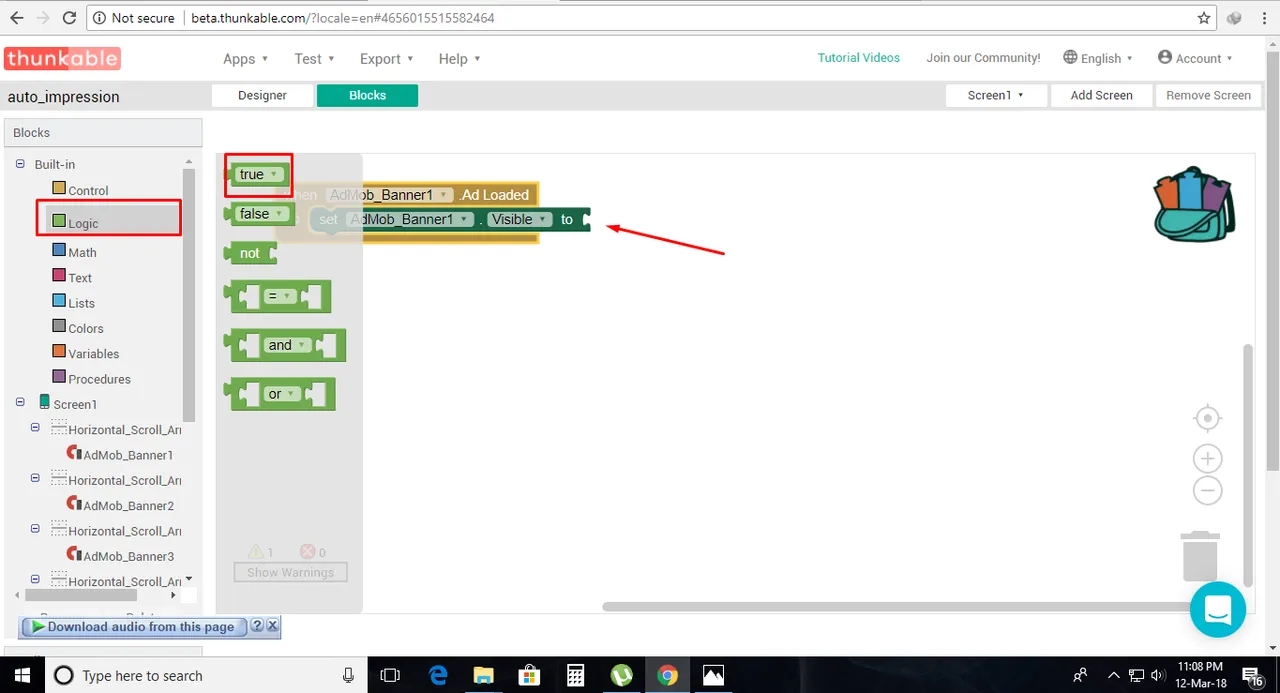
do like this.....

Now do it for all admob banner. Like this one.

Now go to screen1 and drag this to block screen.

Now go to clock 1 and drag this in screen 1 I mark.

Now go to clock again and drag when do clock 1 Timer. Then call admob banner. Call first 3 like this screen shot. then add set clock 1 timer enable to False. And set clock 1 timer enable to true. Again do same But this time for clock 2. call remaining admob banner and set clock 2 timer enable to False and set clock 1 timer enable to true. You have done. Now just export this app and install you will see the result. I am providing aia file so that you can easily check what I did. Click here to download aia file

Posted on Utopian.io - Rewarding Open Source Contributors