
Introduction
To convert PDF files to MS Word (doc, docx) can be done in two ways ie offline or with software and online without the need for additional software. In addition to using pdf to word converter applications specifically for MS Office 2013 users and above this can be done directly from MS Word because since version 2013, Microsoft has provided a feature that allows word applications to open PDF files directly.
As for users of Office 2007, 2003 then the choice can only use pdf to word converter software or by way of online.
This page I intentionally created to show various easy ways to convert PDF document files to MS Word by online,
How To Convert PDF To Online Word Without Software
- visit http://convertonlinefree.com/PDFToWORDEN.aspx
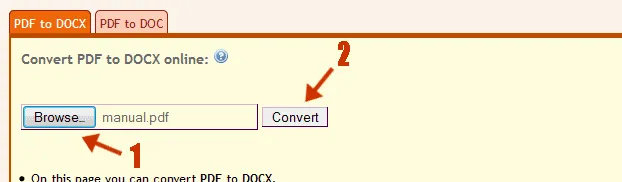
- Then specify the desired output type by selecting PDF to DOC or PDF to DOCX tab.
- Next click Browse, and locate the document you want to convert to word from your PC.
- Finally click Convert and wait for the conversion process to complete and pop up to download the resulting file. Click OK to download to your computer.
Well, that's my suggestion to convert pdf files to word online, hopefully useful and implementation of the idea from me.
If there are any shortcomings and writing errors I apologize.

Posted on Utopian.io - Rewarding Open Source Contributors