
Months ago I wrote about being in love with 'Busy' - a different interface for Steemit. One of the reasons I loved it was that I could save drafts, though I was missing some of the Steemit interface features. However, Steempeak seems to combine all the things I like about these two but also offer so, so much more, saving me popping over to Steemworld or Steemauto for the things I need.
I haven't written a 'how to' or 'what I like' post for a long time, so I thought I'd run down what I like about Steempeak and try to convince you that it's worth making the switch. It's always hard wrapping your head around a new interface, and to be honest, I only will use Steempeak on the PC for now as I can't seem to use it effectively on my mobile (I like Busy for that).
However, I'm pretty sold - it's certainly piqued my interest. See what I did there?
One of the reasons I like it is the word 'steempeak' and the lovely logo of mountains. This is MUCH much better than the connotation of 'busy', which makes me feel kinda antsy and nervous. One look at those mountains and I'm like aaaahhhh.....
Wait - let me insert a pithy quote:
I am here for a purpose and that purpose is to grow into a mountain, not to shrink to a grain of sand. Henceforth will I apply ALL my efforts to become the highest mountain of all and I will strain my potential until it cries for mercy - Og Mandino
Perhaps SteemPeak can help you do just that?

1. You can see your drafts as you write them - AND save your drafts!
Rather than scrolling down to see your formatting come together, you just look to one side! This feature blows me away - I'm usually constantly scrolling down to see that things are aligned and the side by side option just makes much, much more sense.
It's like seeing the view before you get to the top of the ridge!

And you can save your drafts and even see them in grid view - less scrolling is good in my book. My scrolling fingers are getting callouses - just like a bad pair of hiking boots gives you blisters.

2. You can switch between accounts without having to log in EVERY single time.
This also blows me away. It makes it SO much easier than having different tabs open and is a really easy flip to make. That's like being able to jump from the top of one mountain to another with one leap!
3. You can schedule posts
Going to bed but want to post it at 3 am to increase your chances of catching a specific time zone audience? Going away for the weekend and have a few pre-written posts? Having a digital de-tox? No worries - just schedule your posts! Wowsers! No need to log on to Steemauto - it's all just right at your finger tips! Like getting someone else to climb the mountain for you, it's a breeze!

Beautiful photo of Mt Fitzroy, Argentia, courtesy of 
4. Templates
This is great if you have a template for a curation post or perhaps just your banners. You can save the template and open that every time instead of copying and pasting from old posts or other files. Kinda like being at base camp - you're already half way there.
5. Really nice interface

I also like the fact you can see a lot of things in grid view. We like a good view, otherwise there's no point walking up the damn mountain in the first place.

6. Wallet
I think this is great for newbies because it explains Steem economics quite well, and is quite easy to use. And oy, don't look at my bank balance!
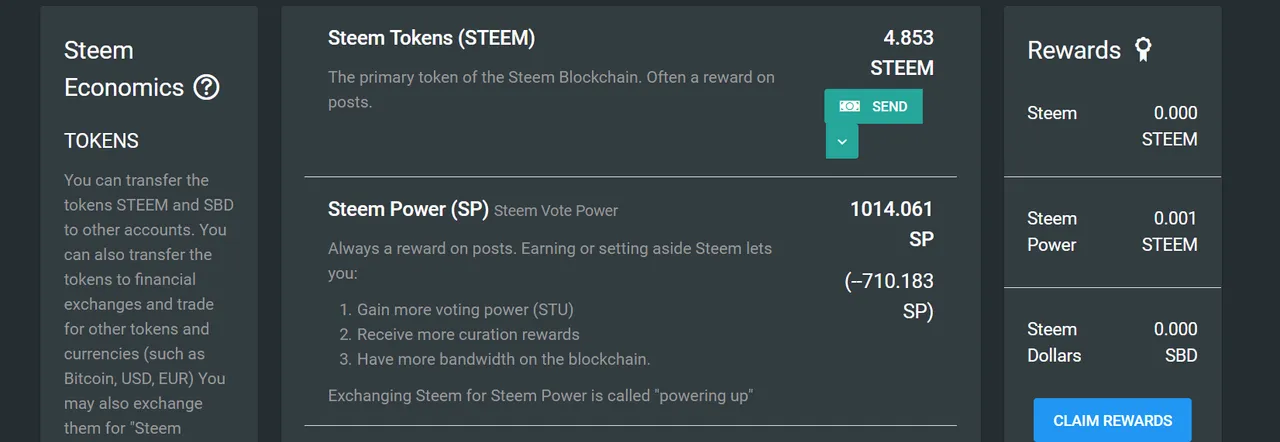
7. Other Interesting Data and Information


8. Bookmarks
Save now, read later. Busy has this too, but this is far more accesible and easy to use.

9. Sexy graphs
Oh my god, check the sexy real time graphs. Real time incoming votes. Real time outgoing votes. Account growth. Blah blah blah. All the sexy data!! Moving about like clouds and thunderstorms over the mountain ranges! Wowsers!

10. Saved Topics and Users
I love this feature - so much easier to keep track of tabs and users rather than jotting them down to look up later and just trying to remember them and look them up when you do. I mean, who wouldn't want to keep track of the #naturalmedicine tag? or #tribesteemup or #ecotrain or #freedomtribe?

11. It does go up to 11, doesn't it?
If the dial goes up beyond 10, it's a dial I like.
Easy to see recent activities. Notifications are important - you gotta keep track of who's talking to you and responding to, otherwise you might as well not be here at all.

Since drafting this post, I've found even more cool features, and it seems there's more on the go. There's even a Discord channel where you can ask for help!
Are you using Steempeak? What's your favourite tool?
Would you think about switching, or is that mountain just too hard to climb?



If you're a supporter of all things natural healing, you might like to read our introductory post here. We'd also love to welcome you on Discord here!!
 |  |
|---|


